Solved

Excel and Acumatica

  • February 4, 2025
  • 9 replies
  • 155 views

We are having problems using excel on downloaded Acumatica information.  Right now, the problem is with pivot tables.  It won’t let us change what is in the table. We are having to copy the information and paste special in a new workbook and rebuild the pivot table.

Best answer by Samvel Petrosov

@RSMGV can you attach a screenshot or example of that Excel file? Technically, the Excel files exported/downloaded from Acumatica contain a connection configuration to OData, so it maybe so that your security preferences are blocking that and because of that you can’t edit the file.

9 replies

Forum|alt.badge.img+5
  • Jr Varsity I
  • February 4, 2025

@RSMGV 

May this link help you.


  • Author
  • Freshman II
  • February 4, 2025

Thank you but I’m not embedding anything(at least I don’t think so).  Just trying to edit the download from Acumatica in excel.


DipakNilkanth
Pro III
Forum|alt.badge.img+13

Hi ​@RSMGV,

Is it possible that you are in "Viewing" mode for the Excel document? You can check this in the upper-right corner of the page, where there is a dropdown selector. Please ensure that you are in "Editing" mode to make changes.


  • Author
  • Freshman II
  • February 5, 2025

Thank you, but yes, we are in editing mode.


Samvel Petrosov
Jr Varsity II
Forum|alt.badge.img+8
  • Jr Varsity II
  • Answer
  • February 5, 2025

@RSMGV can you attach a screenshot or example of that Excel file? Technically, the Excel files exported/downloaded from Acumatica contain a connection configuration to OData, so it maybe so that your security preferences are blocking that and because of that you can’t edit the file.


  • Author
  • Freshman II
  • February 5, 2025

Thanks so much.  I’ll have someone here in security look at that.


  • Author
  • Freshman II
  • February 12, 2025

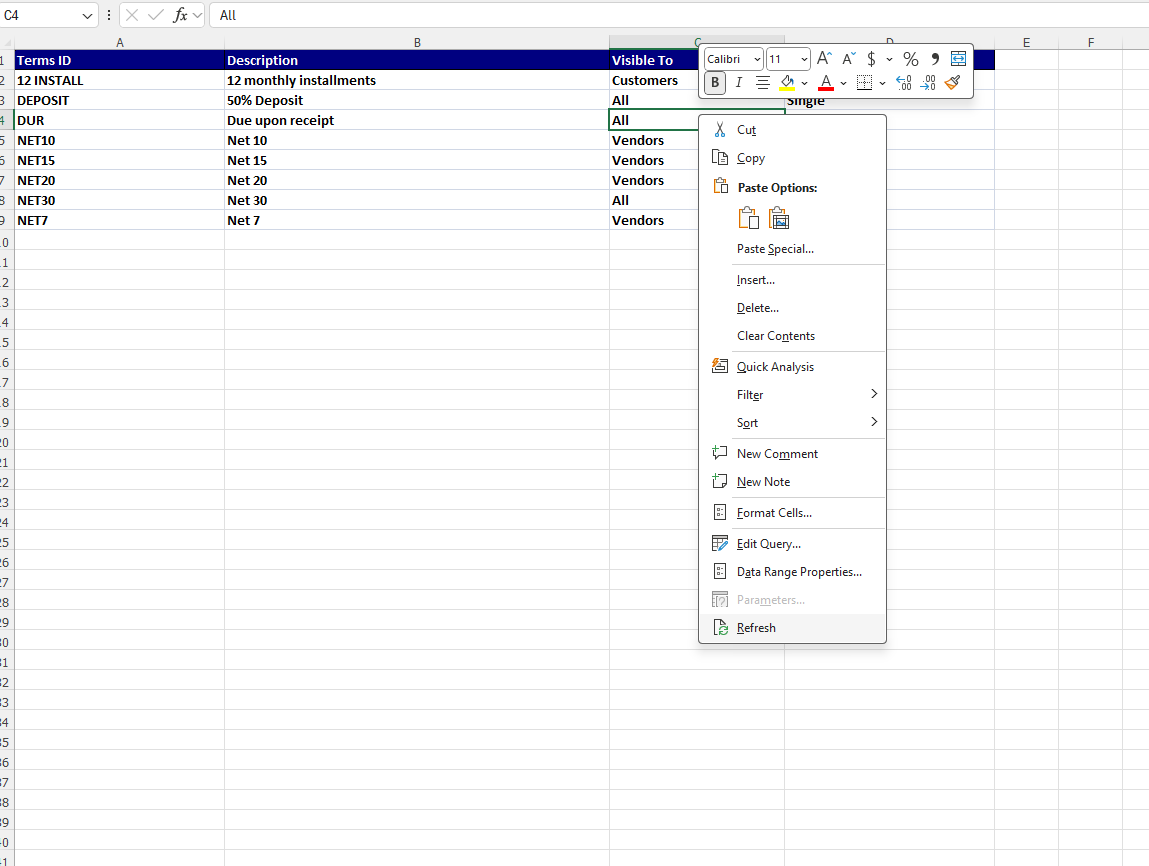
@Samvel Petrosov, how do I refresh the excel worksheet? 


  • Author
  • Freshman II
  • February 17, 2025

@Samvel Petrosov, how do I refresh the excel worksheet?


Samvel Petrosov
Jr Varsity II
Forum|alt.badge.img+8

@Samvel Petrosov, how do I refresh the excel worksheet?

You should be able to simply right-click any cell of the exported grid and hit Refresh action