Question

Error on Sales Prices Screen – "The Expiration Date cannot be empty"

  • July 21, 2025
  • 4 replies
  • 40 views

Forum|alt.badge.img

Hi All,

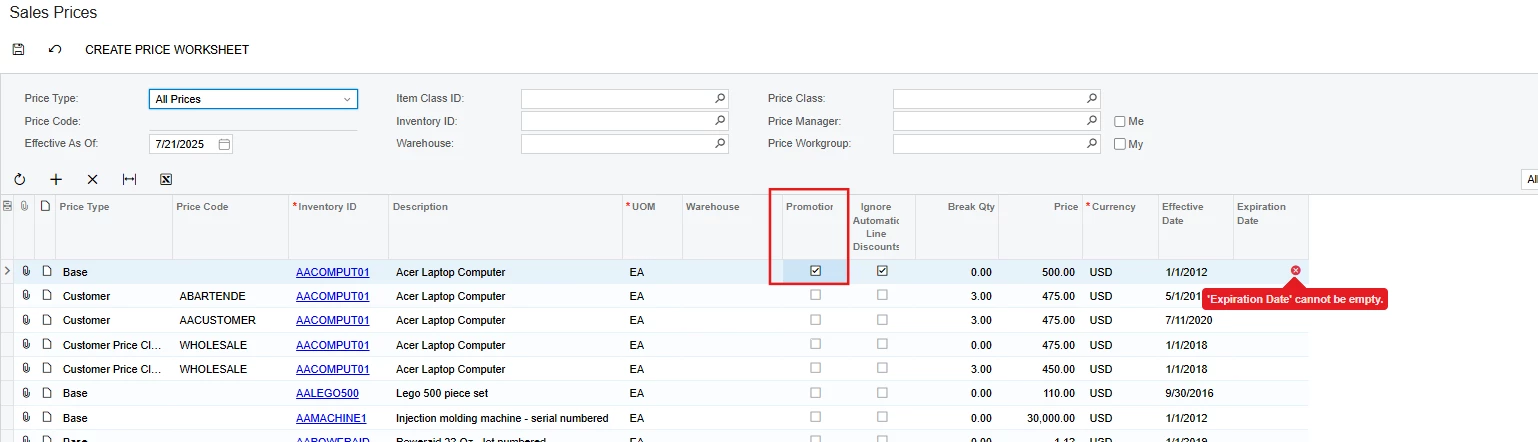
One of my customers is encountering an error when trying to save data on the Sales Prices screen. The error message displayed is:

"The Expiration Date cannot be empty."

Could you please assist in resolving this issue?

The Acumatica version is 23 R1.

Thank you in advance.

Regards,
Lalith

4 replies

Forum|alt.badge.img+1
  • Semi-Pro III
  • July 21, 2025

@Lalith 

Hope this helps!


DipakNilkanth
Pro III
Forum|alt.badge.img+13

Hi ​@Lalith ,

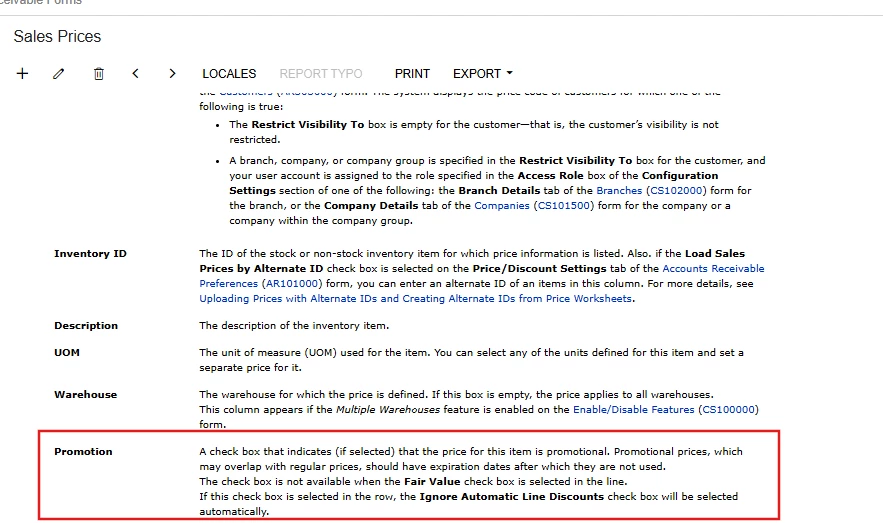
Please confirm whether the Promotion checkbox is checked in the Sales Prices grid. If it is selected, then the Expiration Date becomes a mandatory field and must be filled in before the data can be saved.


Hope, it helps!


Forum|alt.badge.img
  • Author
  • Freshman I
  • July 21, 2025

@Saikrishna V 

Thank you for the response.


Forum|alt.badge.img
  • Author
  • Freshman I
  • July 21, 2025

Hi ​@Nilkanth Dipak 


Thank you for the response. This will be very helpful.