Answer

Session Expired (Acumatica 2024 R1)

  • April 17, 2025
  • 7 replies
  • 212 views

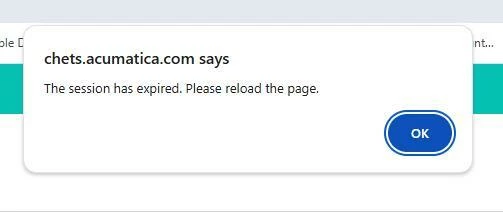
New to Acumatica and have been using Project Quotes since January. Google Chrome is our browser, users are experiencing the following error throughout the day and randomly. Does anyone have any insight on this error and how to remedy ? It is not related to the timeout setting in the UI / Security.


Best answer by lairdtim

We see this quite often.  It’s not a site restart or a session (logon) timeout.  It’s typically because of IIS garbage collection on the server side (those of us on SAAS can’t see that, but I have a passing understanding of how IIS works).  Since most of the processing within Acumatica happens on the web server, as the application pool/web server has other high intensity (or just lots of other low intensity) activities occurring, IIS looks for the connections that have been idle the longest and times them out, resulting in this message.

While our actual idle login timeout is 2 hours, during business hours I can get this message to come up by leaving a screen idle for 5-10 minutes.  It’s usually just an annoyance, but if you are working on something like an order, and you don’t save it and you walk away to use the restroom, you’re likely starting all over when you get back.

I’ve been told ModernUI will help with this quite a bit because it pushes more of the processing to the browser, rather than at the web server.


7 replies

Forum|alt.badge.img+8
  • Captain II
  • April 17, 2025

@ASharpless 

What is your timeout setting?

I personally haven’t seen this error outside of a genuine timeout, which is usually 1 hour of being inactive.


Manikanta Dhulipudi
Captain II
Forum|alt.badge.img+15

@ASharpless 

Did you reviewed the logs in the system Monitor if any task is consuming more time and leads to restarting?


Dmitrii Naumov
Acumatica Moderator
Forum|alt.badge.img+7
  • Acumatica Moderator
  • April 17, 2025

@ASharpless it may be related to server restarts. You can check on System Monitoring Console screen if any restarts occurred. 


It may be a scheduled restart, but if it happens randomly during the day it is possible that the restarts are caused by something consuming all server resources causing the system to fail.

In that case I’d recommend creating a support case for proper investigation.


  • Author
  • Freshman I
  • April 17, 2025

@aiwan , We have our time out set to 8 hours.

@Manikanta Dhulipudi , I guess I’m not sure what this means, I found System Monitor but am not tech savvy enough in order to understand what I’m seeing.


hkabiri
Acumatica Moderator
Forum|alt.badge.img+8
  • Acumatica Support Team
  • April 17, 2025

@ASharpless The timeout you set on Security preferences is the Login timeout which means you do not need to re-login if you leave your sessions as idle for the amount of time you set. your case 8 hours. However, there is a session timeout which is being set at the application config file and no control on the UI. This timeout is by default 60 min and you need to refresh your browser tabs in case left as idle for more than 1 hour. The session timeout is important to the performance of whole instance and recommended not to be increased as it can keep some faulty resource consuming requests in progress and cause performance issue for the instance.


  • Author
  • Freshman I
  • April 17, 2025

@hkabiri , Thank you for the information. I just find it odd it happens to some users and not others. We’re also not leaving the tabs idle for very long as we are actively in the system all day.


Forum|alt.badge.img+1
  • Semi-Pro I
  • Answer
  • April 26, 2025

We see this quite often.  It’s not a site restart or a session (logon) timeout.  It’s typically because of IIS garbage collection on the server side (those of us on SAAS can’t see that, but I have a passing understanding of how IIS works).  Since most of the processing within Acumatica happens on the web server, as the application pool/web server has other high intensity (or just lots of other low intensity) activities occurring, IIS looks for the connections that have been idle the longest and times them out, resulting in this message.

While our actual idle login timeout is 2 hours, during business hours I can get this message to come up by leaving a screen idle for 5-10 minutes.  It’s usually just an annoyance, but if you are working on something like an order, and you don’t save it and you walk away to use the restroom, you’re likely starting all over when you get back.

I’ve been told ModernUI will help with this quite a bit because it pushes more of the processing to the browser, rather than at the web server.