Answer

Random Slow performance in Acumatica 2025R2

  • November 8, 2025
  • 4 replies
  • 80 views

Forum|alt.badge.img

After upgrading to Acumatica 2025R2, some of my users started experiencing random slowdowns. Each week, one or two users report performance issues, but when I check the PCs and the server, neither is running at full capacity. I’m not sure what’s causing it

Best answer by Abhishek Niikam

Hello, ​@vannakheng 
 

  1. Ignore this 3005 event - it’s noise, not the cause.

  2. Check IIS pool recycling settings.

  3. Run network stability tests for affected users.

  4. Check Acumatica trace logs for slow DB operations.

  5. Verify browser and cache conditions.

  6. If it continues, enable SQL Server Extended Events to trace latency.
     

I hope it helps!

4 replies

Forum|alt.badge.img
  • Author
  • Freshman II
  • November 8, 2025

After upgrading to Acumatica 2025R2, some of my users started experiencing random slowdowns. Each week, one or two users report performance issues, but when I check the PCs and the server, neither is running at full capacity. I’m not sure what’s causing it

I saw this warning login in event viewer of server. I don’t know it’s related this the problem or not.

Event code: 3005 
Event message: An unhandled exception has occurred. 
Event time: 08/11/25 10:54:28 
Event time (UTC): 08/11/25 03:54:28 
Event ID: d0e739b90dab44ec95173f311c538d6c 
Event sequence: 33211 
Event occurrence: 13 
Event detail code: 0 
 
Application information: 
    Application domain: /LM/W3SVC/5/ROOT-1-134070145386814404 
    Trust level: Full 
    Application Virtual Path: / 
    Application Path: C:\Program Files\Acumatica ERP\MedivetERP\ 
    Machine name: WIN760XS 
 
Process information: 
    Process ID: 17816 
    Process name: w3wp.exe 
    Account name: IIS APPPOOL\MedivetERP 
 
Exception information: 
    Exception type: HttpException 
    Exception message: The remote host closed the connection. The error code is 0x800704CD.
   at System.Web.Hosting.IIS7WorkerRequest.RaiseCommunicationError(Int32 result, Boolean throwOnDisconnect)
   at System.Web.Hosting.IIS7WorkerRequest.ExplicitFlush()
   at System.Web.HttpResponse.Flush(Boolean finalFlush, Boolean async)
   at System.Web.HttpWriter.Write(String s)
   at PX.Web.UI.PXPage.OnError(EventArgs e)
   at System.Web.UI.Page.HandleError(Exception e)
   at System.Web.UI.Page.ProcessRequestMain(Boolean includeStagesBeforeAsyncPoint, Boolean includeStagesAfterAsyncPoint)
   at System.Web.UI.Page.ProcessRequest(Boolean includeStagesBeforeAsyncPoint, Boolean includeStagesAfterAsyncPoint)
   at System.Web.UI.Page.ProcessRequest()
   at System.Web.UI.Page.ProcessRequest(HttpContext context)
   at PX.Web.UI.PXPage.ProcessRequest(HttpContext context)
   at System.Web.HttpApplication.CallHandlerExecutionStep.System.Web.HttpApplication.IExecutionStep.Execute()
   at System.Web.HttpApplication.<>c__DisplayClass285_0.<ExecuteStepImpl>b__0()
   at System.Web.HttpApplication.ExecuteStepImpl(IExecutionStep step)
   at System.Web.HttpApplication.ExecuteStep(IExecutionStep step, Boolean& completedSynchronously)


Request information: 
    Request URL: http://192.168.100.7:8899/pages/ar/ar302000.aspx?isRedirect=True 
    Request path: /pages/ar/ar302000.aspx 
    User host address: 192.168.100.34 
    User: Sophany@AG 
    Is authenticated: True 
    Authentication Type: Forms 
    Thread account name: IIS APPPOOL\MedivetERP 
 
Thread information: 
    Thread ID: 417 
    Thread account name: IIS APPPOOL\MedivetERP 
    Is impersonating: False 
    Stack trace:    at System.Web.Hosting.IIS7WorkerRequest.RaiseCommunicationError(Int32 result, Boolean throwOnDisconnect)
   at System.Web.Hosting.IIS7WorkerRequest.ExplicitFlush()
   at System.Web.HttpResponse.Flush(Boolean finalFlush, Boolean async)
   at System.Web.HttpWriter.Write(String s)
   at PX.Web.UI.PXPage.OnError(EventArgs e)
   at System.Web.UI.Page.HandleError(Exception e)
   at System.Web.UI.Page.ProcessRequestMain(Boolean includeStagesBeforeAsyncPoint, Boolean includeStagesAfterAsyncPoint)
   at System.Web.UI.Page.ProcessRequest(Boolean includeStagesBeforeAsyncPoint, Boolean includeStagesAfterAsyncPoint)
   at System.Web.UI.Page.ProcessRequest()
   at System.Web.UI.Page.ProcessRequest(HttpContext context)
   at PX.Web.UI.PXPage.ProcessRequest(HttpContext context)
   at System.Web.HttpApplication.CallHandlerExecutionStep.System.Web.HttpApplication.IExecutionStep.Execute()
   at System.Web.HttpApplication.<>c__DisplayClass285_0.<ExecuteStepImpl>b__0()
   at System.Web.HttpApplication.ExecuteStepImpl(IExecutionStep step)
   at System.Web.HttpApplication.ExecuteStep(IExecutionStep step, Boolean& completedSynchronously)
 
 
Custom event details: 


Forum|alt.badge.img+2
  • Jr Varsity II
  • Answer
  • November 8, 2025

Hello, ​@vannakheng 
 

  1. Ignore this 3005 event - it’s noise, not the cause.

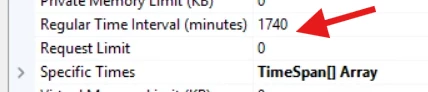
  2. Check IIS pool recycling settings.

  3. Run network stability tests for affected users.

  4. Check Acumatica trace logs for slow DB operations.

  5. Verify browser and cache conditions.

  6. If it continues, enable SQL Server Extended Events to trace latency.
     

I hope it helps!


Forum|alt.badge.img
  • Author
  • Freshman II
  • November 10, 2025

Hello, ​@vannakheng 
 

  1. Ignore this 3005 event - it’s noise, not the cause.

  2. Check IIS pool recycling settings.

  3. Run network stability tests for affected users.

  4. Check Acumatica trace logs for slow DB operations.

  5. Verify browser and cache conditions.

  6. If it continues, enable SQL Server Extended Events to trace latency.
     

I hope it helps!
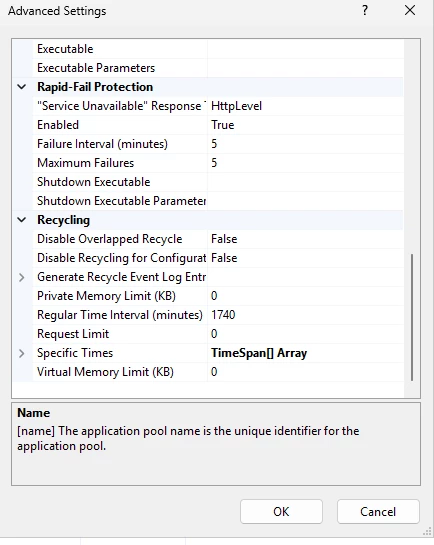
IIS pool recycling settings. Is it right ?


Forum|alt.badge.img+2

Yes this configuration is fine in most cases.