Question

AuditHistory Cleanup – Is it possible to separate Financial vs CRM audit logs?

  • February 19, 2026
  • 4 replies
  • 39 views

Hi Community,

We are working with a customer where the AuditHistory table has grown significantly (currently around 387 GB), and we are evaluating cleanup and retention options.

Background:

  • The client wants to reduce database size and improve manageability.

  • Similar cleanup work was performed several years ago for this same customer.

Client Requirements:

  1. Separate Financial audit logs from CRM audit logs.

  2. Remove all CRM audit logs.

  3. Retain only the last 7 years of Financial audit logs.

Information received from Acumatica Support:

  • Financial and CRM audit logs are stored together in the same AuditHistory table.

  • There are no built-in retention settings for specific audit log types.
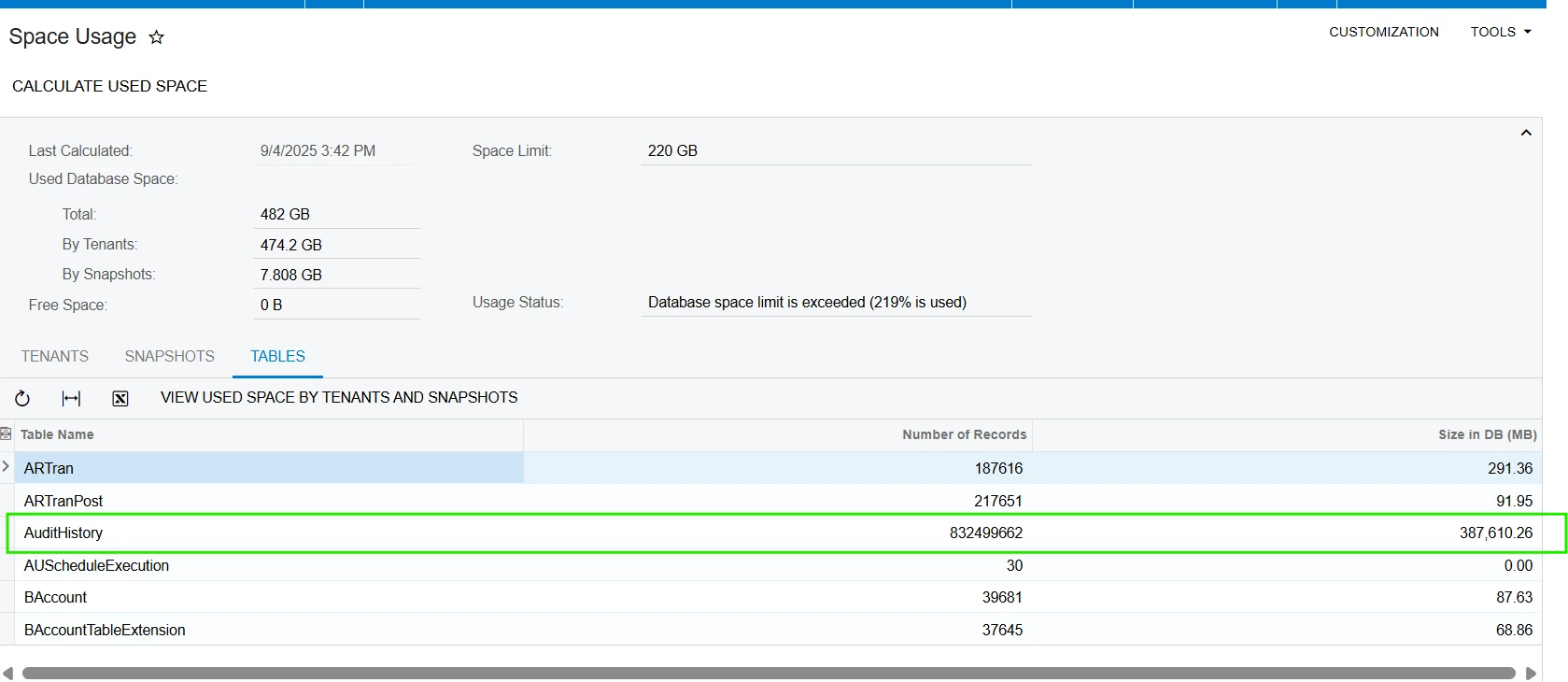


Questions:

  • Has anyone implemented a workaround or customization to separate Financial vs CRM audit logs?

  • Any best practices for managing large AuditHistory tables in similar scenarios?

Any insights or recommendations would be greatly appreciated.

Thanks in advance!

4 replies

Forum|alt.badge.img+1

Hey ​@ydasari ,

Have you checked out the following?


https://www.youtube.com/watch?v=FhoHPt5g2bU


Hope this helps!!


DasunPerera91
Acumatica Employee
Forum|alt.badge.img
  • Acumatica Employee
  • February 19, 2026

Hi ​@ydasari,

Please have a look at below post and replies for some suggestions.

Is it safe to clean "Auidit history" and how? | Community


  • Freshman II
  • February 20, 2026

Hi ​@ydasari,

There is no separate logging for Financial and CRM audit logs in Acumatica; both are stored in the same AuditHistory table.


Although separate logging is not available by default, we can implement a controlled cleanup mechanism(Customization) if the client needs to delete audit history data older than 7 years(CRM & Financial both). This can be done by creating a custom processing screen that allows records to be purged based on a selected date range.

However, the initial cleanup of approximately 387 GB is a very large operation. Performing the first purge entirely through the application layer will be time-consuming and may take several days due to the volume of data and system performance considerations.

Recommendation: For the initial bulk cleanup, it is advisable for the DBA to execute a direct SQL script (for On-Premise or Private Cloud environments) to remove the majority of historical records. Alternatively, the data can be deleted in periodic, chunk-wise batches using the custom processing screen to minimize system load and avoid performance issues.


KrunalDoshi
Freshman II
Forum|alt.badge.img
  • Freshman II
  • February 20, 2026

Hi ​@ydasari,

There is no inbuild feature to purge Audit history. It looks like Acumatica is currently gathering requirements for this Product Ideas. You can add your business scenario their, which will help them in gathering more information for implementation of the product.

However, if this your top priority (may be because of DB size grown exponentially), I would suggest you create a custom processing screen to delete Audit History in batches. Processing screen can always be run on schedule so that way you can plan to run it during off business hours.

Hope this helps!