25R2 slowness - Cross-Selling ML Generation

  • December 8, 2025
  • 8 replies
  • 238 views

Forum|alt.badge.img+1

I wanted to help out if anyone was having an issue with slowness after an upgrade to 25R2.  I have two instances that both have the same issue (support tickets 482453 & 482455).

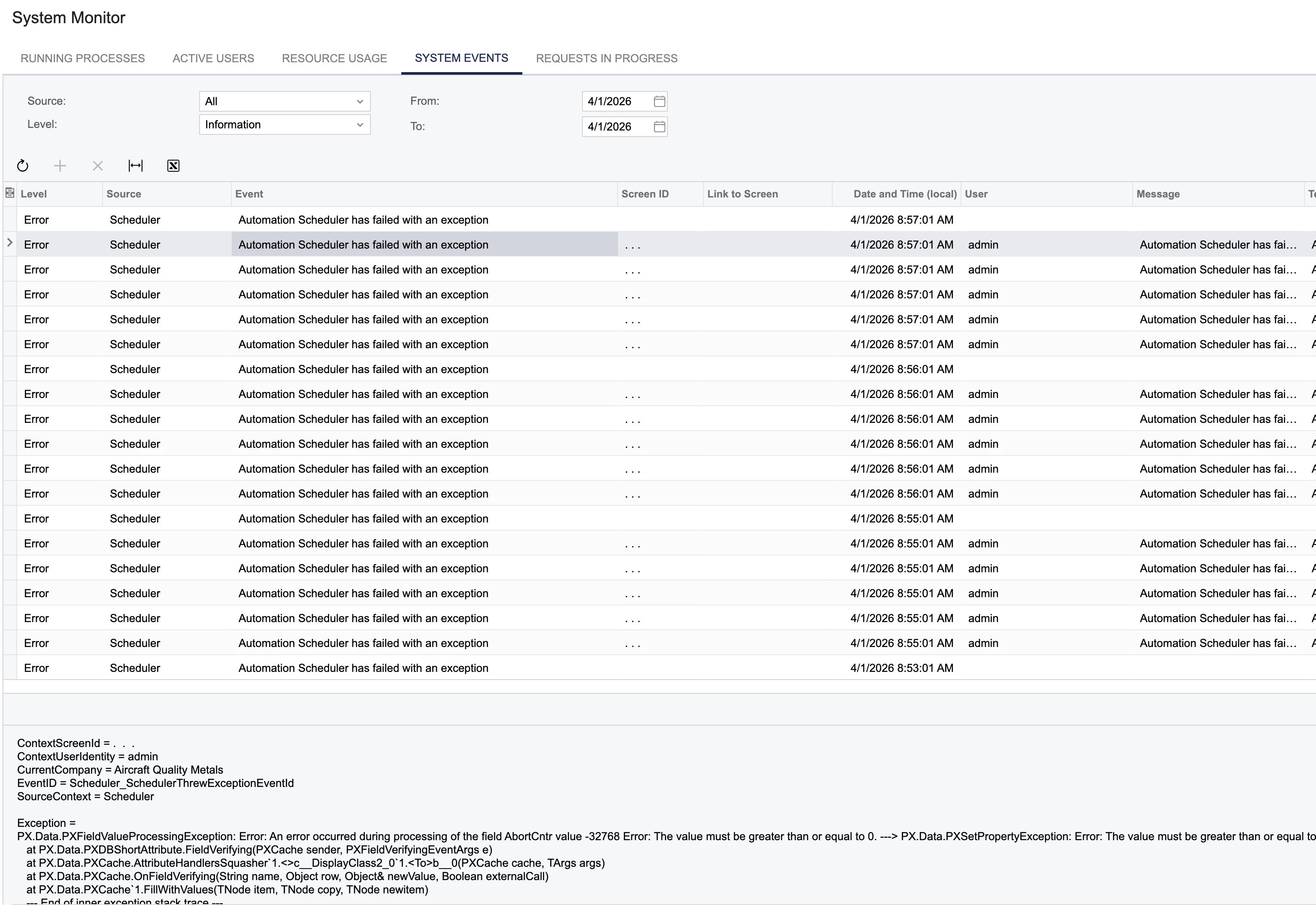
Check your system monitor and look for failed Automation Scheduler exceptions.  Look at the details and see what schedule is causing it.  For us it’s Cross-Selling ML Generation.  We disabled it manually and seems to have resolved the slowness.
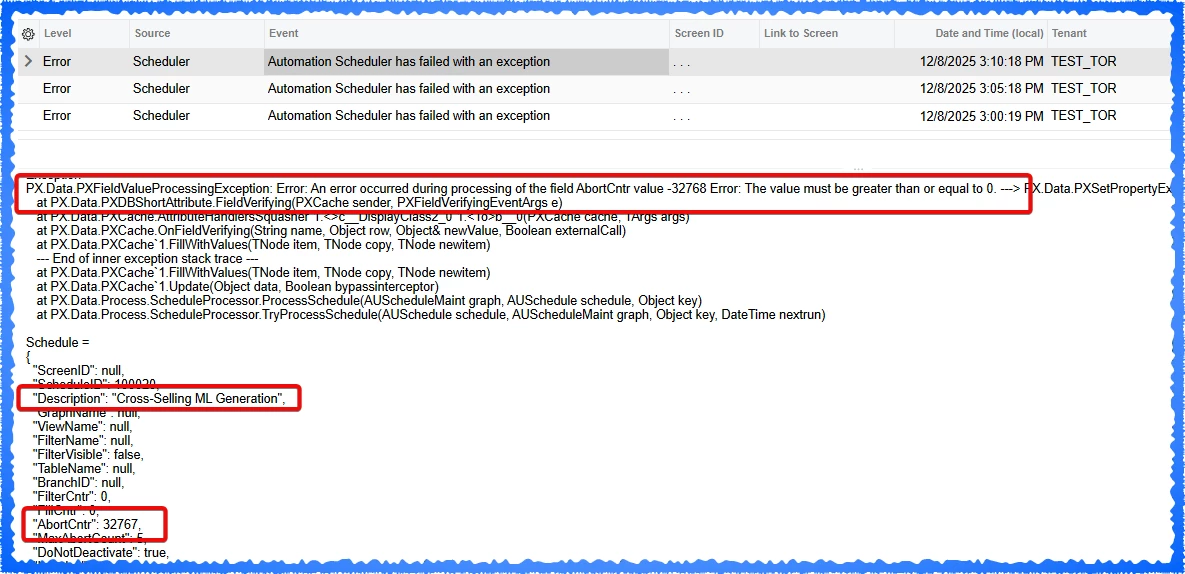


What I believe is happening is in the AUSchedule DAC, the AbortCntr field is a smallint data type which is a range of -32768 and 32768.  What I think is happening is it's maxed out at 32768 (failures) already and trying to add a failure to it which I think is causing a buffer overflow and it doesn’t know what to do so it’s causing the system to slow down.  


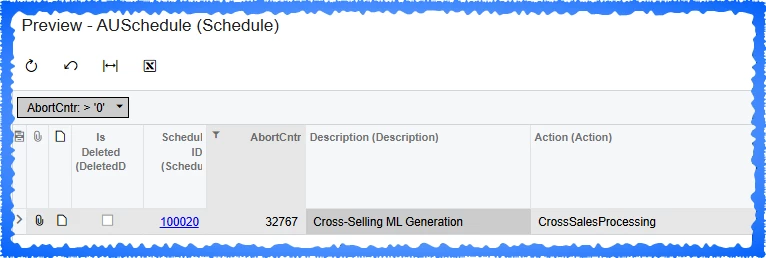
We can see in AUSchedule that the AbortCntr is set to 32767.


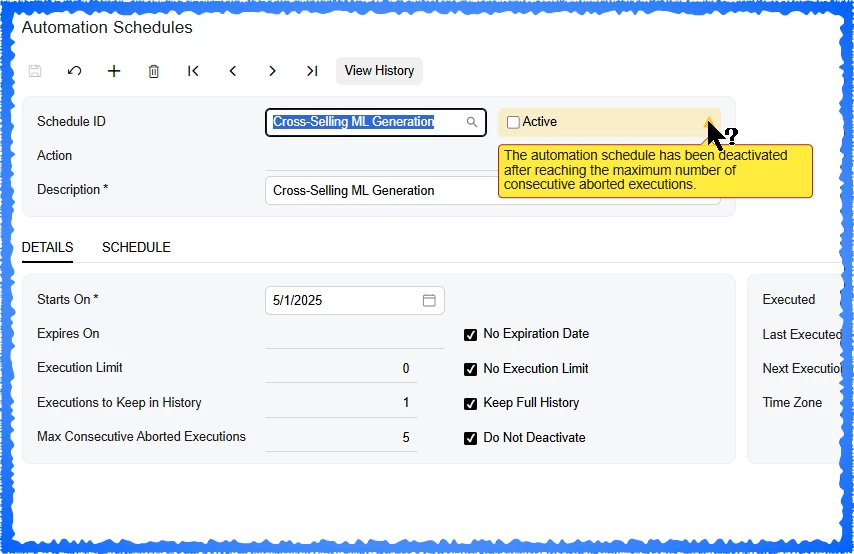
I have manually disabled the automation schedule for it.  Notice that the new “Max consecutive aborted executions” checkbox of “Do not deactivate” is checked.  That would mean this schedule stays activated regardless if it fails 1 million times (overflowing AbortCntr due to the smallint data type).

If you manually deactivate it, the AbortCntr is still set which I think (haven’t looked at the code) is creating the tooltip stating it has been deactivated due to aborted executions.  This is a false tooltip as it’s was disabled manually.    


8 replies

Forum|alt.badge.img+1
  • Acumatica Employee
  • December 14, 2025

Hello ​@travislawson,


Thank you for sharing this, this issue has been already addressed and hopefully would be fixed in 25R2 Service Pack 01.


Thank you


Forum|alt.badge.img+1
  • Author
  • December 15, 2025

Thank you ​@CJayalath49!  Loving the improvements in 25R2 already!


Forum|alt.badge.img
  • Jr Varsity II
  • March 20, 2026

@CJayalath49 

Still Happening on 25.201.0213.2


Forum|alt.badge.img
  • Jr Varsity III
  • March 31, 2026

CJay

Hello ​@travislawson,


Thank you for sharing this, this issue has been already addressed and hopefully would be fixed in 25R2 Service Pack 01.


Thank you


We are running 25.201.0213.2 and I can confirm that we just ran into this issue today as well. 

I have disabled the schedule ​@travislawson suggested, however I am still curious what this automation schedule does and why it is scheduled to run every 5 minutes.


Forum|alt.badge.img
  • Jr Varsity II
  • April 1, 2026

If you disable it, the system will re-enable it.

Deleting it seems to work.

-Chad


vshashkova
Acumatica Moderator
Forum|alt.badge.img+1
  • Acumatica Moderator
  • April 1, 2026

@CJayalath49 ​@MattWSM 

The fix in 25R2 Service Pack 01 is that the scheduler remains active, but when the feature is disabled, it is not used and therefore should not generate errors. No additional actions should be required during the upgrade. Since this did not happen in your case, it may be related to the upgrade process in your environment.

Please create a support case and include the version you upgraded from and the version you upgraded to so the team can review the issue.


Forum|alt.badge.img
  • Jr Varsity II
  • April 1, 2026

@CJayalath49 

It is 100% not fixed. 

Every single SaaS instance that gets upgraded from 24R2 to 25R2 has the issue.

We (as in you, Acumatica) upgrade our clients to 25R2 multiple times a week right now. Just did one last night. Sorry, not logging cases for this - then going back and forth with support. We just delete the schedules. Consider this as a case logged. It’s Acumatica’s cloud resources - seems like someone would be interested in this.

Screen shot from Sys Mon this morning from upgrade last night (25.201.0213.2):


vshashkova
Acumatica Moderator
Forum|alt.badge.img+1
  • Acumatica Moderator
  • April 1, 2026

@clancour I understand what you mean, especially if you are seeing this consistently after upgrades.

The reason I asked for this to be reported as a support case is not to create extra back-and-forth, but to make sure the issue can be escalated to L3 right away so the development team can access a specific affected database and diagnose what is happening in the upgraded environment. That is the fastest way to confirm why the issue is still occurring and what needs to be fixed.

When creating the case, please mention that I asked for it to be logged and escalated to L3.