Question

Shopify B2B - Terms Customers

  • January 14, 2026
  • 6 replies
  • 45 views

sandypik
Freshman I

We are working on moving our B2B shop to Shopify. 

My question for anyone using Shopify B2B, how are you handling Terms customers payments? 

Currently our B2B site is with Woocommerce, and Terms orders just come in unpaid, and we send an invoice. But with Shopify, customers can pay on the B2B site. 

Since Acumatica doesnt natively sync those payments at this time, are you disabling the ability for Terms customers to pay past orders in Shopify? Or are there customizations that can be built to handle the payments. Conversely, if a Customer pays an open Shopify invoice in Acumatica, can the open Shopify order be marked paid? (I do see some discussions in here regarding this, please let me know if you have had success with this)

Thank you

6 replies

Yuri Karpenko
Captain II
Forum|alt.badge.img+6

@sandypik , if the order is not paid in Shopify, it will come into Acumatica without a payment. Then, later, when a customer pays that order IN SHOPIFY, the payment will be imported into Acumatica and reconciled with the invoice.

Whoever is working on your connector needs to configure it properly, but these scenarios are all supported by the native connector.

P.S. You cannot upload a payment from Acumatica to Shopify. I would NOT recommend receiving a payment in Acumatica, and then trying to build a crutch to update the Shopify order financial status to PAID.


Jeff96
Captain II
Forum|alt.badge.img+4
  • Captain II
  • January 14, 2026

P.S. You cannot upload a payment from Acumatica to Shopify. I would NOT recommend receiving a payment in Acumatica, and then trying to build a crutch to update the Shopify order financial status to PAID.

Can you elaborate why not? 


Yuri Karpenko
Captain II
Forum|alt.badge.img+6

P.S. You cannot upload a payment from Acumatica to Shopify. I would NOT recommend receiving a payment in Acumatica, and then trying to build a crutch to update the Shopify order financial status to PAID.

Can you elaborate why not? 

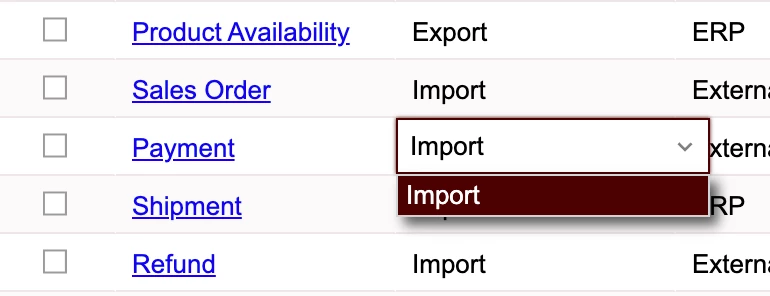
Why you can’t upload a payment from Acumatica to Shopify? For Payment entity, the only allowed sync direction is Import (from Shopify to Acumatica):


kkeating24
Semi-Pro I
Forum|alt.badge.img+1
  • Semi-Pro I
  • January 14, 2026

Also, you can always have the payment AUTHORIZE in shopify and then capture on shipment/fulfillment. 

Shopify and ACU can now map terms as well. We have several clients using this method. To ​@Yuri Karpenko point, you should try to have 1 source of truth for your payments….but you can always go back to shopify and mark it PAID externally (outside of shopify) if you need to take payment in ACU…


sandypik
Freshman I
  • Author
  • Freshman I
  • January 14, 2026

Thank you all for commenting. And thank you ​@Yuri Karpenko for explaining clearly.

Would our bookkeeper send invoices/Statements from Acumatica without the link for Fortis payment (or a link to Shopify)? I suppose that if a terms customer mailed a check, we would just mark the Invoice paid via Shopify admin?

I’m aware that bidirectional payment sync may be in a future update


Yuri Karpenko
Captain II
Forum|alt.badge.img+6
  • Captain II
  • January 14, 2026

Thank you all for commenting. And thank you ​@Yuri Karpenko for explaining clearly.

Would our bookkeeper send invoices/Statements from Acumatica without the link for Fortis payment (or a link to Shopify)? I suppose that if a terms customer mailed a check, we would just mark the Invoice paid via Shopify admin?

I’m aware that bidirectional payment sync may be in a future update


This is a great question! If you want your customer to pay through Shopify, you can send email (you can automate it) in Shopify, telling them that it’s time to pay, and provide a link to their Shopify account. They would pay, and the payment would come into Acumatica.

If you want them to pay through Fortis, it’s better to send reminders / statements from Acumatica, and include a link to their Fortis payment link(s).

The most important thing is thinking this through with your consultants / VAR, and setting it up properly. And TEST TEST TEST, even though it’s a bit hard with payments / statement, as time lag is usually involved. But don’t automate anything until you’ve run enough of these processes manually in a controlled environment and you like what you see.