Solved

Prepayment by Payment Type

  • December 19, 2025
  • 6 replies
  • 51 views

Is there a way to have a certain payment type always post as a prepayment instead of a payment?
 
For context:
We create sales orders and send them to customers so they can pay for their items before they are delivered. The payments made through the integrated payment processor all post as "Payments" which creates a negative AR and really throws the AR Aging reports and overall AR out of whack. Especially since it can be a month or more before an animal is delivered and the SO is converted to an invoice, thus balancing out the AR. Manually generated payments can be posted as "Prepayments" and thereby coded to Customer Deposits instead of AR on receipt and don't cause that issue.
 
Ideally, we'd have specific payment types automatically generate as "Prepayments" instead of "Payments" so that they post to our Customer Deposits account until the item is delivered and the transaction completed. Does anyone know if that is possible?
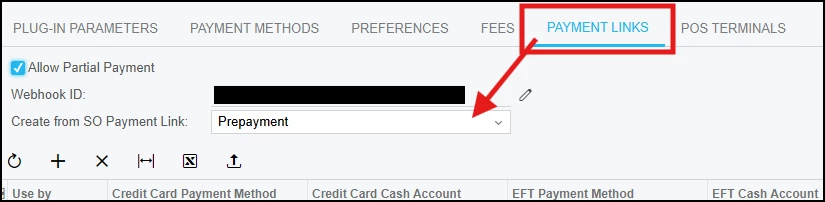

Best answer by kyle90

If you have Acumatica Payment links, you can set how those are posted (Payment vs Prepayment) on the Processing Center (CA205000) under the payment links section


6 replies

Yuri Karpenko
Captain II
Forum|alt.badge.img+7
  • Captain II
  • December 19, 2025

@BrittLass , are you talking about an integration with Shopify / BigCommerce? Or is it for payments created through the web interface?


Forum|alt.badge.img+3

@BrittLass 

Normally, you can create a prepayment from the sales order, and it will be in Balanced status once created. After the shipment is delivered, you create an invoice. When you apply a payment to that invoice, the system automatically opens the previously created prepayment and applies it to the invoice.

When the invoice is created from the sales order, it is saved in the system but does not generate any postings initially. Once you attempt to apply a payment to the invoice, the system retrieves the related prepayment transaction, and the payment against that invoice is recorded accordingly.


  • Author
  • Freshman I
  • December 22, 2025

@BrittLass , are you talking about an integration with Shopify / BigCommerce? Or is it for payments created through the web interface?

This is related to ones created through the Fortis payment processor integration. At the moment, if a customer pays via the payment link generated, it posts to our books as a “Payment” type when we really need it to post as a “Prepayment” type. If we’re creating them manually, we’ll enter as a prepayment, but we can’t do anything about ones that are auto-generated.


Forum|alt.badge.img+2
  • Captain II
  • Answer
  • December 22, 2025

If you have Acumatica Payment links, you can set how those are posted (Payment vs Prepayment) on the Processing Center (CA205000) under the payment links section


kkeating24
Semi-Pro I
Forum|alt.badge.img+1
  • Semi-Pro I
  • December 22, 2025

If you have Acumatica Payment links, you can set how those are posted (Payment vs Prepayment) on the Processing Center (CA205000) under the payment links section


I was just about to post this, haha. 


  • Author
  • Freshman I
  • December 22, 2025

Oh hallelujah. That is EXACTLY what we needed. Thank you @kyle90 and @kkeating24