Answer

Posting Payment from Acumatica to Shopify for B2B customers

  • August 27, 2025
  • 14 replies
  • 166 views

nshah90
Freshman II
Forum|alt.badge.img

We have a situation where a B2B shopify order gets sync’ed into Acumatica from Shopify.  The order is on terms (IE - Net 30) so no payment records comes with the shopify record.  


Shopify order is fulfilled inside Acumatica and Invoice is generated for sales order.  Some time later, customer pays the invoice and invoice is closed in Acumatica but the original order in shopify remains open instead of closed.  


Is there a way to close that B2B (Terms) order in shopify when payment is completed in Acumatica?


Best answer by Yuri Karpenko

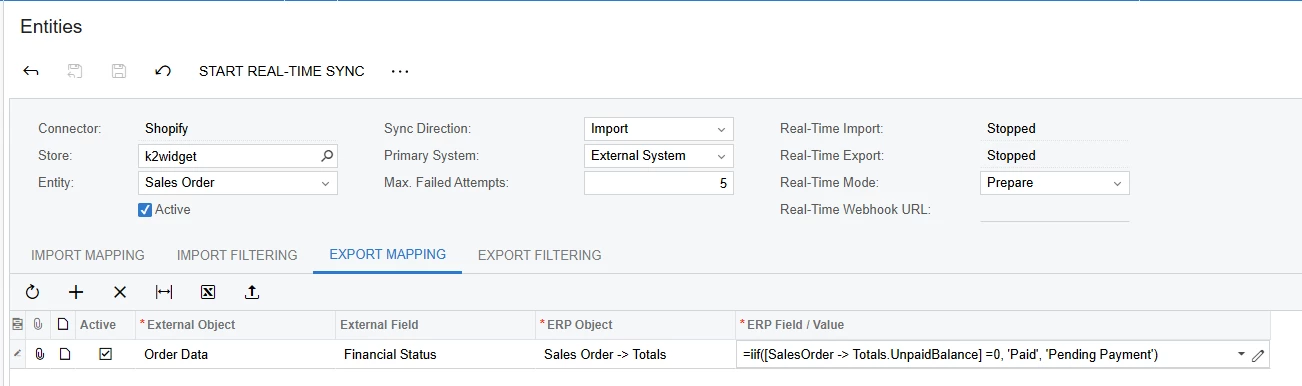
@nshah90 , I definitely had this mapping working:

We disabled it, because it would create a payment in Shopify (I think, Shopify does it automatically), but mark it as Pending.

So we scraped the idea. If you need a custom integration for this piece, glad to pick it up in private messages.

14 replies

JSpikowski
Jr Varsity II
Forum|alt.badge.img
  • Jr Varsity II
  • August 27, 2025

What percent of the sale does Shopify take when not using their credit card processing service?


nshah90
Freshman II
Forum|alt.badge.img
  • Author
  • Freshman II
  • August 27, 2025

@JSpikowski not sure but the client generally pays ACH or check for those B2B shopify orders.  Those B2B customers do not pay through Shopify.


JSpikowski
Jr Varsity II
Forum|alt.badge.img
  • Jr Varsity II
  • August 27, 2025

That's the rub with Shopify. They make their money doing the CC processing and charge a minimal subscription fee. That changes if you are handling the payment.

On the Basic plan, this additional transaction fee can be up to 2.0%, while on higher-tier plans, it is lower, such as 0.5% for the Advanced Plan. 


Forum|alt.badge.img+1

Hi ​@nshah90:

We currently do not have a way to update financial status in Shopify from Acumatica. The payments can only be imported into ERP from Shopify.
We are currently investigating ways to mark orders as paid in Shopify.

A question:

Does the customer always pay for their orders in full or can there also be partial payments in ERP?  


kkeating24
Varsity III
Forum|alt.badge.img+1
  • Varsity III
  • August 27, 2025

If i remember you can’t push payment info out to Shopify. ​​​​​​​

You might be able to setup some sort of an attribute that captures payment then sync the order after payment is applied and have a shopify Flow rule to fulfill payment based on a tag…   terrible solution...but it’s the only thing I can think of off the top of my head without a customization. 


Forum|alt.badge.img
  • Jr Varsity III
  • August 28, 2025

Hello ​@nshah90 

We can do this as a customization. Shopify allows for the required API to achieve it. Please let me know if you would like to discuss.  Happy to help here.  

Regards

Sai 


Yuri Karpenko
Captain II
Forum|alt.badge.img+6

@kkeating24 , do you know if something like this might work?


kkeating24
Varsity III
Forum|alt.badge.img+1
  • Varsity III
  • August 28, 2025

@kkeating24 , do you know if something like this might work?


I thought about that, but if a sales order is completed, it doesn’t always mean it’s paid.   It could have been shipped and invoiced and that ‘completes’ it...but the invoice could still be open. 


kkeating24
Varsity III
Forum|alt.badge.img+1
  • Varsity III
  • August 28, 2025

@Yuri Karpenko  - did try this though and it didn’t work - is ‘Paid’ the right status for shopify to update payment records?

looks like it might be: 

Shopify's financial status values, referring to order payment statuses, include paid, pending, authorized, partially_paid, partially_refunded, refunded, and voided. These statuses track the payment lifecycle for each order, helping merchants manage and export order data based on their payment progress, as shown in the example of using the financial_status parameter in a Shopify API URL. 


Yuri Karpenko
Captain II
Forum|alt.badge.img+6

@kkeating24 , I’m pretty sure ‘paid’ is the right status. I can test it but later tonight. in your screenshot, I see the direction of the sync is Import. Maybe, that’s the issue? Also, I don’t know if UnpaidBalance is accessible for the formula. To test the sync process, try to simply hard-code ‘paid’ into the ERP Field / Value column, and then we can figure out the formula, if it works. If the ‘paid’ works, then try with ‘pending’ second - will it change it back to “Awaiting payment”? If so, we might have a good solution for ​@nshah90 


kkeating24
Varsity III
Forum|alt.badge.img+1
  • Varsity III
  • August 28, 2025

@kkeating24 , I’m pretty sure ‘paid’ is the right status. I can test it but later tonight. in your screenshot, I see the direction of the sync is Import. Maybe, that’s the issue? Also, I don’t know if UnpaidBalance is accessible for the formula. To test the sync process, try to simply hard-code ‘paid’ into the ERP Field / Value column, and then we can figure out the formula, if it works. If the ‘paid’ works, then try with ‘pending’ second - will it change it back to “Awaiting payment”? If so, we might have a good solution for ​@nshah90 

i tried bi-directional as well and that did not work. Used this logic:


nshah90
Freshman II
Forum|alt.badge.img
  • Author
  • Freshman II
  • September 4, 2025

Thank you ​@kkeating24  and ​@Yuri Karpenko, great suggestions here but unfortunately does not work in this case.  Appears a customization will be necessary?


Yuri Karpenko
Captain II
Forum|alt.badge.img+6
  • Captain II
  • Answer
  • September 4, 2025

@nshah90 , I definitely had this mapping working:

We disabled it, because it would create a payment in Shopify (I think, Shopify does it automatically), but mark it as Pending.

So we scraped the idea. If you need a custom integration for this piece, glad to pick it up in private messages.


nshah90
Freshman II
Forum|alt.badge.img
  • Author
  • Freshman II
  • September 11, 2025

Hey Yuri, 

Yes, lets pick this up as it is necessary for our customer.