Solved

Changing the Availalbilty setting for Big Commerce to exclude negative available

  • February 10, 2022
  • 16 replies
  • 178 views

dgodsill97
Varsity I
Forum|alt.badge.img+3

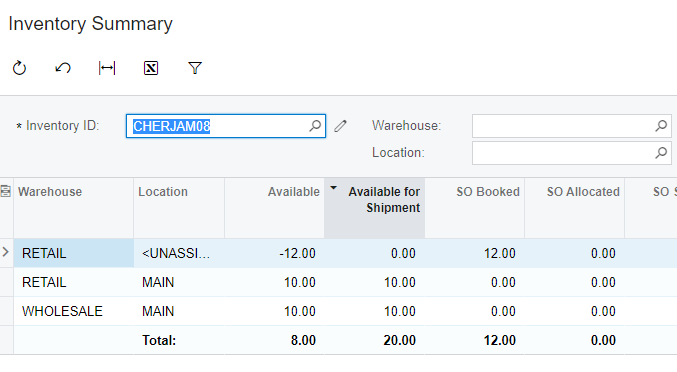
There are only 2 choices to show available  for the web store.  My client would prefer that negative available is ignored and factored into the calculations. In the example below, they want to see 10.

This is an example I set up and tested with the store setting for Availability Mode for Available and Available for Shipping.

  • When set to Available the store shows a qty of 8
  • When set to Available for Shipping it shows 20


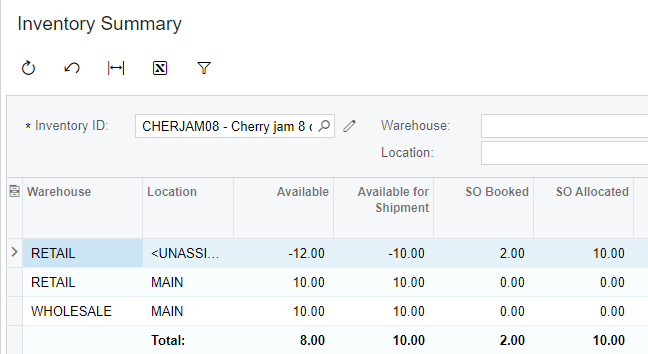
If I allocate the sales order for the 10 pieces it changes to either 8 or 10.  Generally, we do not set the sales orders to allocate because it ties up inventory you could use for orders with earlier ship dates.  Unfortunately, there is no way to allocate orders based on date.



Best answer by smarenich

@kmcalister58 I understand the problem and will create an internal ticket to elaborate this functionality in the future versions.

However, right now the only think I can suggest is to customize the availability sync.

16 replies

smarenich
Acumatica Moderator
Forum|alt.badge.img+3
  • Acumatica Commerce Edition Team Lead
  • February 10, 2022

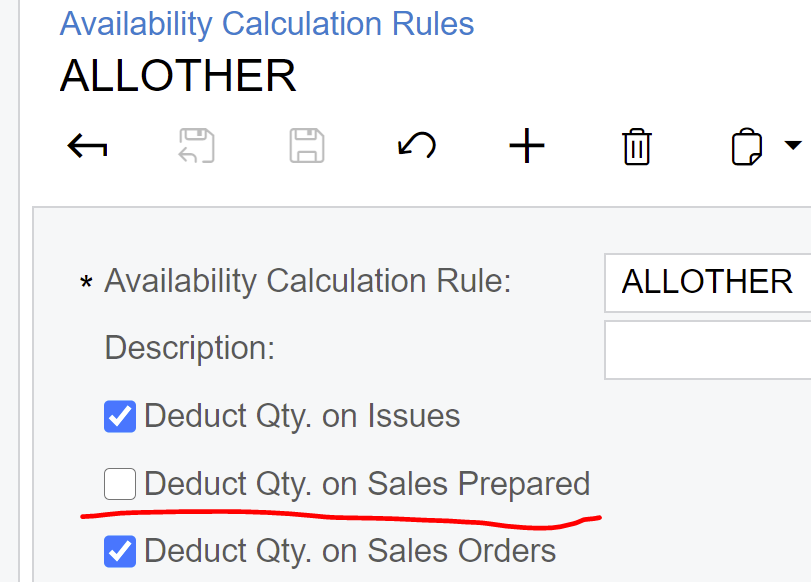
Hi @dgodsill97 could you please check if the Available with deductions on Sales Order Prepared can work for you?


dgodsill97
Varsity I
Forum|alt.badge.img+3
  • Author
  • Varsity I
  • February 11, 2022

They have multiple warehouse and the negative availability in one warehouse should be ignored. BC currently cannot show available by warehouse.


smarenich
Acumatica Moderator
Forum|alt.badge.img+3
  • Acumatica Commerce Edition Team Lead
  • February 11, 2022

@dgodsill97 

To be able to help you I need a bit more information to fully understand the problem. Could you please give me an example with some numbers, or reproduction steps?


dgodsill97
Varsity I
Forum|alt.badge.img+3
  • Author
  • Varsity I
  • February 11, 2022

This is an example I set up and tested with the store setting for Availability Mode for Available and Available for Shipping. According to the client, the available calc should be 10 for there are 10 units available in WHOLESALE.

  • When set to Available the store shows a qty of 8
  • When set to Available for Shipping it shows 20


dgodsill97
Varsity I
Forum|alt.badge.img+3
  • Author
  • Varsity I
  • February 11, 2022

Sorry, it keeps throwing away the screen shot.


dgodsill97
Varsity I
Forum|alt.badge.img+3
  • Author
  • Varsity I
  • February 11, 2022

Same example but allocating the sale order.  This is better and may work for the client.


smarenich
Acumatica Moderator
Forum|alt.badge.img+3
  • Acumatica Commerce Edition Team Lead
  • February 11, 2022

@dgodsill97 

The problem is that many customers do now want to oversell items, so we trying to keep availability as accurate as possible.

What your client would do if someone buys 10 items and then you ship all of 12. Would you cancel the order for the rest 2 items?


dgodsill97
Varsity I
Forum|alt.badge.img+3
  • Author
  • Varsity I
  • February 11, 2022

For this client, each customer is fulfilled by a regional warehouse using client trucks to deliver the goods.  So if you are a AZ customer on the Thursday route your orders are fulfilled by the AZ warehouse and delivered by client truck.  How difficult is it to customize the connector to allow export mapping and/or filtering for the Product Availability?  Export mapping  would the ideal situation because you can write a formula to change the stock level in BC. We often find that clients want to manipulate the stock level they show to customers - very common when sending the EDI 846 to a trading partner.


kmcalister58
Freshman II
  • Freshman II
  • March 2, 2022

@smarenich @josh.fischer  Any thoughts on how to help this client? Dennis and I are on the same team working on the same issue. 


smarenich
Acumatica Moderator
Forum|alt.badge.img+3
  • Acumatica Commerce Edition Team Lead
  • Answer
  • March 2, 2022

@kmcalister58 I understand the problem and will create an internal ticket to elaborate this functionality in the future versions.

However, right now the only think I can suggest is to customize the availability sync.


dgodsill97
Varsity I
Forum|alt.badge.img+3
  • Author
  • Varsity I
  • March 14, 2022

Does the availability sync use a GI?


smarenich
Acumatica Moderator
Forum|alt.badge.img+3
  • Acumatica Commerce Edition Team Lead
  • March 14, 2022

@dgodsill97 in versions below 2022r1 yes, Availability is based on the GI. However, I highly do not recommend to modify the GI. In case of modifications, any changes done by Acumatica team as part of bugfixes would result in problems with modified GI. in 2022r1 the GI is not used anymore.


dgodsill97
Varsity I
Forum|alt.badge.img+3
  • Author
  • Varsity I
  • March 14, 2022

I will request a customization from our team.  But will that work with 2021Rxx or will the GI. BC_StorageDetails be used regardless?


smarenich
Acumatica Moderator
Forum|alt.badge.img+3
  • Acumatica Commerce Edition Team Lead
  • March 14, 2022

@dgodsill97 as I said, modifications in BCStorageDetails will lead to the major problems with upgrades and updates. We have seed this before.

It will be safer to customize the Availability processor with code.


dgodsill97
Varsity I
Forum|alt.badge.img+3
  • Author
  • Varsity I
  • March 14, 2022

Understood, thanks


Chris Hackett
Community Manager
Forum|alt.badge.img
  • Acumatica Community Manager
  • April 25, 2022

Hi @dgodsill97 were you able to resolve this issue? Thank you!