
Solved

BigCommerce 20R2 - Release Payments checkbox is disabled

  • December 14, 2021
  • 4 replies
  • 104 views

vivekm
Varsity II
Forum|alt.badge.img

Hello Everyone,

I have an instance with Build 20.212.0038 and have configured Authorize.Net as processing center and payment method and using to map with BigCommerce Authorize.Net payment method.

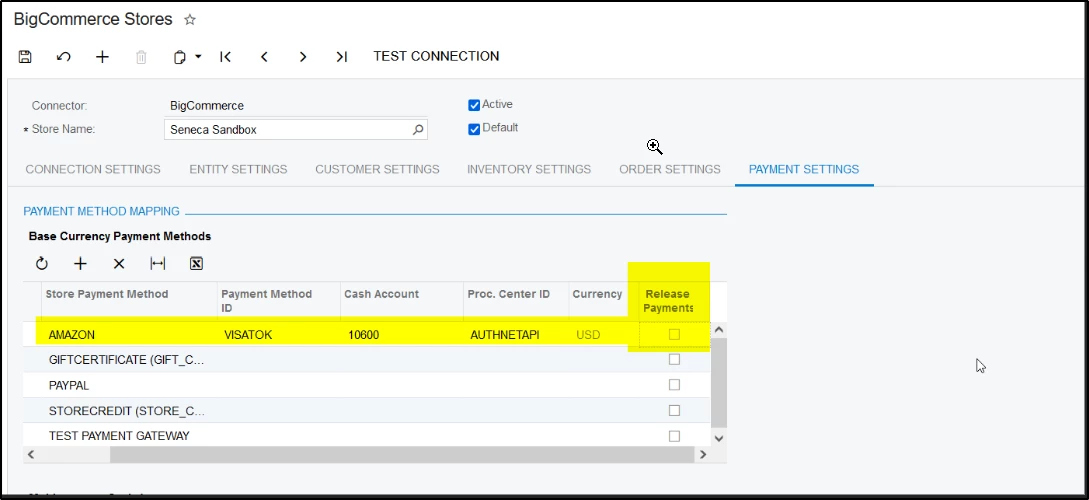
But as soon as I am selecting Processing Center ID the Release Payments checkbox getting disabled and then the synced payment records are not getting released automatically.

Can someone please suggest on how we can configure the settings to Release, synced payments automatically.



Best answer by smarenich

Hi @vivekm this checkbox is disabled when Processing Center ID is selected. Connector was not able to release payments with CC transactions, as they might require processing. 

As a workaround you can create a scheduler that will release such kind of payments.

4 replies

smarenich
Acumatica Moderator
Forum|alt.badge.img+3
  • Acumatica Commerce Edition Team Lead
  • Answer
  • December 14, 2021

Hi @vivekm this checkbox is disabled when Processing Center ID is selected. Connector was not able to release payments with CC transactions, as they might require processing. 

As a workaround you can create a scheduler that will release such kind of payments.


KarthikGajendran
Acumatica Moderator
Forum|alt.badge.img+3

@vivekm Thanks for the question. 

Credit Card payment could be released only when it is Captured. During the import process we cannot be sure that the payment is not in Authorized or Pending Approval status. So that is the reason the Release Payment checkbox is disabled. You can certainly release the payments automatically by scheduling the Release AR Document form. 


vivekm
Varsity II
Forum|alt.badge.img
  • Author
  • Varsity II
  • December 14, 2021

Thanks @smarenich for the details, will move forward with suggested workaround.


vivekm
Varsity II
Forum|alt.badge.img
  • Author
  • Varsity II
  • December 14, 2021

Thanks @KarthikGajendran for the details.