Question

Acumatica / Shopify Connector Not Setting Correct Available due to UNASSIGNED Commitments

  • April 18, 2025
  • 5 replies
  • 97 views

Forum|alt.badge.img

We are using the Shopify Connector, and have the Shopify Warehouses mapped to Acumatica Warehouses. Whether I select a Location for the mapping or leave it blank, it seems to ignore anything <UNASSIGNED> regardless of Allocated or not. This is not ideal because it reports a higher inventory number than is actually available to be sold, resulting in over-selling, upset customers, etc. 


Am I missing something?

5 replies

kkeating24
Varsity III
Forum|alt.badge.img+1
  • Varsity III
  • April 18, 2025

i just had a similar issue. I’m on 24R2 build 07.

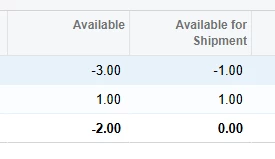
I had a location designated in my shopify store mapping, for inventory warehouse export mapping.  And my availability was set to “Available to Ship”.  It kept sending 1 QTY back to Shopify even though we had 3 orders (Allocation type) with the product allocated with 1 QTY per order. 

When product availability ran it was not paying attention to the inventory on allocated orders because they are ‘UNASSIGNED’ until shipped. Since I had selected another ‘location’ in my settings it wasn’t using the right number.

Looking at the inventory summary, I saw that the TOTAL was correct for available for shipment, BUT the 2nd ROW was my location that was designated on the store mapping and the connector was picking that 1 QTY up and sending it to Shopify: 

By removing the location from shopify store settings and making sure that any warehouse locations I don’t want to be included in availability are unchecked it now works. 

Hope that helps. 


Forum|alt.badge.img
  • Jr Varsity III
  • April 18, 2025

Hi ​@cberwaldt 

This might primarily be happening because of the definition in the Availability Calculation Rules.  Please check if Deduct Quantity on Sales Orders is selected.  

If not, you can check that and then execute the Recalculate Inventory process. 

Let me know if that helps please. 


Forum|alt.badge.img
  • Author
  • Freshman II
  • April 18, 2025

@kkeating24 thanks for that info! Did you leave the Shopify Store Availability Mode set to “Available For Shipping” or did you have to change it to “Available” also to get it to work.

I removed the location from one of my warehouses to experiment, but it didn’t seem to affect things. Also though, my availability mode in the store is currently set to “Available”.


kkeating24
Varsity III
Forum|alt.badge.img+1
  • Varsity III
  • April 18, 2025

we always use available for shipment, so yes we kept that setting.


Chris Hackett
Community Manager
Forum|alt.badge.img
  • Acumatica Community Manager
  • July 2, 2025

Hi ​@cberwaldt were you able to find a solution? Thank you!