


Answer

Visual Expression to hide field if blank in ='Lot #: ' + [SOShipLine.LotSerialNbr]

  • January 26, 2024
  • 2 replies
  • 128 views

mike2665
Jr Varsity III
Forum|alt.badge.img

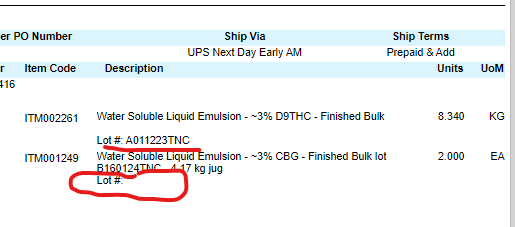
On our Shipment Confirmation form we provide our lot numbers on stock items but on a service or non-stock item I want to hide the Lot # field to not show that doesn’t have a lot code. See below. I tried using =IIF(StkItem = FALSE, FALSE,TRUE) in the text box visual expression behavior but it does not work. Can someone let me know if I need to add something to the schema to make this work?
 

Best answer by mike2665

Thank you Yulias18, that helped me to find my problem. I did not have the InventoryID table in my schema. When I added it I then added the visual expression of  =IIF([InventoryItem.StkItem]=FALSE,FALSE,TRUE) that hid my field for Lot #’s of non-stock items while allowing my stock items with lot codes to populate.

2 replies

Forum|alt.badge.img+1

You can try using 

[InventoryItem.StkItem]=TRUE 

in visibilityExpr


mike2665
Jr Varsity III
Forum|alt.badge.img
  • Author
  • Jr Varsity III
  • Answer
  • January 26, 2024

Thank you Yulias18, that helped me to find my problem. I did not have the InventoryID table in my schema. When I added it I then added the visual expression of  =IIF([InventoryItem.StkItem]=FALSE,FALSE,TRUE) that hid my field for Lot #’s of non-stock items while allowing my stock items with lot codes to populate.