Answer

Vendor Requisition - Quote for One Item at Different Quantities

  • April 14, 2023
  • 3 replies
  • 102 views

I’m trying to create a Request for Proposal to send to vendors. I want the vendor to quote one item at 2 different quantities. 

Inventory ID Qty Req’d
IM2300

25

IM2300 50


When I click Request for Proposal, the form merges the two lines together as though I want the vendor to provide a quote for 75 of the item. 



Is there a way to get the system to keep them as separate lines so I can send one form to a vendor requesting a quote for 25 and 50?


Thanks!
Best answer by kdavis45

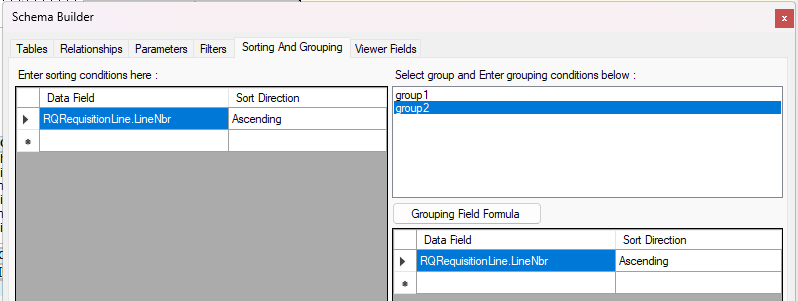
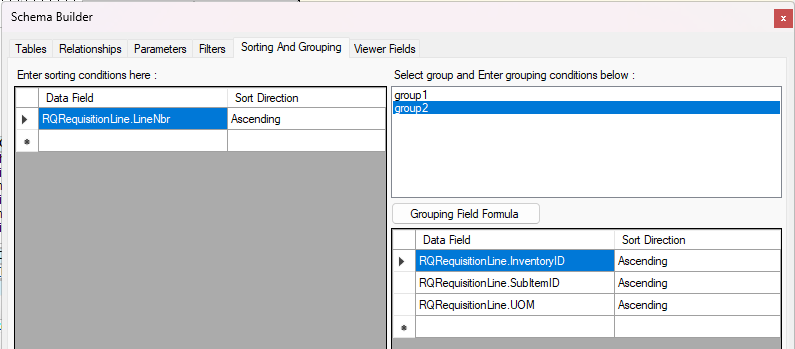
Check the group formulas - in the default requisition design, it’s grouped by inventoryID, subitemID, and UOM, which would be the same in your scenario and cause everything to summarize.


You can adjust these as-needed, but I’d probably use only RQRequisitionLine.LineNbr to keep all lines separate. Both versions are included for reference.


Original Version


Edited Version


3 replies

kdavis45
Semi-Pro I
Forum|alt.badge.img+1
  • Semi-Pro I
  • Answer
  • April 14, 2023

Check the group formulas - in the default requisition design, it’s grouped by inventoryID, subitemID, and UOM, which would be the same in your scenario and cause everything to summarize.


You can adjust these as-needed, but I’d probably use only RQRequisitionLine.LineNbr to keep all lines separate. Both versions are included for reference.


Original Version


Edited Version


  • Author
  • Freshman I
  • April 14, 2023

Could you tell me where you found the group formulas/default design? Thanks!


kdavis45
Semi-Pro I
Forum|alt.badge.img+1
  • Semi-Pro I
  • April 14, 2023

Could you tell me where you found the group formulas/default design? Thanks!

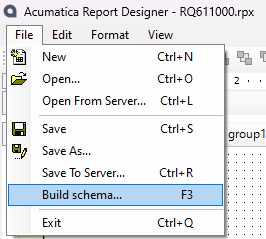
File > Build Schema, then the Sorting and Grouping tab. You can toggle between the different groups and adjust as-needed.

Since the detail is listed on groupHeaderSection2, I went straight to group 2’s setup for review / adjustment.