

Answer

Using Styles in AR Report for Past Due

  • May 20, 2025
  • 4 replies
  • 57 views

Does anyone know how to use Styles to show color for invoices that are past due? I have the below formula.

=CDec( DateDiff( 'd', [ARInvoice.DueDate], Today()) )

Thank you.


Best answer by meganfriesen37

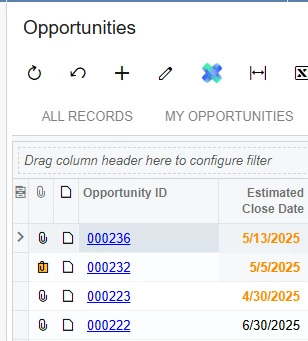
Your issue might be that you don’t have an alternate format when the condition is false.  So if you add a ,’default’ at the end that might solve your problem, but I think you could probably simplify it if it’s just a 2 condition format (either it’s overdue or not) to something like this (just swap opportunity field with ARInvoice.DueDate. 

=iif([CROpportunity.CloseDate]<Today(),'orange0','default')
 

4 replies

meganfriesen37
Captain II
Forum|alt.badge.img+12

The only way that I’ve been able to do it (in report designer) is to have multiple fields that are overlapping, each with different Visible criteria that do no conflict and then each field has separate formatting.  I’ve done it to change branding colours if there’s multiple companies in a system or do do similar items to highlight overdue items or budgets > x% etc.

It’s easier to do in the Generic Inquiries.


  • Author
  • May 20, 2025

Hi Megan,

It is a generic inquiry. This is what I have but it’s not working.


=IIf(DateDiff('d', Today(), [ARInvoice.DueDate]) < 0, 'orange0')


meganfriesen37
Captain II
Forum|alt.badge.img+12

Your issue might be that you don’t have an alternate format when the condition is false.  So if you add a ,’default’ at the end that might solve your problem, but I think you could probably simplify it if it’s just a 2 condition format (either it’s overdue or not) to something like this (just swap opportunity field with ARInvoice.DueDate. 

=iif([CROpportunity.CloseDate]<Today(),'orange0','default')


  • Author
  • May 20, 2025

That did it………...thank you Megan!!!

Here is the final formula:

=IIf(DateDiff('d', Today(), [ARInvoice.DueDate]) > 0, 'bad','good')

