Answer

Using a Calendar as a GI Source

  • March 20, 2025
  • 7 replies
  • 120 views

Forum|alt.badge.img+1

Hi, 


I recently was working on a way to pull productivity data from Acumatica. Specifically during Overtime shifts.

Display Only "Time" in a GI, not Date. | Community


However, this became quite the rabbit hole and I tried to find another direction.

So I wanted to start a new question and see if anyone has any experience with this.


I noticed the Work Calendar screen in Acumatica, and hoped it might help me.

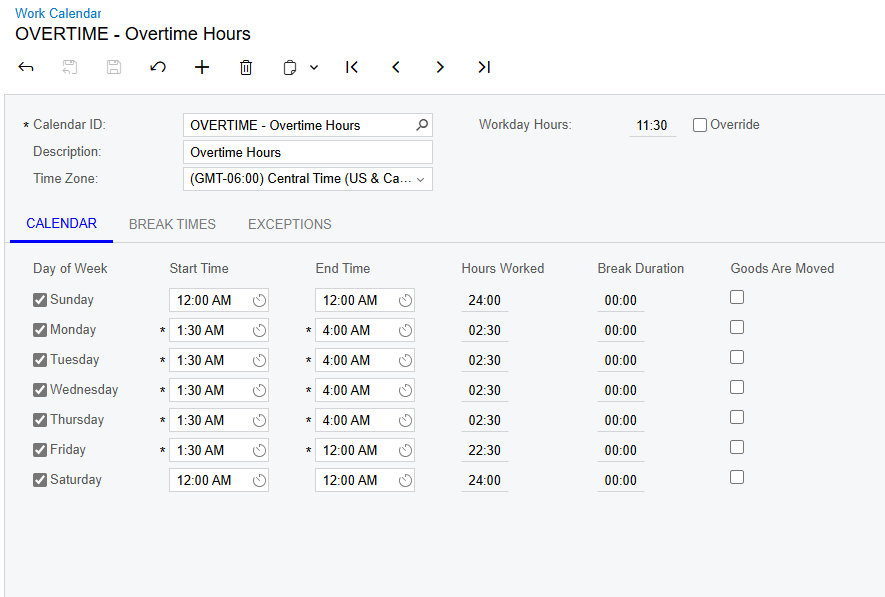
So I created a Work Calendar Schedule for Overtime hours like this:


I was hoping I could pull this into my Move transaction summary GI so that I could maybe have a checkbox check if the transaction was done during the Overtime Calendar Hours.


Or even if I could display the Calendar ID if the transaction happened within that calendar.  


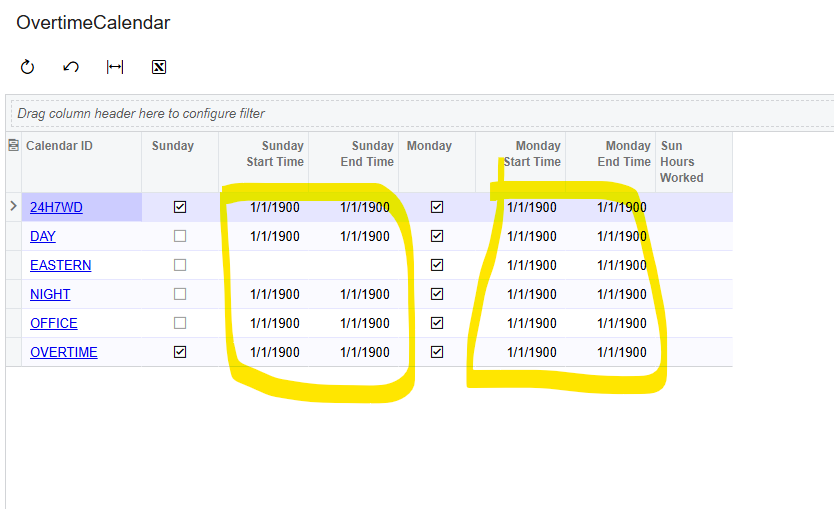
However, I am struggling to get this information to pull into my GI correctly, I started another GI to just get the times to display, however it gives me this random date and does not help me in this regard. 


Does anyone have any Ideas on this? Or am I reaching too high on this? I don’t see what the calendars are for if they are not able to work in this way.


Thanks,

Bodie

Best answer by bodiec

Hi ​@Chris Hackett  


Using the calendar feature seemed to be quite difficult to set up and kind of got abandoned. 


Instead I developed a long complicated formula. It does get the job done though. It is essentially just an IIF statement that checks a box if the transaction occurred within a time period on each day using a sum of the minutes for that time, and it factors in the time difference. 


Here is the final formula for me, checking between the hours of 1:30am-4am Monday-Thursday, All of Sunday/Saturday, and after 1:30am on Friday. 


=IIf((DayOfWeek(DateAdd([AMBatch.CreatedDateTime],’h’,-6))=1 and Hour(DateAdd([AMBatch.CreatedDateTime],’h’,-6))*60 + Minute(DateAdd([AMBatch.CreatedDateTime],’h’,-6))>=1 and Hour(DateAdd([AMBatch.CreatedDateTime],’h’,-6))*60 + Minute(DateAdd([AMBatch.CreatedDateTime],’h’,-6))<=719) OR (DayOfWeek(DateAdd([AMBatch.CreatedDateTime],’h’,-6))=2 and Hour(DateAdd([AMBatch.CreatedDateTime],’h’,-6))*60 + Minute(DateAdd([AMBatch.CreatedDateTime],’h’,-6))>=90 and Hour(DateAdd([AMBatch.CreatedDateTime],’h’,-6))*60 + Minute(DateAdd([AMBatch.CreatedDateTime],’h’,-6))<=240) OR (DayOfWeek(DateAdd([AMBatch.CreatedDateTime],’h’,-6))=3 and Hour(DateAdd([AMBatch.CreatedDateTime],’h’,-6))*60 + Minute(DateAdd([AMBatch.CreatedDateTime],’h’,-6))>=90 and Hour(DateAdd([AMBatch.CreatedDateTime],’h’,-6))*60 + Minute(DateAdd([AMBatch.CreatedDateTime],’h’,-6))<=240) OR (DayOfWeek(DateAdd([AMBatch.CreatedDateTime],’h’,-6))=4 and Hour(DateAdd([AMBatch.CreatedDateTime],’h’,-6))*60 + Minute(DateAdd([AMBatch.CreatedDateTime],’h’,-6))>=90 and Hour(DateAdd([AMBatch.CreatedDateTime],’h’,-6))*60 + Minute(DateAdd([AMBatch.CreatedDateTime],’h’,-6))<=240) OR (DayOfWeek(DateAdd([AMBatch.CreatedDateTime],’h’,-6))=5 and Hour(DateAdd([AMBatch.CreatedDateTime],’h’,-6))*60 + Minute(DateAdd([AMBatch.CreatedDateTime],’h’,-6))>=90 and Hour(DateAdd([AMBatch.CreatedDateTime],’h’,-6))*60 + Minute(DateAdd([AMBatch.CreatedDateTime],’h’,-6))<=240) OR (DayOfWeek(DateAdd([AMBatch.CreatedDateTime],’h’,-6))=6 and Hour(DateAdd([AMBatch.CreatedDateTime],’h’,-6))*60 + Minute(DateAdd([AMBatch.CreatedDateTime],’h’,-6))>=90 and Hour(DateAdd([AMBatch.CreatedDateTime],’h’,-6))*60 + Minute(DateAdd([AMBatch.CreatedDateTime],’h’,-6))<=719) OR (DayOfWeek(DateAdd([AMBatch.CreatedDateTime],’h’,-6))=7 and Hour(DateAdd([AMBatch.CreatedDateTime],’h’,-6))*60 + Minute(DateAdd([AMBatch.CreatedDateTime],’h’,-6))>=1 and Hour(DateAdd([AMBatch.CreatedDateTime],’h’,-6))*60 + Minute(DateAdd([AMBatch.CreatedDateTime],’h’,-6))<=719),TRUE, FALSE)


7 replies

bwhite49
Captain II
Forum|alt.badge.img+10
  • Captain II
  • March 20, 2025

This is some great out-of-the-box thinking. I like it. 

I’m going to review this.


bwhite49
Captain II
Forum|alt.badge.img+10
  • Captain II
  • March 20, 2025

OK, I took a look. I think the calendar table is more trouble than helpful. 

It did give me inspiration though… I think this formula will flag the correct time. 

=IIF(DATEADD([AMMTran.CreatedDateTime], 'd', DATEDIFF('d',[AMMTran.TranDate], '01/01/1900')) >= '1/1/1900 8:30:00 PM' AND DATEADD([AMMTran.CreatedDateTime], 'd', DATEDIFF('d',[AMMTran.TranDate], '01/01/1900')) <= '1/1/1900 11:00:00 PM', TRUE, FALSE)

This section of the formula makes the date irrelevant

=DATEADD([AMMTran.CreatedDateTime], 'd', DATEDIFF('d',[AMMTran.TranDate], '01/01/1900'))

Since the data is stored in GMT, I changed your start time to be 8:30-11:00 PM instead of 1:30-4:00 AM


Forum|alt.badge.img+3
  • Varsity I
  • March 21, 2025

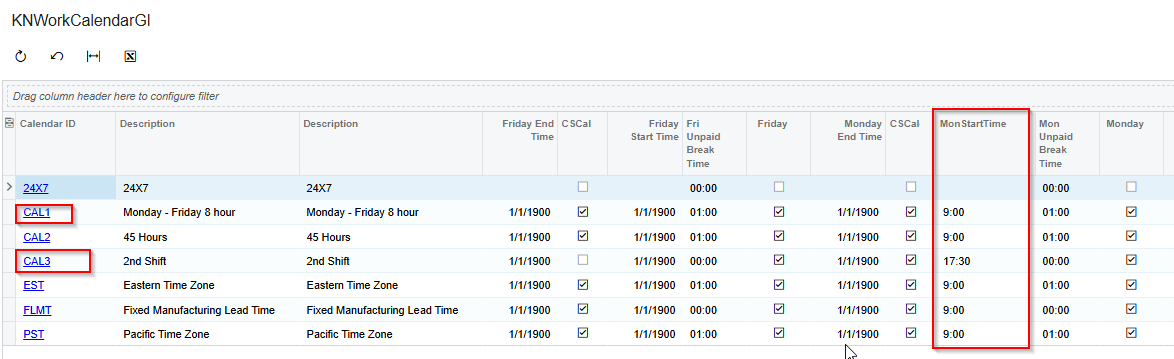
Hi ​@bodiec , Try with this formula, this will display the time in GI
=CStr([CSCalendar.MonStartTime_Hour]) + ':' + PadLeft( CStr(Minute( [CSCalendar.MonStartTime] )), 2, '0' )


Forum|alt.badge.img+1
  • Author
  • Semi-Pro II
  • March 27, 2025

OK, I took a look. I think the calendar table is more trouble than helpful. 

It did give me inspiration though… I think this formula will flag the correct time. 

=IIF(DATEADD([AMMTran.CreatedDateTime], 'd', DATEDIFF('d',[AMMTran.TranDate], '01/01/1900')) >= '1/1/1900 8:30:00 PM' AND DATEADD([AMMTran.CreatedDateTime], 'd', DATEDIFF('d',[AMMTran.TranDate], '01/01/1900')) <= '1/1/1900 11:00:00 PM', TRUE, FALSE)

This section of the formula makes the date irrelevant

=DATEADD([AMMTran.CreatedDateTime], 'd', DATEDIFF('d',[AMMTran.TranDate], '01/01/1900'))

Since the data is stored in GMT, I changed your start time to be 8:30-11:00 PM instead of 1:30-4:00 AM

Hey ​@bwhite49, sorry I have been Out Of Office for a while, I just tried your expression, but I still can’t identify why the boxes check, and why the others don’t.


I still see a 9:16 am that gets checked, but a 9:30 am and a 9:09 am that don’t get checked.

I did make a fresh GI to try to simplify, I also finished off that Overtime Calendar GI so that it displays the correct times. I wanted to come back to this idea. However pulling the times into the other GI proved to be difficult as every data field showed as Formula…….  Each formula being the start Time on that day or the End Time on that day.


So essentially it saying IF it occurred between Monday start time and Monday End time, OR between Tuesday Start Time and Tuesday End Time...etc...


I ended up with something like this,

=IIf( ([AMBatch.CreatedDateTime]>= [OTCalendar.CSCalendar_Formula56fd3ca1b78246d6abefd6d1b84c8c1a] AND [AMBatch.CreatedDateTime]<= [OTCalendar.CSCalendar_Formulac58c8a1ef3914d7a9aa068240afbf499]) OR ([AMBatch.CreatedDateTime]>= [OTCalendar.CSCalendar_Formula641bd672826d418ebeaed20ad7a230e9] AND [AMBatch.CreatedDateTime]<=[OTCalendar.CSCalendar_Formula92019c63a8aa49c4aa8c049644c065ec]) OR ([AMBatch.CreatedDateTime]>=[OTCalendar.CSCalendar_Formula69b7df004ca6463fa7216994c739cf83] AND [AMBatch.CreatedDateTime]<=[OTCalendar.CSCalendar_Formulaaa320e5236374f83b2409380e52fafb2]) OR ([AMBatch.CreatedDateTime]>=[OTCalendar.CSCalendar_Formula173c76126aea4b60945d469329e87e67] AND [AMBatch.CreatedDateTime]<=[OTCalendar.CSCalendar_Formula07ab10862c26463799d9ff45fd939933]) OR ([AMBatch.CreatedDateTime]>=[OTCalendar.CSCalendar_Formulac9c7c290a0914e01b4c01b3ee5ee569a] AND [AMBatch.CreatedDateTime]<=[OTCalendar.CSCalendar_Formula2252b4429b614a0ca344ec1e3a09a40e]) OR ([AMBatch.CreatedDateTime]>=[OTCalendar.CSCalendar_Formula116899d0dd8c495faf42fab38df01f3a] AND [AMBatch.CreatedDateTime]<=[OTCalendar.CSCalendar_Formulaf57d0b3ba50f46dc8d6fab1c0e285a55]) OR ([AMBatch.CreatedDateTime]>=[OTCalendar.CSCalendar_Formula5efd7ea7c96d4a68b75c83c74fe729bd] AND [AMBatch.CreatedDateTime]<=[OTCalendar.CSCalendar_Formula91ade4b6fb984e179245f16ee5fc0169]), TRUE, FALSE )


However I believe the error is because these are multiple times, however I don’t believe the day of the week is at all specified. So I would need the system to check, “was it made on this day? Ok, now was it made between this specific time zone” 


Any Ideas on furthering this research?


Forum|alt.badge.img+1
  • Author
  • Semi-Pro II
  • March 27, 2025

Update, 


I believe I have created the correct expression, or at least something close.

This would hopefully say, “if it happened on this day, between this time and that time”


=IIf(((DayOfWeek([AMBatch.CreatedDateTime])=1) AND ([AMBatch.CreatedDateTime]>= [OTCalendar.CSCalendar_Formula56fd3ca1b78246d6abefd6d1b84c8c1a] AND [AMBatch.CreatedDateTime]<= [OTCalendar.CSCalendar_Formulac58c8a1ef3914d7a9aa068240afbf499])) OR ((DayOfWeek([AMBatch.CreatedDateTime])=2) AND ([AMBatch.CreatedDateTime]>= [OTCalendar.CSCalendar_Formula641bd672826d418ebeaed20ad7a230e9] AND [AMBatch.CreatedDateTime]<=[OTCalendar.CSCalendar_Formula92019c63a8aa49c4aa8c049644c065ec])) OR ((DayOfWeek([AMBatch.CreatedDateTime])=3) AND ([AMBatch.CreatedDateTime]>=[OTCalendar.CSCalendar_Formula69b7df004ca6463fa7216994c739cf83] AND [AMBatch.CreatedDateTime]<=[OTCalendar.CSCalendar_Formulaaa320e5236374f83b2409380e52fafb2])) OR ((DayOfWeek([AMBatch.CreatedDateTime])=4) AND ([AMBatch.CreatedDateTime]>=[OTCalendar.CSCalendar_Formula173c76126aea4b60945d469329e87e67] AND [AMBatch.CreatedDateTime]<=[OTCalendar.CSCalendar_Formula07ab10862c26463799d9ff45fd939933])) OR ((DayOfWeek([AMBatch.CreatedDateTime])=5) AND ([AMBatch.CreatedDateTime]>=[OTCalendar.CSCalendar_Formulac9c7c290a0914e01b4c01b3ee5ee569a] AND [AMBatch.CreatedDateTime]<=[OTCalendar.CSCalendar_Formula2252b4429b614a0ca344ec1e3a09a40e])) OR ((DayOfWeek([AMBatch.CreatedDateTime])=6) AND ([AMBatch.CreatedDateTime]>=[OTCalendar.CSCalendar_Formula116899d0dd8c495faf42fab38df01f3a] AND [AMBatch.CreatedDateTime]<=[OTCalendar.CSCalendar_Formulaf57d0b3ba50f46dc8d6fab1c0e285a55])) OR ((DayOfWeek([AMBatch.CreatedDateTime])=7) AND ([AMBatch.CreatedDateTime]>=[OTCalendar.CSCalendar_Formula5efd7ea7c96d4a68b75c83c74fe729bd] AND [AMBatch.CreatedDateTime]<=[OTCalendar.CSCalendar_Formula91ade4b6fb984e179245f16ee5fc0169])), TRUE, FALSE )


This does pass Validation, however, when viewing the Inquiry, I get an error saying 

The multi-part identifier “OTCalendar.CSCalendar_Formula…..” could not be bound.


Which is weird, because this error only occurred once I added the DayOfWeek to the Expression.


Anyone able to clarify what it means when something cannot be bound? 

Or anything I can fix my expression with?


Chris Hackett
Community Manager
Forum|alt.badge.img
  • Acumatica Community Manager
  • June 18, 2025

Hi ​@bodiec were you able to find a solution? Thank you!


Forum|alt.badge.img+1
  • Author
  • Semi-Pro II
  • Answer
  • June 18, 2025

Hi ​@Chris Hackett  


Using the calendar feature seemed to be quite difficult to set up and kind of got abandoned. 


Instead I developed a long complicated formula. It does get the job done though. It is essentially just an IIF statement that checks a box if the transaction occurred within a time period on each day using a sum of the minutes for that time, and it factors in the time difference. 


Here is the final formula for me, checking between the hours of 1:30am-4am Monday-Thursday, All of Sunday/Saturday, and after 1:30am on Friday. 


=IIf((DayOfWeek(DateAdd([AMBatch.CreatedDateTime],’h’,-6))=1 and Hour(DateAdd([AMBatch.CreatedDateTime],’h’,-6))*60 + Minute(DateAdd([AMBatch.CreatedDateTime],’h’,-6))>=1 and Hour(DateAdd([AMBatch.CreatedDateTime],’h’,-6))*60 + Minute(DateAdd([AMBatch.CreatedDateTime],’h’,-6))<=719) OR (DayOfWeek(DateAdd([AMBatch.CreatedDateTime],’h’,-6))=2 and Hour(DateAdd([AMBatch.CreatedDateTime],’h’,-6))*60 + Minute(DateAdd([AMBatch.CreatedDateTime],’h’,-6))>=90 and Hour(DateAdd([AMBatch.CreatedDateTime],’h’,-6))*60 + Minute(DateAdd([AMBatch.CreatedDateTime],’h’,-6))<=240) OR (DayOfWeek(DateAdd([AMBatch.CreatedDateTime],’h’,-6))=3 and Hour(DateAdd([AMBatch.CreatedDateTime],’h’,-6))*60 + Minute(DateAdd([AMBatch.CreatedDateTime],’h’,-6))>=90 and Hour(DateAdd([AMBatch.CreatedDateTime],’h’,-6))*60 + Minute(DateAdd([AMBatch.CreatedDateTime],’h’,-6))<=240) OR (DayOfWeek(DateAdd([AMBatch.CreatedDateTime],’h’,-6))=4 and Hour(DateAdd([AMBatch.CreatedDateTime],’h’,-6))*60 + Minute(DateAdd([AMBatch.CreatedDateTime],’h’,-6))>=90 and Hour(DateAdd([AMBatch.CreatedDateTime],’h’,-6))*60 + Minute(DateAdd([AMBatch.CreatedDateTime],’h’,-6))<=240) OR (DayOfWeek(DateAdd([AMBatch.CreatedDateTime],’h’,-6))=5 and Hour(DateAdd([AMBatch.CreatedDateTime],’h’,-6))*60 + Minute(DateAdd([AMBatch.CreatedDateTime],’h’,-6))>=90 and Hour(DateAdd([AMBatch.CreatedDateTime],’h’,-6))*60 + Minute(DateAdd([AMBatch.CreatedDateTime],’h’,-6))<=240) OR (DayOfWeek(DateAdd([AMBatch.CreatedDateTime],’h’,-6))=6 and Hour(DateAdd([AMBatch.CreatedDateTime],’h’,-6))*60 + Minute(DateAdd([AMBatch.CreatedDateTime],’h’,-6))>=90 and Hour(DateAdd([AMBatch.CreatedDateTime],’h’,-6))*60 + Minute(DateAdd([AMBatch.CreatedDateTime],’h’,-6))<=719) OR (DayOfWeek(DateAdd([AMBatch.CreatedDateTime],’h’,-6))=7 and Hour(DateAdd([AMBatch.CreatedDateTime],’h’,-6))*60 + Minute(DateAdd([AMBatch.CreatedDateTime],’h’,-6))>=1 and Hour(DateAdd([AMBatch.CreatedDateTime],’h’,-6))*60 + Minute(DateAdd([AMBatch.CreatedDateTime],’h’,-6))<=719),TRUE, FALSE)