




Hi all,
I’m trying to figure out if I’m missing a trick, or if there’s a functionality gap here.
With Azure Entra SSO configured, and using the SSO Group based Role assignments logic this introduces, I can’t find a way to report on ActiveDirectory Roles/Groups.
While I was able to find PX.SM.RoleActiveDirectory, and query this to get information about which AD Groups have which Roles:
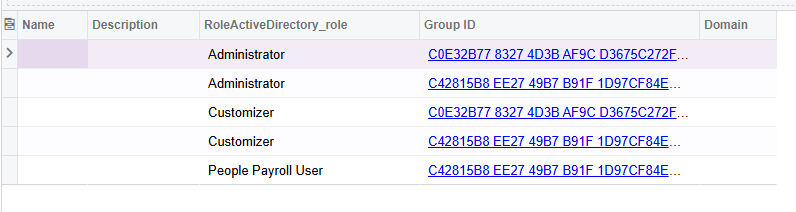
I wasn’t able to then join it to a Group name in a way would display, or find somewhere to join against to identify the link between AD group and User.
I tried:
PX.SM.ActiveDirectoryGroup
This has the correct names like it should be providing me the name of the AD groups, but I couldn’t actually get information to display from it.
(I think maybe this information isn’t persisted? Though it is possible I’ve got my joins wrong.)
Any hints, or confirmation that I’m trying to do something not currently supported, would be really appreciated.
My goals are to be able to reproduce something like
- Access Rights by Role (SM651500 ) except Access Rights by Group
- User List (SM650500) to include Roles coming from their AD Group assignments
- Role List (SM651000) to include AD Groups, and the users that are assigned to those groups.
While I can probably manage to graft the Group IDs into the above reports and achieve some version of having the AD Groups show in the lists, I’d prefer to be showing the Group Names and their memberships, both of which I’m currently blocked on.
* Edited to fix a typo.

