Answer

Use of SWITCH in Generic Inquiry

  • April 29, 2024
  • 5 replies
  • 538 views

Forum|alt.badge.img+1

I am using SWITCH in a Generic Inquiry but the column comes up without any values. 

My formula is as follows: =SWITCH(([SOInvoice.DocType] = 'Credit Memo'), 'C',([SOInvoice.DocType] = 'Invoice'), 'O')

So what I am attempting to do is if the DocType = ‘Credit Memo’, change the field to a ‘C’ and if it is an ‘Invoice’ change to an ‘O’.

Best answer by travislawson

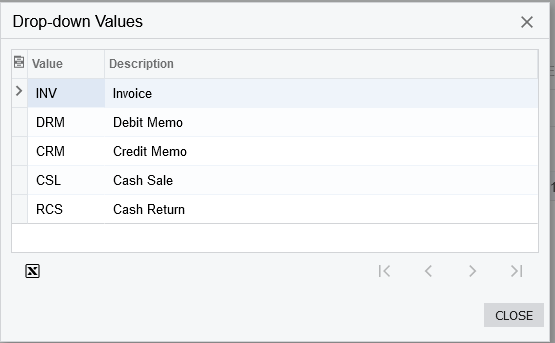
SOInvoice.DocType is a char(3) which means 3 characters.


Credit Memo is CRM, Invoice is INV.  So you’re original switch is correct, just not implemented correctly:


I split it up into separate lines so you can see it better. 

=SWITCH(

[SOInvoice.DocType] = 'CRM', 'C',

[SOInvoice.DocType] = 'INV', 'O'

)


5 replies

Forum|alt.badge.img+1
  • Author
  • Semi-Pro I
  • April 29, 2024

I found my own solution: =SWITCH(([SOInvoice.DocType] = 'Credit Memo'), 'C', ‘O’). Anyone has a better way?.


Forum|alt.badge.img+1

SOInvoice.DocType is a char(3) which means 3 characters.


Credit Memo is CRM, Invoice is INV.  So you’re original switch is correct, just not implemented correctly:


I split it up into separate lines so you can see it better. 

=SWITCH(

[SOInvoice.DocType] = 'CRM', 'C',

[SOInvoice.DocType] = 'INV', 'O'

)


Forum|alt.badge.img+1
  • Author
  • Semi-Pro I
  • April 29, 2024

Thank you for the additional feedback.


Forum|alt.badge.img+1

Thank you for the additional feedback.

Also to help you further to find out these codes, in at least 2023R1, open your invoices screen and you can go to Customization → Inspect Element (or CTRL+ALT and click) and click on the Type field.  It’ll have a drop-down values button. 


Forum|alt.badge.img+1
  • Author
  • Semi-Pro I
  • April 29, 2024

Thank you for that screenshot.