Answer

understanding report designer excel formatting

  • November 5, 2025
  • 7 replies
  • 71 views

Forum|alt.badge.img

Hello,

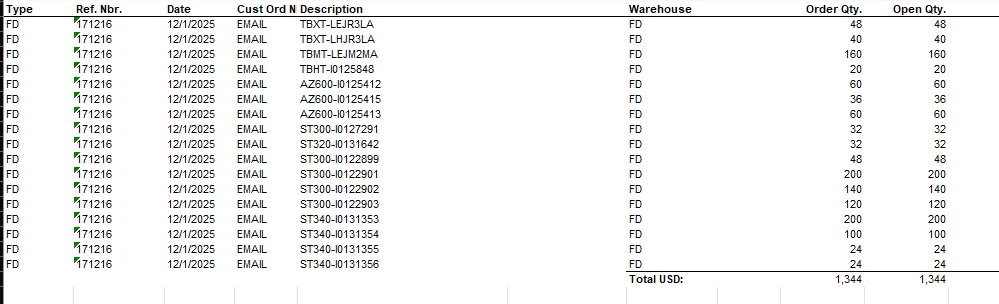
Just installed report designer. My first project is to figure out why the PDF file of a report has a data set that the bounced excel file does not. I came across this link

https://www.augforums.com/forums/acumatica-report-designer/export-report-to-excel-totally-skews-report-but-it-pdf-looks-perfect/

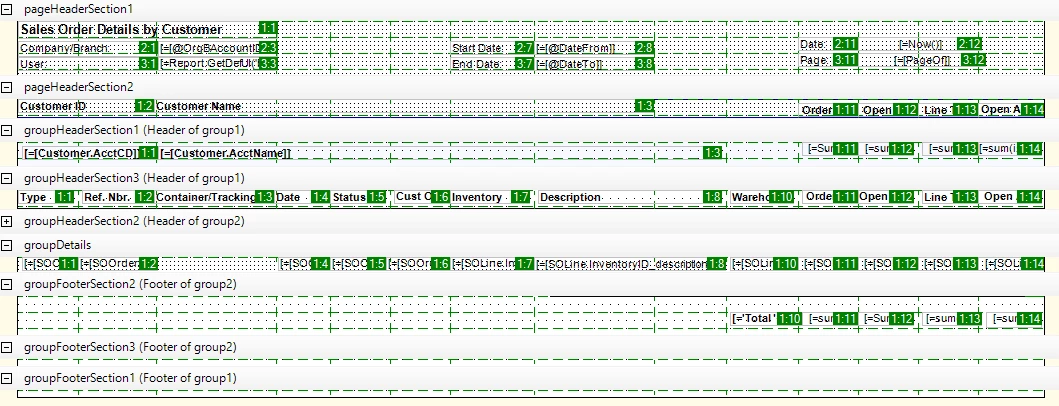
I totally understand this. However, I don't understand how the row/column layout works regarding this. From the link i get what the green box shows. but how do multiple data values use the same “excel cell”, but when pushed to excel they’re not actually those values. 

For example, wouldn’t my ‘warehouse’ value lay on 7,7? that’s where it lies on the excel sheet.I’m trying to get “SOLine.InventoryID_description” to show on excel.
Best answer by bwhite49

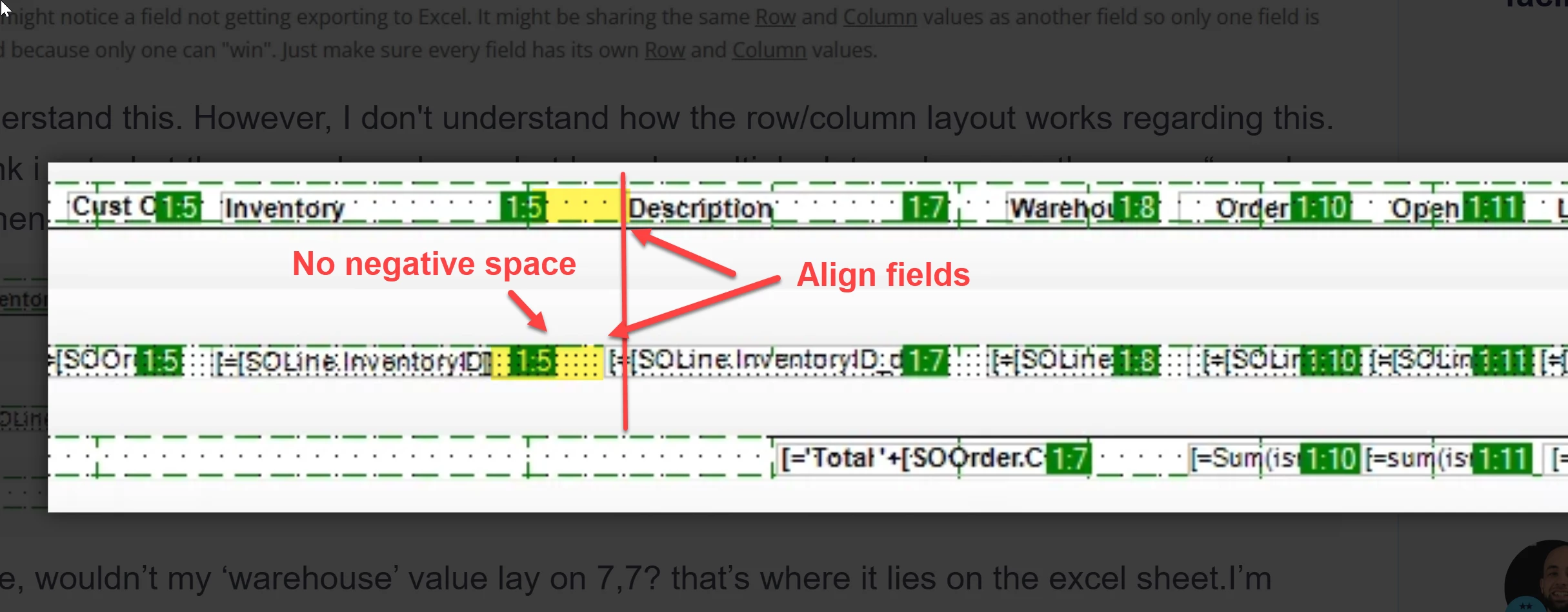
If exporting to excel, your report should have minimum negative space and getting everything aligned is also important. 


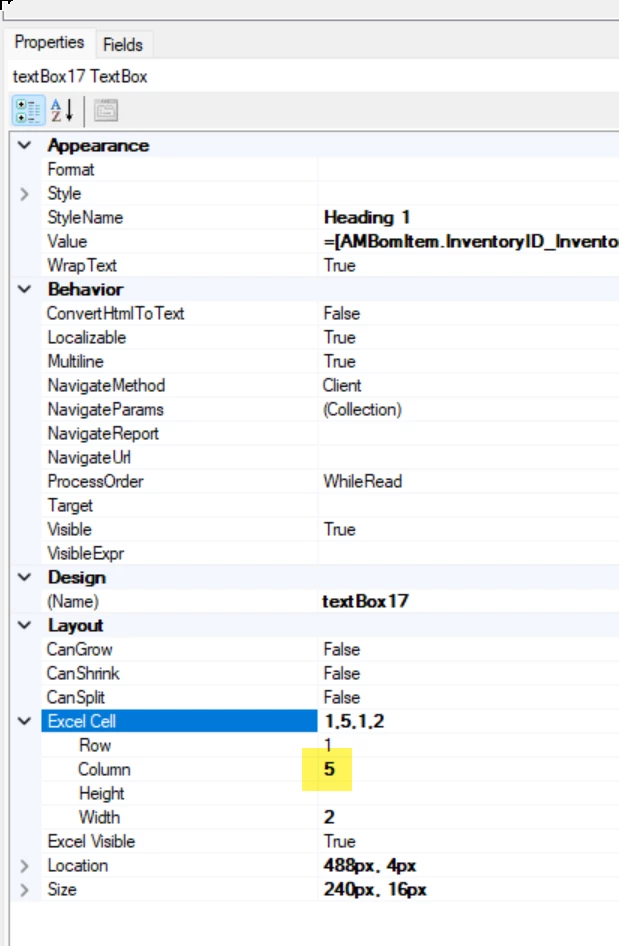
If everything is aligned and negative space is removed then you just need to worry about column settings. Make sure each column and related value has the same number and each column does not have the same column number.


7 replies

bwhite49
Captain II
Forum|alt.badge.img+11
  • Captain II
  • Answer
  • November 5, 2025

If exporting to excel, your report should have minimum negative space and getting everything aligned is also important. 


If everything is aligned and negative space is removed then you just need to worry about column settings. Make sure each column and related value has the same number and each column does not have the same column number.


Forum|alt.badge.img
  • Author
  • Freshman II
  • November 6, 2025

When i spit to excel, it looks good, albeit, missing the one column in need.


I hear you on the “ Make sure each column and related value has the same number and each column does not have the same column number.” but as you can see on my original screen shot, a lot of these values have the same row/column configuration of 1:10 or 1:11. I’m confused on how the spreadsheet comes out well even with all those overlapping configurations. This was made by our installers, i’m just trying to figure out how to modify it.


bwhite49
Captain II
Forum|alt.badge.img+11
  • Captain II
  • November 6, 2025

I think the software makes up its own mind sometimes on where things should go. As I wrote above, alignment does matter for excel exports. I spent enough time tearing my hair out to know that if I want the form to export to excel correctly, then I should align columns, remove negative spaces, and give each column a unique excel configuration.


Forum|alt.badge.img
  • Author
  • Freshman II
  • November 6, 2025

ten four.

i’ll go through and adjust all of these columns rows manually and see if that changes anything! is there away to increase the size of the UI text or cell boarders? it’s insanely small and hard to see to line up fully.

I’m going to also work on manually editing all of the rows / columns to see if that helps it show!


bwhite49
Captain II
Forum|alt.badge.img+11
  • Captain II
  • November 6, 2025

ten four.

i’ll go through and adjust all of these columns rows manually and see if that changes anything! is there away to increase the size of the UI text or cell boarders? it’s insanely small and hard to see to line up fully.

I’m going to also work on manually editing all of the rows / columns to see if that helps it show!

I don’t think the excel field size does anything. It’s never worked for me. If you expand the width of the cell in report designer, that does have an impact up to a point. There may be a conflicting space or column making the cell super small. It can be hard to trouble-shoot.


Forum|alt.badge.img
  • Author
  • Freshman II
  • November 6, 2025

ten four.

i’ll go through and adjust all of these columns rows manually and see if that changes anything! is there away to increase the size of the UI text or cell boarders? it’s insanely small and hard to see to line up fully.

I’m going to also work on manually editing all of the rows / columns to see if that helps it show!

I don’t think the excel field size does anything. It’s never worked for me. If you expand the width of the cell in report designer, that does have an impact up to a point. There may be a conflicting space or column making the cell super small. It can be hard to trouble-shoot.

absolutely it does help! But the cells themselves are so tiny for my old blind eyes. I’m going to mark your earlier post as answer solved.

As always, brother, i appreciate your patienceand help working with me on new adventure!


Forum|alt.badge.img
  • Author
  • Freshman II
  • November 14, 2025

I wanted to post this if future people search up “acumatica report designer group headers” like i did multiple times.

it seems that when putting groupHeaderSections will trick excel. I was putting in the row col configs the exact cell i wanted them in. However, each grouping would treat the row col config as a “new spreadsheet” kind of thing. If I were to put 5 : 1 on my Customer.AcctCD spot, it would be five spots BELOW where the header said it was going to be. So it would actually be 10 : 1. not sure what made the bulb click but i tested and sure enough. each one as a col 1 for each header, it lays out perfectly


Not sure why, that’s more research. but future people doing google fu against the new awful SEO might need this.