Solved

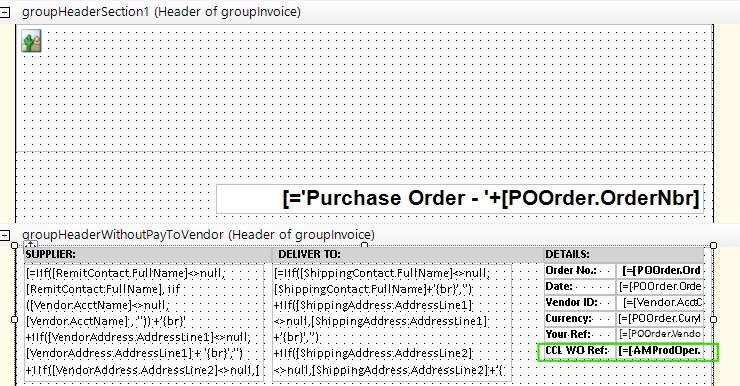
Trying to hide a Text field when [AMProdOper.ProdOrdID] is blank in Report Designer.

  • October 6, 2025
  • 5 replies
  • 39 views

On our purchase orders for outwork/subcontract work we want the PO to show the production order number.  Our production order number is alpha numeric.

I have tried using the following in the visableExpr field but they all cause errors:

  • [AMProdOper.ProdOrdID]=0

  • [AMProdOper.ProdOrdID]=’’

  • IIF statement


(this is my first time using the community for help so im hoping ive done it correctly :-) )


Best answer by darylbowman

=IIf(IsNull([AMProdOper.ProdOrdID],'')='',False,True)

5 replies

nmizzell9000
Varsity I
Forum|alt.badge.img
  • Varsity I
  • 23 replies
  • October 6, 2025

Try cstr() and isnull()

iif(isnull(cstr([AMProdOper.ProdOrdID],’’)),’’,cstr([AMProdOper.ProdOrdID])

or

iif(isnull(cstr([AMProdOper.ProdOrdID],0)),’’,cstr([AMProdOper.ProdOrdID])

maybe

iif(isnull(cstr([AMProdOper.ProdOrdID])),’’,cstr([AMProdOper.ProdOrdID])


  • Author
  • Freshman I
  • 4 replies
  • October 6, 2025

Thanks, all 3 cause an error and the purchase order is fully blank.


nmizzell9000
Varsity I
Forum|alt.badge.img
  • Varsity I
  • 23 replies
  • October 6, 2025

what happens when you just return the ID by itself?


=[AMProdOper.ProdOrdID]


darylbowman
Captain II
Forum|alt.badge.img+14
  • 2076 replies
  • Answer
  • October 6, 2025

=IIf(IsNull([AMProdOper.ProdOrdID],'')='',False,True)


  • Author
  • Freshman I
  • 4 replies
  • October 6, 2025

Thank you both :-)

This worked = =IIf(IsNull([AMProdOper.ProdOrdID],'')='',False,True)