Answer

Try to filter with @ME on table EP.EPExpenseClaimDetails.EmployeeID with no luck

  • October 13, 2025
  • 4 replies
  • 53 views

martingaxiola
Varsity I
Forum|alt.badge.img

Good day,


We are trying to recreate the Expense Receipts EP301010, where the list has a Filter for Employee ID or Claimed by ID, like it does under the system screen, but on a GI, the table EP.EPExpenseClaimDetails which tehcnically has all we need to create the GI does not work with the @ME under the EP.EPExpenseClaimDetails.EmployeeID, the report does not filter by the @ME, do you guys have any idea why is not working? 

Best answer by bwhite49

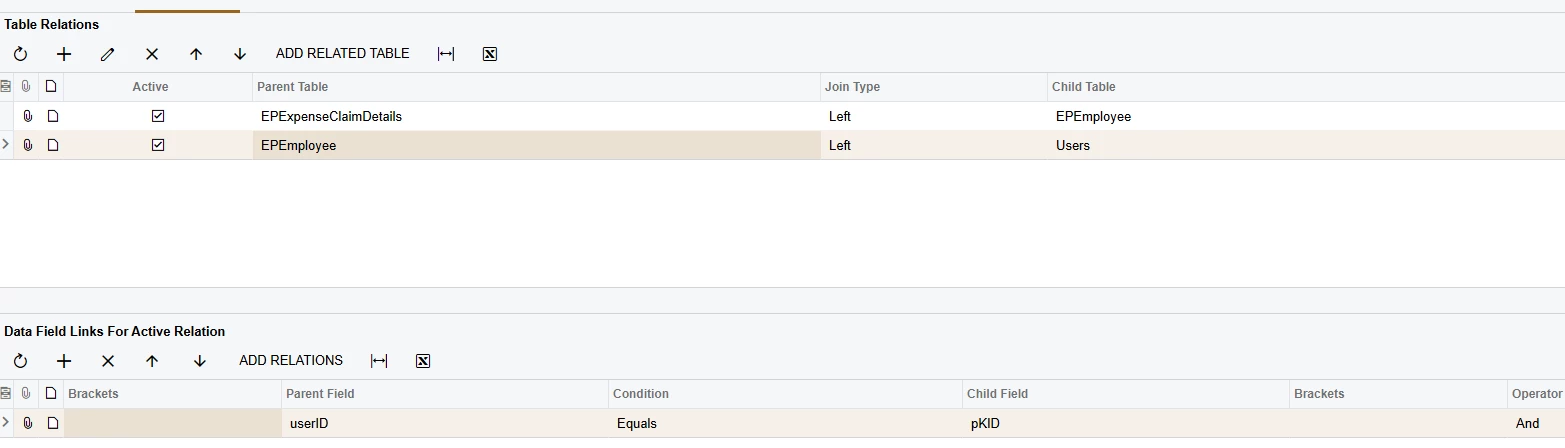
I think in the employee table it is “Employee Login” or “UserID” as ​@jhouser wrote. It’s the note ID associated with the user which is the PKID in the User table. 

@Me works on all created/last modifed by fields, the EPEmployee.UserID, and Users.PKID

4 replies

jhouser
Captain II
Forum|alt.badge.img+6
  • Captain II
  • October 13, 2025

Hi ​@martingaxiola I don't think @Me works for employee. I think you need User ID of employee. If that doesn't work, try contactID. You may have to join to new tables if DAC you're using doesn't contain these. 


martingaxiola
Varsity I
Forum|alt.badge.img
  • Author
  • Varsity I
  • October 13, 2025

Hi ​@martingaxiola I don't think @Me works for employee. I think you need User ID of employee. If that doesn't work, try contactID. You may have to join to new tables if DAC you're using doesn't contain these. 

I will try this. Thank you ​@jhouser 


bwhite49
Captain II
Forum|alt.badge.img+11
  • Captain II
  • Answer
  • October 13, 2025

I think in the employee table it is “Employee Login” or “UserID” as ​@jhouser wrote. It’s the note ID associated with the user which is the PKID in the User table. 

@Me works on all created/last modifed by fields, the EPEmployee.UserID, and Users.PKID


martingaxiola
Varsity I
Forum|alt.badge.img
  • Author
  • Varsity I
  • October 14, 2025

Hola ​@bwhite49 , the EPEmployee.UserID did the trick, 


Thank you both for the advise. ​@jhouser and ​@bwhite49