

Answer

Spreading an Opportunity across 12 months

  • June 5, 2025
  • 1 reply
  • 34 views

All,

I have a pivot table we would like to modify, but I think I might need to use Report Designer to rewrite this.

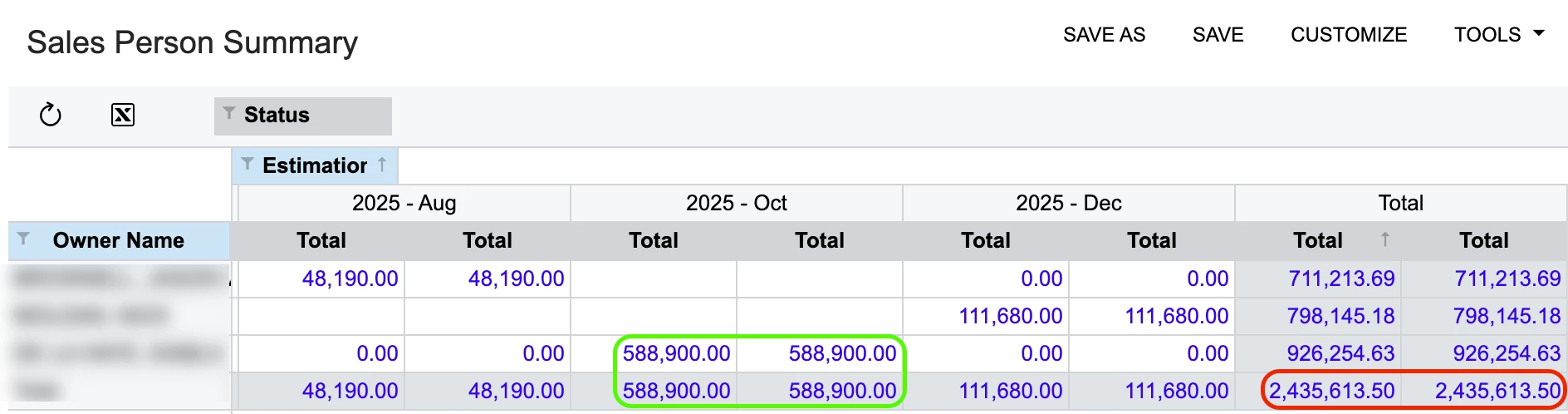
In our sales order summary, we have some large opportunities that will eventually become blanket orders, to be spread across 12 months. However, the lump sum is being reported in a single month.

I could have the sales person split the large opportunity into 12 separate opportunities, but that would be too much to manage. What I proposed to the team is to prefix a “blanket opportunity” with an asterisk * so maybe I could use that to filter in Report Designer to spread that opportunity across twelve months or divide by /12.

Please see screenshot and October 2025 -- three large Opportunities that are lump summed but should actually be spread through to October 2026. Thoughts or ideas? Thanks!

 

Best answer by lauraj46

Hi ​@polyfuze ,

If you use an asterisk or a user defined field on the Opportunity screen to specify the blanket orders, then you could design a GI or a report with formula fields for a rolling n months forward, something like this:

Month1: iif(left([CROpportunity.Subject],1)=’*’,     
iif(Year(Today())*100 + Month(Today()<=year(DateAdd([CROpportunity.CloseDate],'m',12))*100 + Month(DateAdd([CROpportunity.CloseDate],'m',12)) and Year(Today())*100 + Month(Today())>=Year([CROpportunity.CloseDate])*100 + Month([CROpportunity.CloseDate]), [CROpportunity.CuryProductsAmount]/12.0, 0),[CROpportunity.CuryProductsAmount])

Month2: iif(left([CROpportunity.Subject],1)=’*’,
iif(Year(DateAdd(Today(),'m',1))*100 + Month(DateAdd(Today(),'m', 1)<=year(DateAdd([CROpportunity.CloseDate],'m',12))*100 + Month(DateAdd([CROpportunity.CloseDate],'m',12)) and Year(DateAdd(Today(),'m',1))*100 + Month(DateAdd(Today(),'m',1))>=Year([CROpportunity.CloseDate])*100 + Month([CROpportunity.CloseDate]),[CROpportunity.CuryProductsAmount]/12.0, 0),
[CROpportunity.CuryProductsAmount])

Month3: iif(left([CROpportunity.Subject],1)=’*’,
iif(Year(DateAdd(Today(),'m',2))*100 + Month(DateAdd(Today(),'m', 2)<=year(DateAdd([CROpportunity.CloseDate],'m',12))*100 + Month(DateAdd([CROpportunity.CloseDate],'m',12)) and Year(DateAdd(Today(),'m',2))*100 + Month(DateAdd(Today(),'m',2))>=Year([CROpportunity.CloseDate])*100 + Month([CROpportunity.CloseDate]),[CROpportunity.CuryProductsAmount]/12.0, 0),
[CROpportunity.CuryProductsAmount])

Hope this helps!

Laura

1 reply

lauraj46
Captain II
Forum|alt.badge.img+8
  • Captain II
  • Answer
  • June 20, 2025

Hi ​@polyfuze ,

If you use an asterisk or a user defined field on the Opportunity screen to specify the blanket orders, then you could design a GI or a report with formula fields for a rolling n months forward, something like this:

Month1: iif(left([CROpportunity.Subject],1)=’*’,     
iif(Year(Today())*100 + Month(Today()<=year(DateAdd([CROpportunity.CloseDate],'m',12))*100 + Month(DateAdd([CROpportunity.CloseDate],'m',12)) and Year(Today())*100 + Month(Today())>=Year([CROpportunity.CloseDate])*100 + Month([CROpportunity.CloseDate]), [CROpportunity.CuryProductsAmount]/12.0, 0),[CROpportunity.CuryProductsAmount])

Month2: iif(left([CROpportunity.Subject],1)=’*’,
iif(Year(DateAdd(Today(),'m',1))*100 + Month(DateAdd(Today(),'m', 1)<=year(DateAdd([CROpportunity.CloseDate],'m',12))*100 + Month(DateAdd([CROpportunity.CloseDate],'m',12)) and Year(DateAdd(Today(),'m',1))*100 + Month(DateAdd(Today(),'m',1))>=Year([CROpportunity.CloseDate])*100 + Month([CROpportunity.CloseDate]),[CROpportunity.CuryProductsAmount]/12.0, 0),
[CROpportunity.CuryProductsAmount])

Month3: iif(left([CROpportunity.Subject],1)=’*’,
iif(Year(DateAdd(Today(),'m',2))*100 + Month(DateAdd(Today(),'m', 2)<=year(DateAdd([CROpportunity.CloseDate],'m',12))*100 + Month(DateAdd([CROpportunity.CloseDate],'m',12)) and Year(DateAdd(Today(),'m',2))*100 + Month(DateAdd(Today(),'m',2))>=Year([CROpportunity.CloseDate])*100 + Month([CROpportunity.CloseDate]),[CROpportunity.CuryProductsAmount]/12.0, 0),
[CROpportunity.CuryProductsAmount])

Hope this helps!

Laura
