Answer

Sales Order Line Manual Price Change Tracking

  • October 2, 2025
  • 3 replies
  • 47 views

Forum|alt.badge.img

We are having issues tracking manual price changes on sales order lines. The business has removed the ability to manual price change from most staff but if we had proper visibility its likely we could give the access back to select staff members which would solve alot of problems created by removal of the function. There are genuine reasons why we need to manually price something and what i’d like to be able to do is exclude manual price changes by specific people from appearing in a GI. 

I am using a sales order by line report then using various filters to work through the data to remove lines that are ok (some of this is SO created by vs SO Line added by and if its been added by someone who is allowed to manually price it can be excluded) but I'm left with lots of lines that on face value look like they have had a manual price change but when I go into the audit trails the line has been modified by an approved person.


Does anyone have a GI built or could share what needs done to allow me to track sales order lines with manual price changes & pull from the audit history who modified the line to do the manual price change?

That would allow me to exclude certain people from the GI and monitor the ones who have been given back the access.

The “Last modified by” on SO line field doesn’t work for this as it can be modified for various reasons, not just price.


Thanks in advance.
 

Best answer by travislawson

This would be a pretty complex GI I believe.  Trying to use Audit History isn’t as straight forward.  

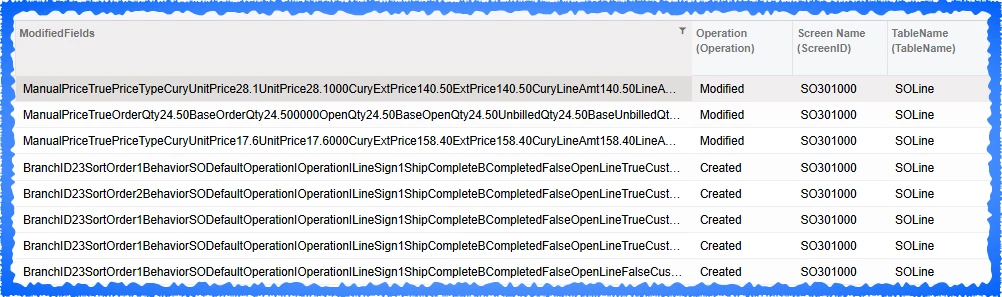
The actual changes are inside the “Modified Fields” column. In this case I did a filter where it contains “ManualPrice” and you’d use a filter on Operations = Modified.  

You will have to use the InStr() to fin something like CuryExtPrice and ExtPrice.  Then use SubString()


CuryExtprice28.1000ExtPrice


Then you’ll use replace() to remove CuryExtPrice and Ext price so you’re left with the dollar amount.  Then I would have a second GI that pulls the current price for that SO.  the only thing I don’t know is how it relates the Audit History to a particular sales order.  


3 replies

mohammadnawaz51
Jr Varsity I
Forum|alt.badge.img+4

@chrisross you can use Business Events in Acumatica to trigger when a field is inserted or changed — even at the line-item (detail record) level.


Forum|alt.badge.img+1

This would be a pretty complex GI I believe.  Trying to use Audit History isn’t as straight forward.  

The actual changes are inside the “Modified Fields” column. In this case I did a filter where it contains “ManualPrice” and you’d use a filter on Operations = Modified.  

You will have to use the InStr() to fin something like CuryExtPrice and ExtPrice.  Then use SubString()


CuryExtprice28.1000ExtPrice


Then you’ll use replace() to remove CuryExtPrice and Ext price so you’re left with the dollar amount.  Then I would have a second GI that pulls the current price for that SO.  the only thing I don’t know is how it relates the Audit History to a particular sales order.  


Forum|alt.badge.img
  • Author
  • Freshman II
  • October 3, 2025

Thanks ​@travislawson , You've confirmed what I thought, its far from straight forward to do!

