I'm trying to create a Generic Inquiry that identifies sales orders where a required TaxID is missing, based on the Customer Tax Zone. Here’s what I want:
If the TaxZoneID is STNRETAILR, the order should have both TNOTP66SALES and TNSTEX
If the TaxZoneID is MSRETAILR, the order should have both MSOTPEXS and MSSTEX
If either is missing, I want to show that order in the results so it can be corrected
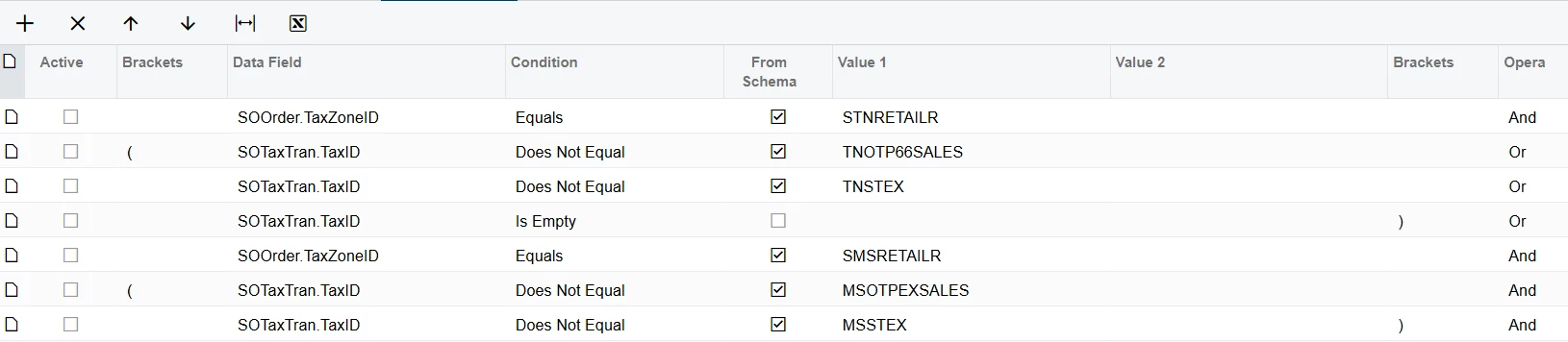
Below condition is working fine . But When i tick all together it shows 0 Records Means condition is not working when i active all.
Best answer by plambert
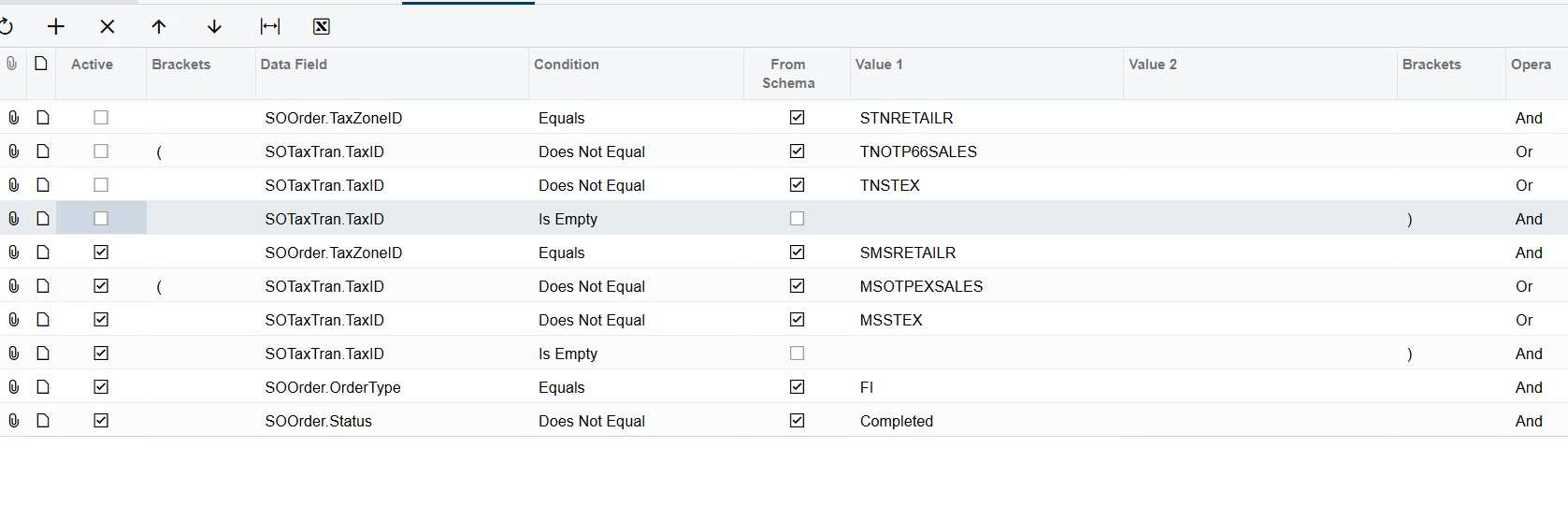
First, yes, kmuczynski is correct that double brackets will help your logic. Currently if you activate all those conditions you will create: TaxZoneID = ‘STNRETAILR’ and (TaxIDs) and TaxZoneID = ‘MSRETAILR’ and (TaxIDs) … and no SOOrder can have both TaxZoneIDs, hence the 0 results. I believe that (TaxZoneID = ‘STNRETAILR’ and (TaxIDs)) OR (TaxZoneID = ‘MSRETAILR’ and (TaxIDs)) … is more what you are trying to accomplish.
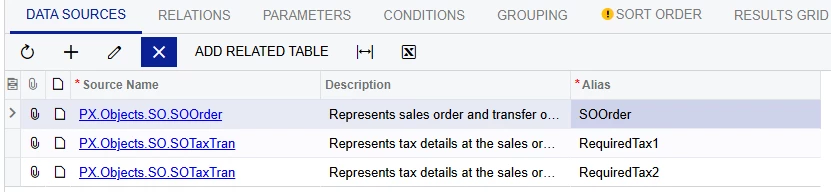
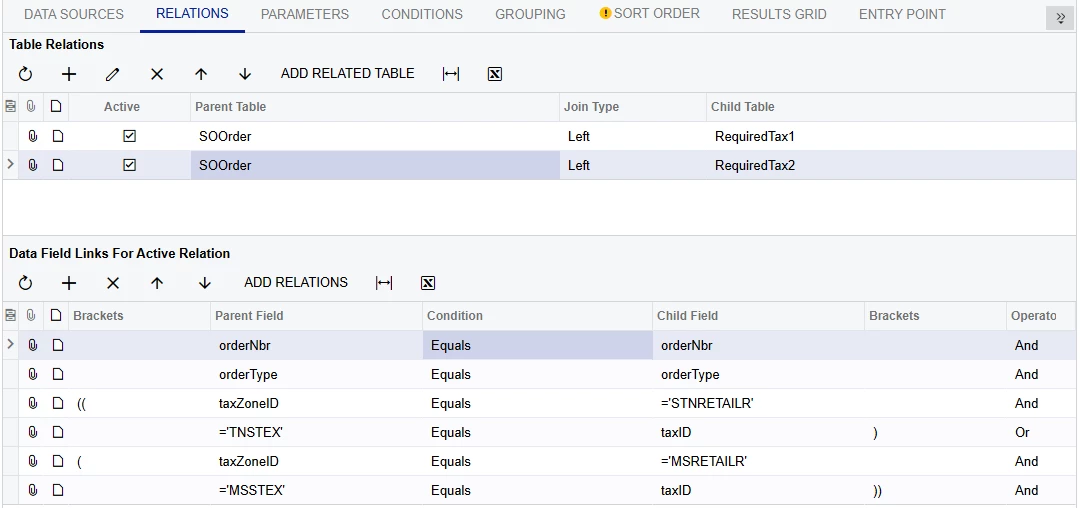
Also, I came up with an alternate approach to your GI design that should get you what you’re looking for: multiple left joins on SOTaxTran. I used two, but you could alternately do four to clearly show the different TaxIDs.
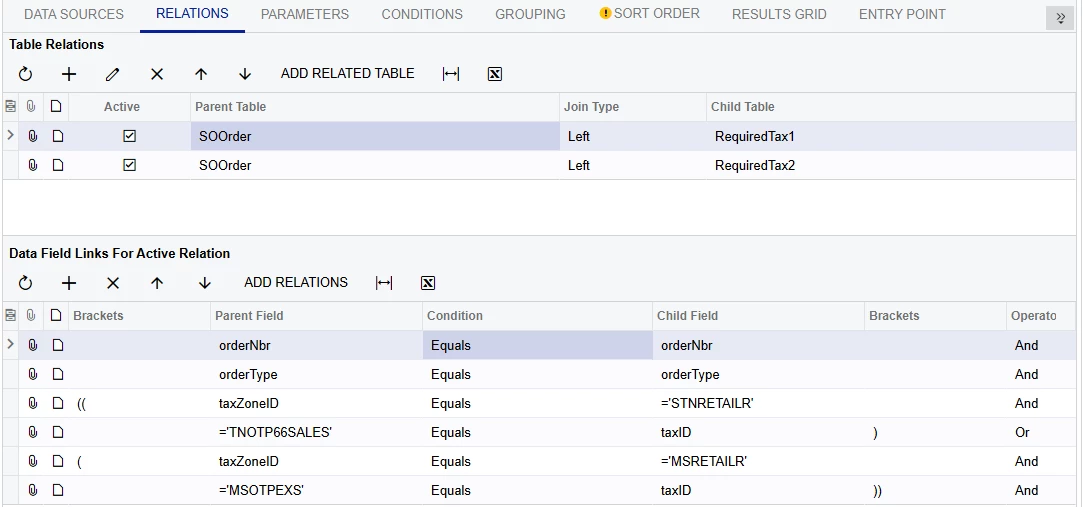
By having the conditions be built into the joins, it will result an empty record for that table if the required TaxID is not present for that order. Since missing taxes are what you’re after, this is preferable to having the logic come after the joins.
Two (or four) joins are needed to specify the TaxIDs you are confirm are present. Each join is determining each TaxID separately all on one record. I’ve stacked the two different tax zones to simplify the conditions later. If you did go that route then it would be one SOTaxTran table for ‘TNSTEX’, one for ‘MSSTEX’, one for ‘TNOTP66SALES’, and one for ‘MSOTPEXS’.
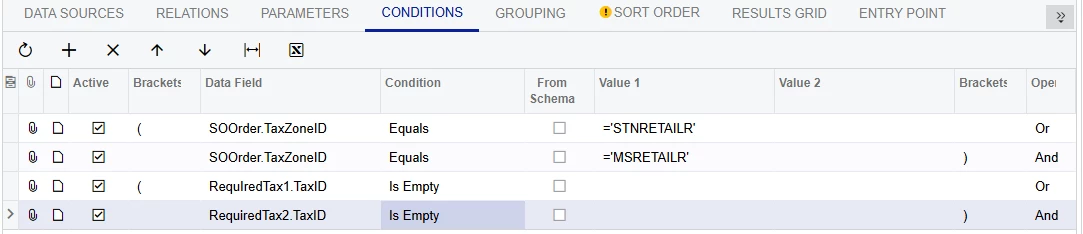
Then the conditions narrow down these specific joins to only show orders without both taxes with those tax zones.
Finally in the results, the essentials are SOOrder.OrderNbr, SOOrder.TaxZoneID, RequiredTax1.TaxID, and RequiredTax2.TaxID
Hello. At first glance, I would utilize the double brackets to further define the groupings of logic. The left double to the left of your TaxZoneID lines. And the double bracket to the right of the last TaxID line for each grouping. I hope that makes sense.
Also, I think there is an And/Or that needs to be looked at in first grouping.
Another idea for building your conditions is to update the logic step by step until you get it where you want. Do one grouping and test it, then when good, add in the next grouping, etc.
First, yes, kmuczynski is correct that double brackets will help your logic. Currently if you activate all those conditions you will create: TaxZoneID = ‘STNRETAILR’ and (TaxIDs) and TaxZoneID = ‘MSRETAILR’ and (TaxIDs) … and no SOOrder can have both TaxZoneIDs, hence the 0 results. I believe that (TaxZoneID = ‘STNRETAILR’ and (TaxIDs)) OR (TaxZoneID = ‘MSRETAILR’ and (TaxIDs)) … is more what you are trying to accomplish.
Also, I came up with an alternate approach to your GI design that should get you what you’re looking for: multiple left joins on SOTaxTran. I used two, but you could alternately do four to clearly show the different TaxIDs.
By having the conditions be built into the joins, it will result an empty record for that table if the required TaxID is not present for that order. Since missing taxes are what you’re after, this is preferable to having the logic come after the joins.
Two (or four) joins are needed to specify the TaxIDs you are confirm are present. Each join is determining each TaxID separately all on one record. I’ve stacked the two different tax zones to simplify the conditions later. If you did go that route then it would be one SOTaxTran table for ‘TNSTEX’, one for ‘MSSTEX’, one for ‘TNOTP66SALES’, and one for ‘MSOTPEXS’.
Then the conditions narrow down these specific joins to only show orders without both taxes with those tax zones.
Finally in the results, the essentials are SOOrder.OrderNbr, SOOrder.TaxZoneID, RequiredTax1.TaxID, and RequiredTax2.TaxID