Answer

Restriction Group for items

  • March 27, 2023
  • 5 replies
  • 231 views

I created restriction groups based on item classes, and I see all prebuild reports follow the restriction rules and don’t show up the items for users outside the groups.

However, I created some GI’s on the PO line table and SO line table and it does show up in these reports all items even outside of the users group.

is there anything I'm doing wrong that the system doesn't follow the restrictions on my reports?

Best answer by Pinny

@Chris Hackett Yes, I did.

since the restriction groups does not effect the item line level in excising documents but does effect on the item master record, i added the inventory item table to the GI and that removed SO lines with items outside of the users group.

5 replies

Forum|alt.badge.img+12
  • Acumatica Support Team
  • March 27, 2023

Hi @Pinny 

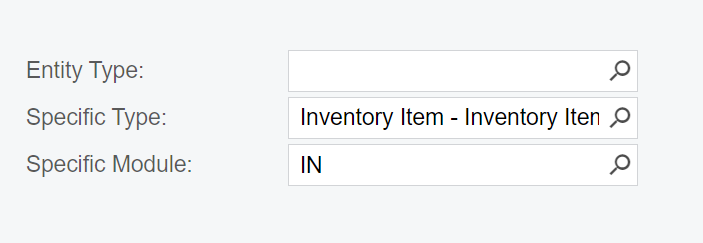
Can you send a screenshot of ScreenId=SM201030 (Restriction groups) for the restriction group you have created.  Check if specific module has been selected on that screen. 

Regards,


  • Author
  • March 27, 2023

@vkumar see screenshot below, kindly let me know if that's how this should be setup. 


Chris Hackett
Community Manager
Forum|alt.badge.img
  • Acumatica Community Manager
  • May 17, 2023

Hi @Pinny were you able to find a solution? Thank you!


  • Author
  • Answer
  • May 18, 2023

@Chris Hackett Yes, I did.

since the restriction groups does not effect the item line level in excising documents but does effect on the item master record, i added the inventory item table to the GI and that removed SO lines with items outside of the users group.


Chris Hackett
Community Manager
Forum|alt.badge.img
  • Acumatica Community Manager
  • May 18, 2023

Thank you for sharing your solution with the community @Pinny !