

Answer

Report header and columns are disappearing while exporting to excel

  • July 3, 2023
  • 2 replies
  • 493 views

I have added this header in my report and when i’m extracting this report in excel format this header is disappearing.

Best answer by lauraj46

Hi @debas56 ,

You can adjust Excel export settings in the field properties within the Report Designer.
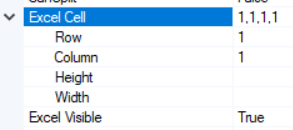
 

Hope this helps!

Laura

2 replies

lauraj46
Captain II
Forum|alt.badge.img+8
  • Captain II
  • Answer
  • July 3, 2023

Hi @debas56 ,

You can adjust Excel export settings in the field properties within the Report Designer.


Hope this helps!

Laura


Laura03
Captain II
Forum|alt.badge.img+19
  • Captain II
  • July 3, 2023

Hello @debas56 ,

In addition to what Laura pointed out above, we can also click View, Excel Grid, then either Show Columns or Show Rows. Acumatica will label every field on the report with Excel Row:Column, making it easy to see where the field will “land” in Excel. If you see the same Excel Row:Column value on more than one field, the second field will over-write the first when the report is exported to Excel.

HTH,


Laura


