

Answer

Report - GL Edit Detailed & GL Edit Summary

  • August 8, 2025
  • 6 replies
  • 71 views

I am testing Acumatica before we go live.  We imported sales invoices (not released), and I wanted to run a GL Edit report to make sure everything went to the proper GL.  However, when I run the report, nothing shows up.  I know that the transactions are in the system, because they are in the AR Edit Detailed and AR Edit Summary reports.  Any advice on how to troubleshoot this?

Best answer by lauraj46

Hi ​@KASSO ,

Yes, this is normal.  While it is possible to have unreleased GL transactions (for example if you create a transaction manually through the GL transaction screen), in your situation the GL transaction is created and then released automatically when the invoice is released.  Depending on your AR Preference settings, the GL transaction may or may not be posted. 

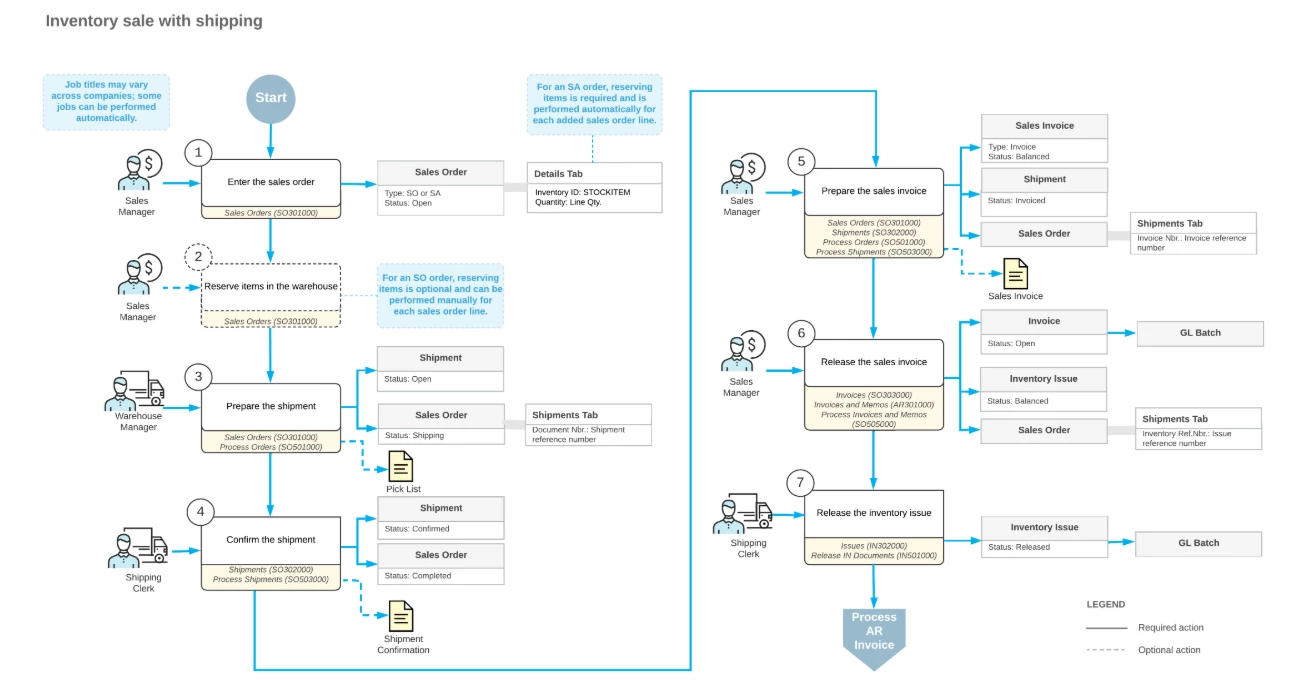
The online help and also Acumatica Open University course D100 include flow diagrams that may help with understanding when the GL Batches are created.  If there is inventory involved on the sales order, there will be second GL batch associated with the Inventory transaction.
Hope this helps!

Laura

6 replies

lauraj46
Captain II
Forum|alt.badge.img+8
  • Captain II
  • August 8, 2025

Hi ​@KASSO ,

The AR Edit Detailed report includes details from invoices that have not been released, but the GL entries are not actually created until you release the invoice.  

Hope this helps!

Laura


  • Author
  • Freshman I
  • August 8, 2025

Hello ​@lauraj46 ,

Thank you for responding.

If that is the case, then what would show in a GL Edit report?  Would it only be journal entries?

Thank you again,

Karen.


lauraj46
Captain II
Forum|alt.badge.img+8
  • Captain II
  • August 8, 2025

Hi ​@KASSO ,

Yes, the GL Edit Detailed report is based on the GLTran table which contains journal entries.  

If you have a test tenant then I would recommend importing one of the sales invoices there and then releasing it.  On the Financial tab of the invoice you will find a link to the Batch where you can review the transaction.

To review all transactions for a specific GL account, the Account Details screen is also quite useful.

Hope this helps!

Laura


  • Author
  • Freshman I
  • August 8, 2025

Hi ​@lauraj46,

For the Account Details, it gives me the option of including “unposted” and “unreleased” but the transactions still do not show up.  Is that normal?

Karen.


lauraj46
Captain II
Forum|alt.badge.img+8
  • Captain II
  • Answer
  • August 8, 2025

Hi ​@KASSO ,

Yes, this is normal.  While it is possible to have unreleased GL transactions (for example if you create a transaction manually through the GL transaction screen), in your situation the GL transaction is created and then released automatically when the invoice is released.  Depending on your AR Preference settings, the GL transaction may or may not be posted. 

The online help and also Acumatica Open University course D100 include flow diagrams that may help with understanding when the GL Batches are created.  If there is inventory involved on the sales order, there will be second GL batch associated with the Inventory transaction.

Hope this helps!

Laura


ricoybanez
Jr Varsity III
Forum|alt.badge.img+3
  • Jr Varsity III
  • August 13, 2025

@KASSO 

I strongly suggest to make a Test Tenant and post all the entries made to check if the expected Journal Entries are correct.

I believed this is part of the UAT process to make sure that setup is correct and generated the proper accounting entries, do the UAT before going LIVE.


-Rico

