

Good day Community
I have modified the Journal Transactions GL report in Report Writer to display the VAT code for AR, AT or CA batches. This formula needed to be changed after the upgrade to 2026 R1 t dislay correctly. Old firmula is commented out in the below.
=
Switch( [GLTran.Module] = 'AP', [APTax.TaxID], [GLTran.Module] = 'AR', [ARTax.TaxID],
[GLTran.Module] = 'CA', [CATax.TaxID],
([GLTran.Module] <> 'AP' or [GLTran.Module] <> 'AR' or [GLTran.Module] <> 'CA'),'CheckModule')
/*IIf([GLTran.Module] = 'AP', [APTran.TaxID], IIf([GLTran.Module] = 'AR', [ARTran.TaxID], ''))*/
This appeared to work perfectly but we have discovered that it is dropping the VAT Code from some lines in the report.
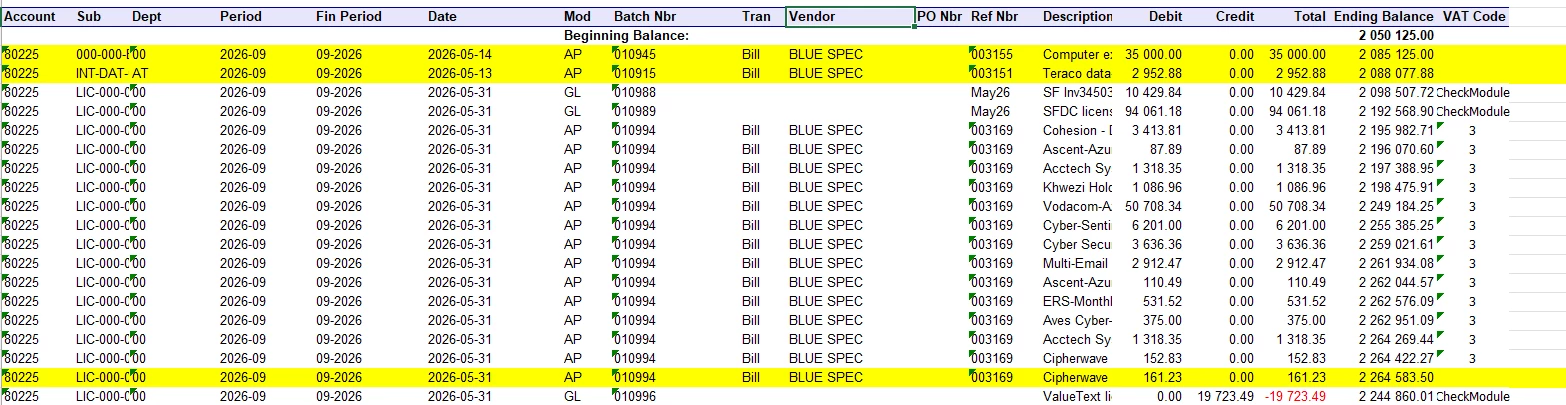
Please can you check to see if the formula is correct (is asses validation) and why some of these transactions are missing the VAT code on the report.
Many thanks on advance.


