Question

Report Designer: Sequence numbers by group

  • August 20, 2025
  • 10 replies
  • 99 views

Forum|alt.badge.img

Has anyone had the need to display or pull the value of an entity’s sequence in the group? 

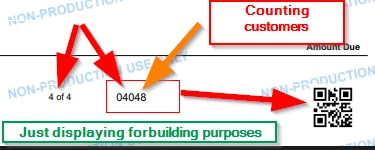
Specifically, I have customer that uses Customer Statements heavily and prints via an offsite 3rd party company. Their vendors printing requirements include specifying the customers print sequence as part of a sorting QR code in the bottom right hand corner. For example: 

  • 1st customer = 2 page statement / (starts on page 1)  / Sequence # 1
  • 2nd customer = 3 page statement / (starts on page 3) / Sequence # 2
  • 3rd customer = 1 page statement / (starts on page 6) / Sequence # 3

I have gotten all other four parts of the QR code to pull, but the sequence number has been eluding me. My latest iteration is displaying everything else correctly, but the sequence part which is finally displaying unique numbers, seems completely random otherwise? 

=Concat( 0 ,[PageIndex], 0,[PageCount],Count( [ARStatement.StatementCustomerID] ), [@JobID])

Any thoughts on how to accomplish this? 

10 replies

bwhite49
Captain II
Forum|alt.badge.img+11
  • Captain II
  • August 20, 2025

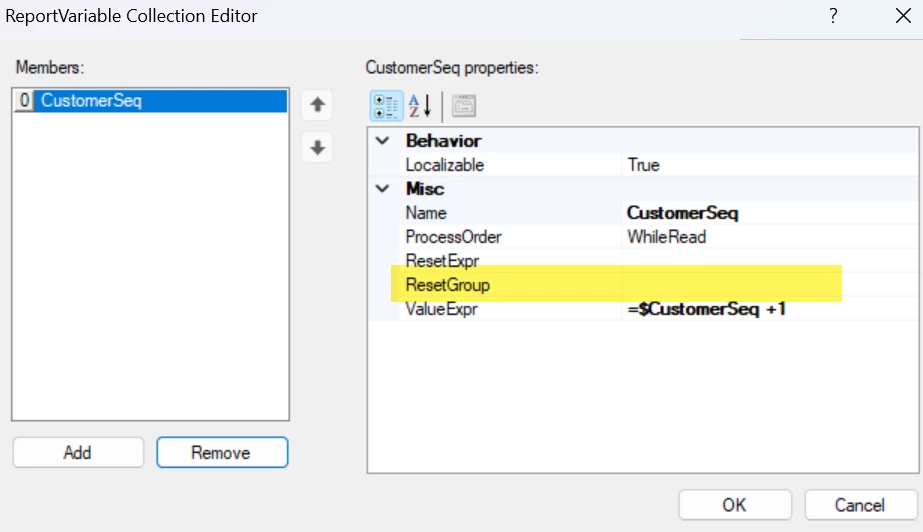
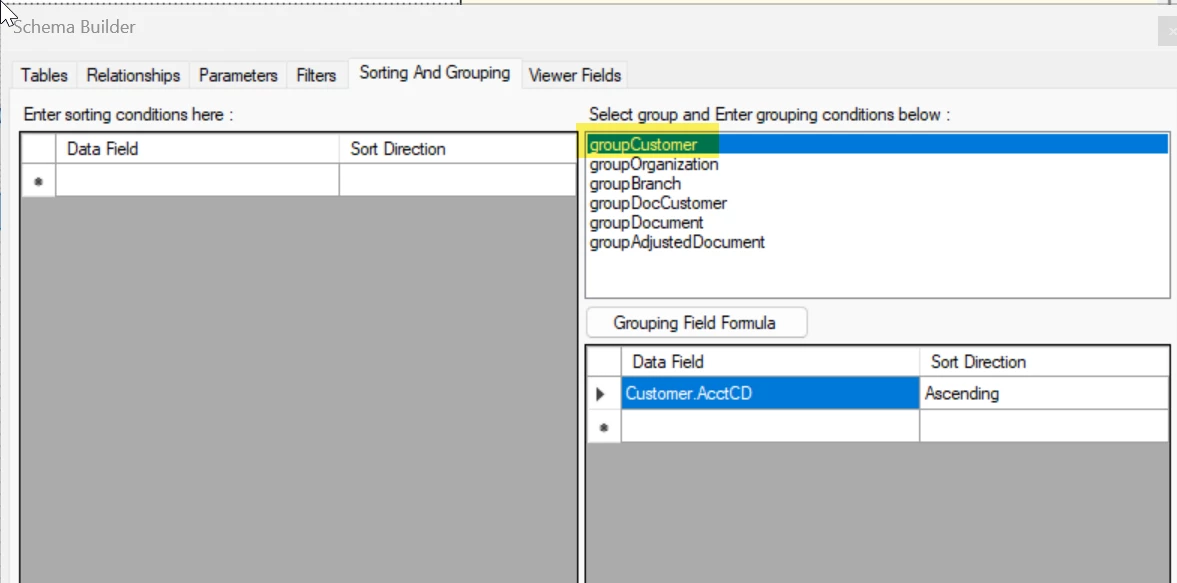
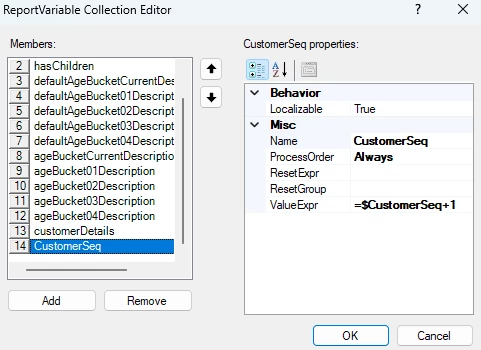
You need to add a variable to count the number of customers. This would be added to one of the report sections,.. maybe the header section. The reset group would be groupCustomer. This would count every time the customer changes.

To add the variable to the report you would do this…

=Concat( 0 ,[PageIndex], 0,[PageCount], $CustomerSeq, [@JobID])


Forum|alt.badge.img
  • Author
  • Freshman I
  • August 20, 2025

 @bwhite49 

I have tried a hundred different combinations. Putting the variable on the group customer header and not resetting the group counts the customers and displays that value. That is the closest I have gotten.  Everything else displays either 0 or gibberish. I have also changed the process order for every combination and it either displays the total count, 1 , or 0. ​


bwhite49
Captain II
Forum|alt.badge.img+11
  • Captain II
  • August 20, 2025

I never get variables correct the first time, so I’m not the best variable support.

What is the current issue now if it is counting the customers as expected?


Forum|alt.badge.img
  • Author
  • Freshman I
  • August 20, 2025

I want it to display the current customer’s (for that page) sequence of printing. So If I am printing based off of a pdf file, the first 3 pages are for a customer and are sequence 1, the next 2 pages are for customer 2, and are therefore sequence 2. 

Basically, I want it to start and stay at 1 for however many pages are for that customer/document, and when I go to the next customer/document,  I want the counter to go up by 1. 

The printer will first reference the Job ID, then the sequence number, then the page counts / identifiers. 

I have not been adding the Job ID for visual simplicity, but it is just a static parameter. 


bwhite49
Captain II
Forum|alt.badge.img+11
  • Captain II
  • August 20, 2025

That is what the variable should do. It should count as you say. I use variables pretty rarely and only in detail sections for the most part. From my experience, variables will need to exist in a section before you need it.

You said you tried to every section? What if you add a section before the customer group and make it not visible and add it there?

My approach to this kind of stuff is trial and error. It can be pretty frustrating... 


WillH
Varsity III
Forum|alt.badge.img+3
  • Varsity III
  • August 20, 2025

@bdrake14 

@bwhite49 ‘s answers are where i’d be looking, but to add my 2 extra troubleshooting tips based on my own getting lost in the report designer.


  1. Try just printing the variable you’re calculating to the page as a plain text, as well as including it in your QR code generation, while trouble testing being able to just see “Ok, the sequence count is correct’ is very helpful.
  2. You’ll need to use a variable for this (as bwhite49 said) unless you want to add some kind of complicated row_number call into the DAC or pipeline feeding the report, which I absolutely would not recommend.
  3. Check the ProcessOrder setting, this can either be WhilePrint , WhileRead or Always.
    There’s a brief discussion of these here: 

    Mostly, I’ve always found ProcessOrder the thing that really throws a spanner in the works if you haven’t thought to check it.


Forum|alt.badge.img
  • Author
  • Freshman I
  • August 21, 2025

@WillH 
The variable did work how I needed if presented by itself but if I throw it in a concatenated QR code or text field it automatically reverts to counting the full customer number again. Any thoughts on how to work around that? I have played around with all Process Orders on both sides of the equation. 
 

@bdrake14 

@bwhite49 ‘s answers are where i’d be looking, but to add my 2 extra troubleshooting tips based on my own getting lost in the report designer.


  1. Try just printing the variable you’re calculating to the page as a plain text, as well as including it in your QR code generation, while trouble testing being able to just see “Ok, the sequence count is correct’ is very helpful.
  2. You’ll need to use a variable for this (as bwhite49 said) unless you want to add some kind of complicated row_number call into the DAC or pipeline feeding the report, which I absolutely would not recommend.
  3. Check the ProcessOrder setting, this can either be WhilePrint , WhileRead or Always.
    There’s a brief discussion of these here: 

    Mostly, I’ve always found ProcessOrder the thing that really throws a spanner in the works if you haven’t thought to check it.


WillH
Varsity III
Forum|alt.badge.img+3
  • Varsity III
  • August 24, 2025

@bdrake14  - ah, thanks for the correction.  Really should have read your post in more detail.


Given what I reread above, you could try what I said you absolutely shouldn’t try with getting counts from the SQL Rows.

The version of your formula that’s referring directly to the DAC could try replacing Count()
With the Row_number function (Assuming you’re on a MS SQL server hosted instance)
https://learn.microsoft.com/en-us/sql/t-sql/functions/row-number-transact-sql?view=sql-server-ver17


I think the following SQL is probably accurate, though I’m not certain if it will execute cleanly inside Acumatica, windowed functions can get a bit intense.

ROW_NUMBER ( ) OVER (PARTITION BY [ARStatement.StatementCustomerID]  ORDER BY  [ARStatement.StatementCustomerID] ASC )

I’ve not tested the above, the instances I work with are all hosted on MySQL which would use the DENSE_RANK() function instead
https://dev.mysql.com/doc/refman/8.4/en/window-function-descriptions.html#function_dense-rank

It’s sounding like the function that creates the QRCode is executing late.

If you can provide a copy of the RPX someone could check variables/process orders/functions.  


Forum|alt.badge.img
  • Author
  • Freshman I
  • August 27, 2025

Thanks Will! I have attached here. The Clients statement printing vendor might have a workaround relatively soon but I do think the process order at every level is a limiting factor of Report Designer.  I was able to get it to display either the sequence or the page count/page index correctly within the the concatenated formula but not both. Based on which process order I selected it would fix one and break the other. I passed the SQL info to my team, Thanks! 

@bdrake14  - ah, thanks for the correction.  Really should have read your post in more detail.


Given what I reread above, you could try what I said you absolutely shouldn’t try with getting counts from the SQL Rows.

The version of your formula that’s referring directly to the DAC could try replacing Count()
With the Row_number function (Assuming you’re on a MS SQL server hosted instance)
https://learn.microsoft.com/en-us/sql/t-sql/functions/row-number-transact-sql?view=sql-server-ver17


I think the following SQL is probably accurate, though I’m not certain if it will execute cleanly inside Acumatica, windowed functions can get a bit intense.

ROW_NUMBER ( ) OVER (PARTITION BY [ARStatement.StatementCustomerID]  ORDER BY  [ARStatement.StatementCustomerID] ASC )

I’ve not tested the above, the instances I work with are all hosted on MySQL which would use the DENSE_RANK() function instead
https://dev.mysql.com/doc/refman/8.4/en/window-function-descriptions.html#function_dense-rank

It’s sounding like the function that creates the QRCode is executing late.

If you can provide a copy of the RPX someone could check variables/process orders/functions.  


Chris Hackett
Community Manager
Forum|alt.badge.img
  • Acumatica Community Manager
  • September 26, 2025

Hi ​@bdrake14 were you able to find a solution? Thank you!