

Answer

Report designer rounding down whole numbers

  • November 12, 2024
  • 4 replies
  • 134 views

Hi all

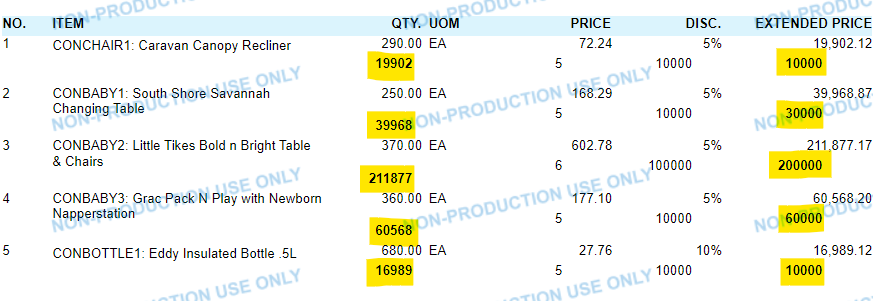
I need to round down values in report designer. Say a customer owes $1076, we need it to show as $1000 only. Please advise

Best answer by arthia

Hi @Andre17 , We have to calculate the number of digits in a variable dynamically and then we can round it off. Please use the below formula

To calculate number of digits in a variable:

PadRight( '1', Len([YourAmountField] ), '0' )

Use the below formula to roundoff:

= Floor([YourAmountField] / (CInt(PadRight( '1', Len([YourAmountField] ), '0' )))) * (CInt(PadRight( '1', Len([YourAmountField] ), '0' )))
 

4 replies

DipakNilkanth
Pro III
Forum|alt.badge.img+13

Hi @Andre17,

You can use below formula.

= Floor([YourAmountField] / 1000) * 1000
Hope, it helps!


  • Author
  • Freshman II
  • November 12, 2024

Hi Dipak - will try that. My amount field is a variable on the AR statement =$OrganizationBegBalance


Forum|alt.badge.img+3
  • Varsity I
  • Answer
  • November 14, 2024

Hi @Andre17 , We have to calculate the number of digits in a variable dynamically and then we can round it off. Please use the below formula

To calculate number of digits in a variable:

PadRight( '1', Len([YourAmountField] ), '0' )

Use the below formula to roundoff:

= Floor([YourAmountField] / (CInt(PadRight( '1', Len([YourAmountField] ), '0' )))) * (CInt(PadRight( '1', Len([YourAmountField] ), '0' )))


  • Author
  • Freshman II
  • November 15, 2024

Hi @Andre17 , We have to calculate the number of digits in a variable dynamically and then we can round it off. Please use the below formula

To calculate number of digits in a variable:

PadRight( '1', Len([YourAmountField] ), '0' )

Use the below formula to roundoff:

= Floor([YourAmountField] / (CInt(PadRight( '1', Len([YourAmountField] ), '0' )))) * (CInt(PadRight( '1', Len([YourAmountField] ), '0' )))


Thank you - excellent formula!!

