Answer

Report designer preview perfect, published blank

  • November 14, 2025
  • 8 replies
  • 85 views

Forum|alt.badge.img

hello! back again with another beginner question!

My report in preview looks PERFECT. however, when i try to publish it, it’s completely blank. I think it may be relationships.

buuut it makes no sense no me why it works in preview but not published. It is pulling the same data, isn’t it?

Report publish works perfectly when my SOLine item and relation is removed 


Best answer by BenjaminCrisman

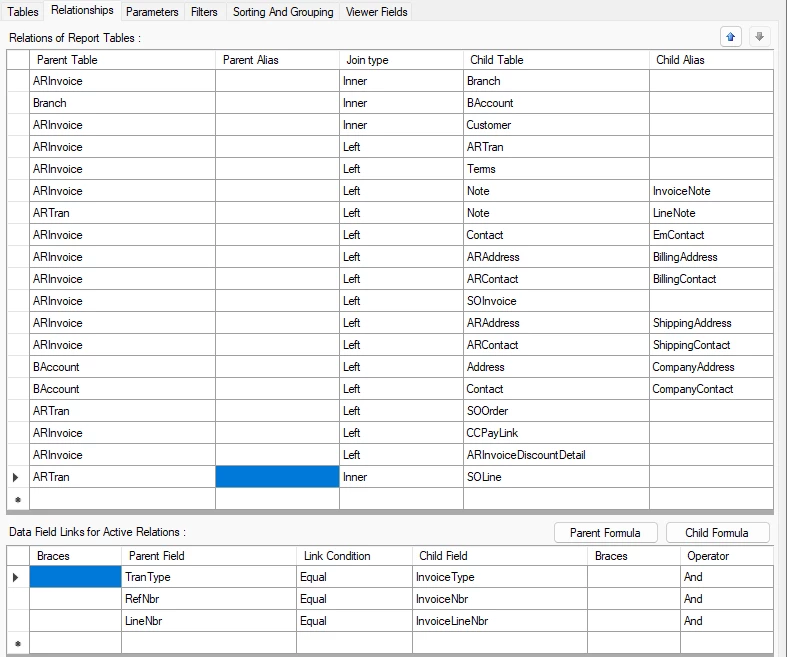
Well you have an inner join there to SOLine, so maybe switch it to left join and make sure there is no filter condition for something related to SO

8 replies

BenjaminCrisman
Acumatica Employee
Forum|alt.badge.img+4
  • Acumatica Support Team
  • November 14, 2025

@kdolgner Do you have parameters hardcoded in the report? Or any filter conditions specified to be able to run it in preview but forgot to remove them prior to saving the report to the site?

If the above is not relevant and you’re just clicking preview with no specific parameters in Report Designer, then it will start with the oldest data that fits the conditions and may preview several invoices at once. But if you plug into Report Designer the same parameters used in the main site, does it still work?

I would recommend to peel back your added tables and see when the report starts populating data, then you can find the specific join which may have started the issue. Double check in the DAC schema browser or the Merged DAC Relations screen to see if your joins match the expected joins.


Forum|alt.badge.img
  • Author
  • Freshman II
  • November 18, 2025

@kdolgner Do you have parameters hardcoded in the report? Or any filter conditions specified to be able to run it in preview but forgot to remove them prior to saving the report to the site?

If the above is not relevant and you’re just clicking preview with no specific parameters in Report Designer, then it will start with the oldest data that fits the conditions and may preview several invoices at once. But if you plug into Report Designer the same parameters used in the main site, does it still work?

I would recommend to peel back your added tables and see when the report starts populating data, then you can find the specific join which may have started the issue. Double check in the DAC schema browser or the Merged DAC Relations screen to see if your joins match the expected joins.


I’m just editing the pre built “invoice report” built by our VAR. It for sure had parameters and filters hard coded. it works perfectly until i join my SOLine to ARTran, then it blows up the whole sheet on the final report, where as the preview tab in designer works great.


I will keep trial and erroring until i get it and will report back. 


BenjaminCrisman
Acumatica Employee
Forum|alt.badge.img+4
  • Acumatica Support Team
  • November 18, 2025

@kdolgner If you click File > Save As you can generate the .rpx report and then attach it here and I could check it against my local data to see if I can get it to work.


Forum|alt.badge.img
  • Author
  • Freshman II
  • November 18, 2025

@kdolgner If you click File > Save As you can generate the .rpx report and then attach it here and I could check it against my local data to see if I can get it to work.

It turns out it was entirely how my joins were set up.


I was working in test to fix it and fanagle it to work and popped in the DAC schema and boom it worked. I must have read the wrong line and feel so dumb. The weird thing was that it worked flawlessly in designer preview but not published. Then when i copied the broken test into publish it didnt work at all. Rewrote it, boom worked.

eating up my little bit of luck this week 🤣


Thanks for all the help all. Answer marked!


BenjaminCrisman
Acumatica Employee
Forum|alt.badge.img+4
  • Acumatica Support Team
  • November 18, 2025

@kdolgner That’s really interesting though it certainly makes a difference on which set of joins you’re using. The ones you had in there originally were still valid, but I think it for if you were moving data the other direction, like if you were going from SOOrder through SOLine into ARTran, then I think the other joins might have worked better. But if you looked in the Merged DAC Relations screen both sets of joins appear as valid.


Forum|alt.badge.img
  • Author
  • Freshman II
  • November 18, 2025

@kdolgner That’s really interesting though it certainly makes a difference on which set of joins you’re using. The ones you had in there originally were still valid, but I think it for if you were moving data the other direction, like if you were going from SOOrder through SOLine into ARTran, then I think the other joins might have worked better. But if you looked in the Merged DAC Relations screen both sets of joins appear as valid.

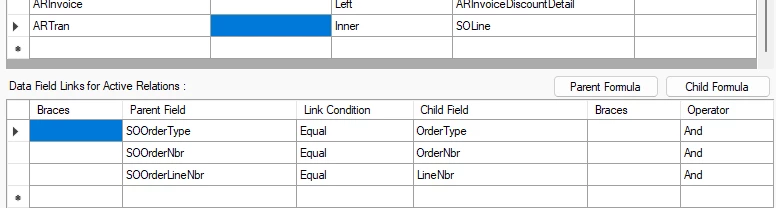
yeah! The screen grab is the final working set of joins. 

Originally I must have had the data fields swapped. I tried to raise it up higher in the list, bring it back down. But for some reason, this works perfectly. I just pulled directly from the DAC table. quite honestly surprised me it worked. I figured i’d be at this for another week or so lol


Forum|alt.badge.img
  • Author
  • Freshman II
  • November 19, 2025

@kdolgner That’s really interesting though it certainly makes a difference on which set of joins you’re using. The ones you had in there originally were still valid, but I think it for if you were moving data the other direction, like if you were going from SOOrder through SOLine into ARTran, then I think the other joins might have worked better. But if you looked in the Merged DAC Relations screen both sets of joins appear as valid.

Went home tonight feeling like a champion. but was told i broke something with my new updates 🤣


It looks like the report spits out blank if there is no sales order associated with it. We run “stock takes” that are just inventory pulls that get invoiced. There is no SO to reference. I want to say that this may be why my SO line is breaking this report. reverts work, but it seems that this one line of joins is breaking if there is no Sales order. 


BenjaminCrisman
Acumatica Employee
Forum|alt.badge.img+4
  • Acumatica Support Team
  • Answer
  • November 19, 2025

Well you have an inner join there to SOLine, so maybe switch it to left join and make sure there is no filter condition for something related to SO