Answer

Report Designer - Parse data based on unique identifier

  • May 5, 2025
  • 4 replies
  • 73 views

Forum|alt.badge.img

Hello,


 Does anyone know of a way to parse data based on a unique identifier in report designer.


For example: In one field of a report, Order Description, we want to parse the data using report designer where there is a unique identifier. When the description has a ; we want to add a line break on the report to put the value after the ; on a second row. 


Order Description: Ship This Today; UPS Ground

We want the report to display the values as;

Line 1: “Ship This Today” (Line Break based on the unique identifier ; )

Line 2: “UPS Ground” 

Best answer by lauraj46

Hi ​@etrojan28 ,

You should be able to use the Replace function to replace the ; character with {br} .  The formula would be something like this:

=Replace([SOOrder.Descr], ';', {br})

Hope this helps!

Laura

4 replies

lauraj46
Captain II
Forum|alt.badge.img+8
  • Captain II
  • Answer
  • May 5, 2025

Hi ​@etrojan28 ,

You should be able to use the Replace function to replace the ; character with {br} .  The formula would be something like this:

=Replace([SOOrder.Descr], ';', {br})

Hope this helps!

Laura


Forum|alt.badge.img+1
  • Jr Varsity II
  • May 6, 2025

Hi ​@etrojan28 ,

Can you try using the expression below

=Replace([OrderDesc], ";", Chr(13) + Chr(10))
Chr(13) and Chr(10) because they together represent a Windows-style line break (\r\n)

Hope above helps!!


Forum|alt.badge.img
  • Author
  • Varsity I
  • May 6, 2025

Thanks ​@lauraj46 and ​@Rakshanda 


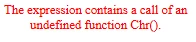
For the formula ​@Rakshanda provided I get an exception message when I run the report from the ACU site. 


lauraj46
Captain II
Forum|alt.badge.img+8
  • Captain II
  • May 6, 2025

Hi ​@etrojan28 ,

The {br} syntax is not well documented, but should work.  Give it a try and let us know.  As far as I’m aware, Chr is not a supported Report Designer function.

Laura