

Answer

Report Designer: Map a file to a record

  • February 7, 2024
  • 2 replies
  • 86 views

Hello team, 

We have a customer that requires us use the report: AP622500.rpx[AP Payment Register] to print payment remittance emails, so we have used the email settings to adjust the subject and the body. 

Previously they were using an email template which copied files from the email to the Checks and Payments form. 



We can see that the payment remittance went out with the attached report. But the actual record does not have the file. 



Is there a way to add the file, when processing records from batch payment . 
Best answer by lauraj46

Hi @rpearson69 ,

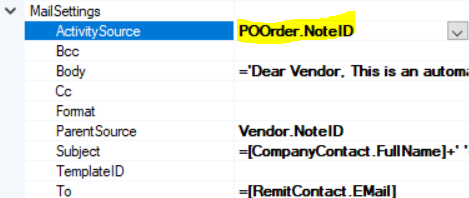
If you are not using an email template, then these settings are defined in the MailSettings section of the report.  Try specifying APPayment.NoteID in the ActivitySource, similar to the example below which is from the PO form.


Hope this helps!

Laura

2 replies

lauraj46
Captain II
Forum|alt.badge.img+8
  • Captain II
  • Answer
  • February 9, 2024

Hi @rpearson69 ,

If you are not using an email template, then these settings are defined in the MailSettings section of the report.  Try specifying APPayment.NoteID in the ActivitySource, similar to the example below which is from the PO form.


Hope this helps!

Laura


  • Author
  • Freshman I
  • February 9, 2024

Thank Laura, 

I will try this and reply back if it is the solution that’s right for my problem!

