Answer

Report Designer: Linked published view not working properly

  • February 13, 2025
  • 6 replies
  • 60 views

We have created a custom view which has been published to our database for use as a table on reporting. I have linked it in reoprt SO644000 (Pick List) but it is not working properly. We will call this view ViewX. The goal is to pull the COO column value into the Pick List report (SO644000). 
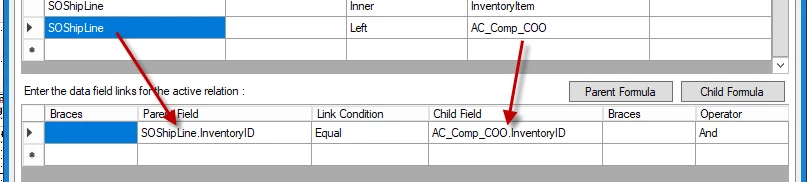
This view is linked to SOShipLine.InventoryID using field ViewX.InventoryID. 
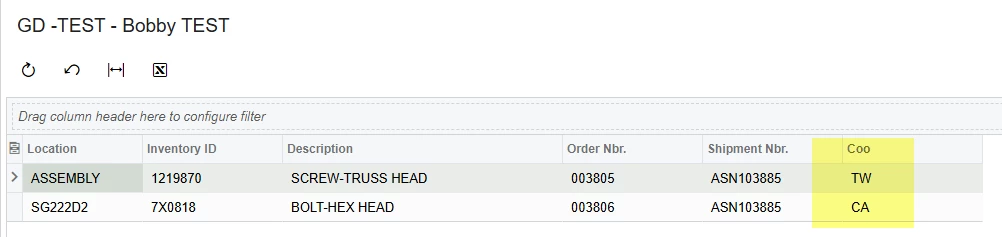
When I run the report, it appears to only pull in the COO value for the first line item in the report detail section. 

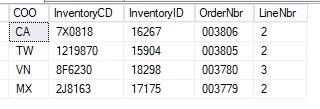
Based on the ViewX data…

Row 1 for item 1219870 correctly shows the COO value of TW.

Row 2 for item 7X0818 does not pull in the COO value of CA...it instead repeats TW (which is incorrect for line #2). 

Is this a grouping, sorting, or other issue in the report schema? I’m new to Acumatica and I have not been able to find anything pointing to a possible solution. 

Best answer by rmarin68

The only suggestions I have (and they’re arguably not great ones) is:

  • Join AC_Comp_COO to InventoryItem instead of SOShipLine (this shouldn’t really change anything)
  • On the joins, use the “local” field names instead of referencing the tables; use inventoryID instead of AC_Comp_COO.inventoryID

We had already tried that and just couldn’t figure out why the view join wasn’t working. We ended up going the long route and joining all the tables we needed to get to the end result. The report is now working, but it would be nice to figure out why the view didn’t work in this instance. We’ve done view joins in the past with other reports without issue. 

Thanks for the reply. 

6 replies

darylbowman
Captain II
Forum|alt.badge.img+15

Have you tried loading your custom DAC into a GI? Just to see if it does actually return the correct data? There are a couple gotchas creating DACs based on SQL views.


Forum|alt.badge.img+8
  • Captain II
  • February 13, 2025

@rmarin68 


What's your view like? ​@darylbowman suggestion to load a GI is a good one.

Not having a companyID join in your view can cause issues too, learnt that one early.


Aleks


  • Author
  • Freshman II
  • February 13, 2025

@rmarin68 


What's your view like? ​@darylbowman suggestion to load a GI is a good one.

Not having a companyID join in your view can cause issues too, learnt that one early.


Aleks

The view we created does specify the company ID. We’ve learned that not doing so will cause issues in results. 


  • Author
  • Freshman II
  • February 13, 2025

@rmarin68 


What's your view like? ​@darylbowman suggestion to load a GI is a good one.

Not having a companyID join in your view can cause issues too, learnt that one early.


Aleks

I was able to link the SOShipLine table and AC_Comp_COO view in a GI and get the results I was looking for. 

That is what I was expecting in the report SO644000 


darylbowman
Captain II
Forum|alt.badge.img+15

The only suggestions I have (and they’re arguably not great ones) is:

  • Join AC_Comp_COO to InventoryItem instead of SOShipLine (this shouldn’t really change anything)
  • On the joins, use the “local” field names instead of referencing the tables; use inventoryID instead of AC_Comp_COO.inventoryID

  • Author
  • Freshman II
  • Answer
  • February 14, 2025

The only suggestions I have (and they’re arguably not great ones) is:

  • Join AC_Comp_COO to InventoryItem instead of SOShipLine (this shouldn’t really change anything)
  • On the joins, use the “local” field names instead of referencing the tables; use inventoryID instead of AC_Comp_COO.inventoryID

We had already tried that and just couldn’t figure out why the view join wasn’t working. We ended up going the long route and joining all the tables we needed to get to the end result. The report is now working, but it would be nice to figure out why the view didn’t work in this instance. We’ve done view joins in the past with other reports without issue. 

Thanks for the reply.