Question

Report Designer - formula to get last year's values

  • January 20, 2026
  • 8 replies
  • 67 views

Forum|alt.badge.img

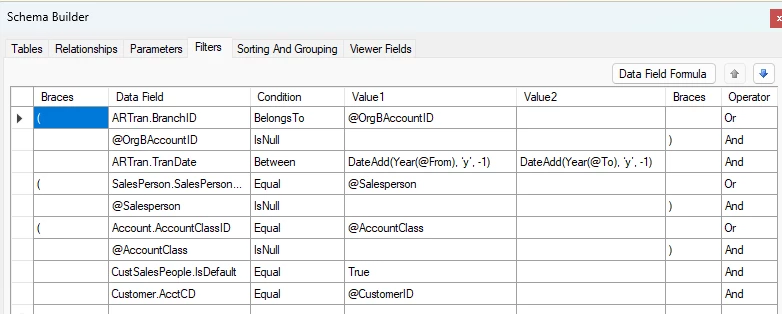
Hi everyone, I am creating a sales report where I would have another column to get the sum of previous years total (ARTran.CuryTranAmt) I tried using a subreport but could not figure out to get the @From or @To to have a value less than 1 year. 
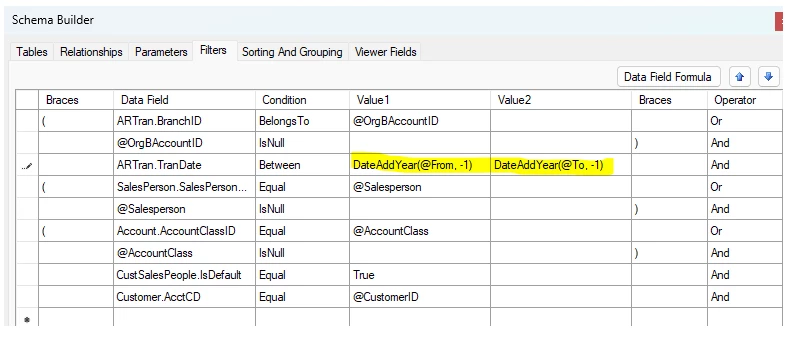
 

Any input is highly appreciated. Thank you. 

8 replies

mymetaforgeid26
Freshman I
Forum|alt.badge.img

Hello Crisel,

It looks like you are on the right track by using the DateAdd logic in your filters. To get the sum of the previous year's total without needing a complex subreport, you can try these adjustments:

  • Filter Logic: In your screenshot, you are using DateAddYear(@From, -1). Ensure that your report parameters for @From and @To are correctly set as Date/Time types. If the report is based on financial periods rather than calendar dates, you might need to use the Report.GetPeriod() functions instead.

  • Variable Calculation: Instead of a subreport, try creating a Variable in the Report Designer. You can set the Value expression to something like: =IIf(Year([ARTran.TranDate]) = Year(@To)-1, [ARTran.CuryTranAmt], 0) Then, simply create a text box in your group footer to calculate the Sum of that variable.

  • Schema Check: Double-check that the ARTran.TranDate field is properly linked in your report tables. If the links are missing, the filter won't be able to evaluate the date range correctly.

I hope this helps you get those last year values into your sales report!


BenjaminCrisman
Acumatica Employee
Forum|alt.badge.img+4
  • Acumatica Support Team
  • January 20, 2026

@Crisel From what I can tell you need to fix the expression at least. DateAdd() is the expression, but I’m not familiar with a separate function of DateAddYear.

It should look like DateAdd(Year(@From), ‘y’, -1), this way you’re adding the date which is taking the year from the From parameter and then subtracting a year.

Make sure you have the beginning bracket after the DateAdd function.

Does that help?


mymetaforgeid26
Freshman I
Forum|alt.badge.img

Yep, makes sense. Using DateAdd(Year(@From), 'y', -1) keeps the year shifting more explicit, and pairing that with a variable or conditional Year() check gives flexibility depending on whether the report is calendar- or period-based. Thanks for the clarification.


Forum|alt.badge.img
  • Author
  • Varsity I
  • January 20, 2026

Thanks so much both for your input! However, I’m not sure I’m able to follow your ideas. I tried adding it in filter but nothing is showing up. 

I am trying to add the report just in case you might be able to look at it. Thank you. 


mymetaforgeid26
Freshman I
Forum|alt.badge.img

Thanks for sharing the updated screenshot, that helps. In your current setup you’re only adjusting the Filter, but the previous-year logic also needs a Variable (or a calculated expression) to actually sum the amounts.

The filter just limits the date range — it won’t display anything unless you output a value.

Try this workflow:

  1. Keep the DateAdd(Year(@From), 'y', -1) and DateAdd(Year(@To), 'y', -1) in the Filter

  2. Create a Variable like:


=IIf(Year([ARTran.TranDate]) = Year(@To)-1, [ARTran.CuryTranAmt], 0)

  1. Then add a text box in your group footer (or report footer) with:


=Sum(YourVariableName)

That should produce a visible result even if the filter is correct.

If nothing displays after that, the next thing to check is whether the report is using financial periods instead of calendar dates.

Let me know what happens after adding the variable happy to help test further.


Forum|alt.badge.img
  • Author
  • Varsity I
  • January 20, 2026

Thanks for sharing the updated screenshot, that helps. In your current setup you’re only adjusting the Filter, but the previous-year logic also needs a Variable (or a calculated expression) to actually sum the amounts.

The filter just limits the date range — it won’t display anything unless you output a value.

Try this workflow:

  1. Keep the DateAdd(Year(@From), 'y', -1) and DateAdd(Year(@To), 'y', -1) in the Filter

  2. Create a Variable like:


=IIf(Year([ARTran.TranDate]) = Year(@To)-1, [ARTran.CuryTranAmt], 0)

  1. Then add a text box in your group footer (or report footer) with:


=Sum(YourVariableName)

That should produce a visible result even if the filter is correct.

If nothing displays after that, the next thing to check is whether the report is using financial periods instead of calendar dates.

Let me know what happens after adding the variable happy to help test further.

I think I got what you mean! However, I still could not understand the logic since Year([ARTran.TranDate]) = Year(@To)-1 however will never be true since @To/@From would only contain 1 year and we’re trying to output data which would be minus 1 year which the data (internal table) doesn’t have. 


trieger
Jr Varsity II
Forum|alt.badge.img
  • Jr Varsity II
  • January 21, 2026

Have you tried spliting this into two lines? One being greater than or equal to DateAdd(Year(@From), 'y', -1) and the other being less than or equal to DateAdd(Year(@To), 'y', -1) with the And operator. Though these are almost redundant if you are only looking for one year and this could result in you getting two or more years worth of data depending on the date range set via the To and From. If you are looking for the same date range from the year before you will need more than just the year though.


Forum|alt.badge.img
  • Author
  • Varsity I
  • January 22, 2026

Have you tried spliting this into two lines? One being greater than or equal to DateAdd(Year(@From), 'y', -1) and the other being less than or equal to DateAdd(Year(@To), 'y', -1) with the And operator. Though these are almost redundant if you are only looking for one year and this could result in you getting two or more years worth of data depending on the date range set via the To and From. If you are looking for the same date range from the year before you will need more than just the year though.

Thanks so much for this. This is what I tried doing but I still could not get the previous year’s value even though I tried picking up 2 year’s worth of data in my parameter. 


I used this formula directly in the report and still giving me current selected year’s value: 

=IIf(Year([ARTran.TranDate]) = Year(@FromPrev), [ARTran.CuryTranAmt], 0)