

Answer

Report Designer Assistance

  • October 16, 2025
  • 3 replies
  • 70 views

Forum|alt.badge.img

Trying to recreate a form we have been using that is manually created and maintained.  The data we need for the form is all in an Acumatica Project or related tables.

We have a need to render a series of checkbox fields from the project on the form with custom CSS to display a different design of a boolean field (0/1).

When the field is checked the output should be a Green Box with the word “YES” in the middle.  If it is not checked, we want to show a Red Box with the word “NO” in the middle.

Doing some research I’ve found references to using an embedded image and creating picture boxes for the YES and NO images. This works with two picture boxes for each field, one for YES and one for NO.  They are both visible = false and using a Visibility formula you set the correct one to visible based on the value being 0 or 1.


It would be nice to change the source of the image dynamically based on a formula using fi

We have a dozen or more fields we need to do this with on the report/form and to create and manage 24 pictureboxes and position them on top of each other is time consuming and a pain.


It would also be helpful to not have to do the image/pictureboxes concept and have a formula for setting the CSS Style based on the value. 

It would also be useful to manually code the CSS Styles.

Does anyone know of a better way to do this?

Does anyone know of best practices to allow the same report to render properly in HTML and PDF?

Thank you.

Glenn
 

Best answer by lauraj46

Hi ​@ggnabasik47 ,

Doing some research I’ve found references to using an embedded image and creating picture boxes for the YES and NO images. This works with two picture boxes for each field, one for YES and one for NO.  They are both visible = false and using a Visibility formula you set the correct one to visible based on the value being 0 or 1.

That is a common approach if you only have a few different options.

It would be nice to change the source of the image dynamically based on a formula using fi

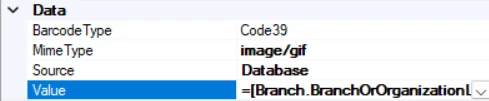
You can display a dynamic image if the image files are stored in Acumatica.  An example of this is the company logo that displays on most of the standard forms.  The key is that the Value in the image properties must be a field name, not a formula.  My thought would be to upload the two images and attach them to a Task or another placeholder record in Acumatica.  Then add one or more joins to the UploadFile table to select the correct UploadFile.Name based on criteria for each of the checkboxes. 

I’m not aware of a way to dynamically change the CSS styles, or best practices for HTML vs PDF.  Maybe others can chime in.

Hope this helps!

Laura

3 replies

darylbowman
Captain II
Forum|alt.badge.img+15

Does anyone know of best practices to allow the same report to render properly in HTML and PDF?

This is tricky. They do not usually quite match.

I don’t think the CSS can be changed dynamically, but you should be able to use a regular textbox (I think) to have a text value and color the text with a colored border. You’d still need to stack them, but possibly you could stack them inside a panel so you’d be able to move them easier / at the same time.


lauraj46
Captain II
Forum|alt.badge.img+8
  • Captain II
  • Answer
  • October 17, 2025

Hi ​@ggnabasik47 ,

Doing some research I’ve found references to using an embedded image and creating picture boxes for the YES and NO images. This works with two picture boxes for each field, one for YES and one for NO.  They are both visible = false and using a Visibility formula you set the correct one to visible based on the value being 0 or 1.

That is a common approach if you only have a few different options.

It would be nice to change the source of the image dynamically based on a formula using fi

You can display a dynamic image if the image files are stored in Acumatica.  An example of this is the company logo that displays on most of the standard forms.  The key is that the Value in the image properties must be a field name, not a formula.  My thought would be to upload the two images and attach them to a Task or another placeholder record in Acumatica.  Then add one or more joins to the UploadFile table to select the correct UploadFile.Name based on criteria for each of the checkboxes. 

I’m not aware of a way to dynamically change the CSS styles, or best practices for HTML vs PDF.  Maybe others can chime in.

Hope this helps!

Laura


Forum|alt.badge.img
  • Author
  • Freshman II
  • October 21, 2025

@lauraj46 thanks for the response.  I’ve tried those approaches and they do work but the techniques are really only good for one or two instances on a report.  I was hoping they were going to upgrade the Report Designer but based on the response I got to a question during DevCon, they aren’t putting any resources towards the Report Designer any time with the next year or two.  I’ve had start looking at alternatives outside of Acumatica for general reports and forms.


