Solved

Repeating data in GI

  • February 11, 2026
  • 8 replies
  • 53 views

Forum|alt.badge.img

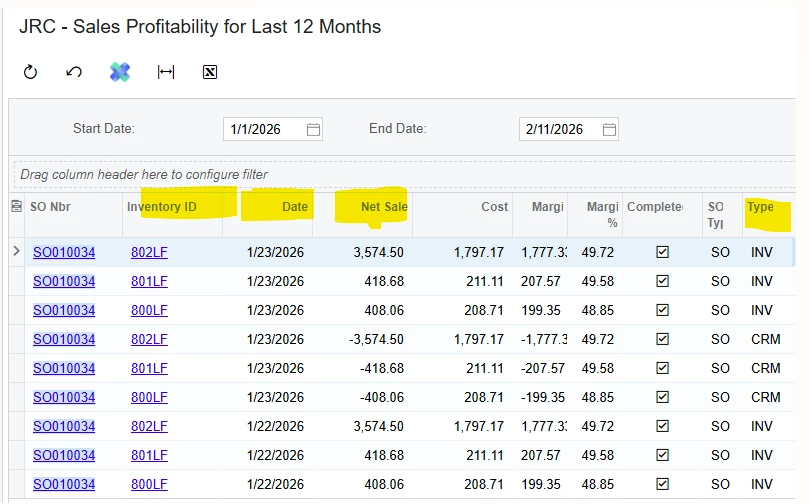
We built this GI in 2024. it was just last week found out that some of the data is repeating itself. Either in a negative or different date 
 

Best answer by aryanjadhav50

Hi ​@SandyA 
 

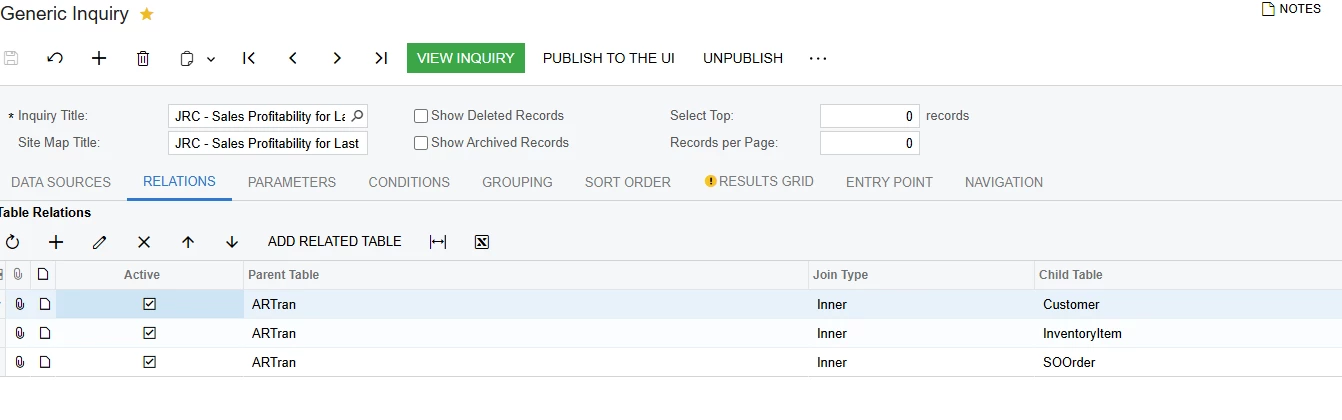
The repeating records in your GI are not caused by an incorrect join. The issue occurs because the inquiry is built on ARTran, which stores multiple AR document types for the same Sales Order and Inventory item.

For the same SO Nbr and Inventory ID, ARTran may contain:

  • Invoice (DocType = INV)

  • Credit Memo (DocType = CRM)

  • Debit Memo (DocType = DRM)

When a credit memo is issued against an invoice, ARTran creates a separate transaction with negative amounts. Since your GI does not filter DocType, it pulls both the original invoice and the related credit memo. This makes the data appear duplicated, but in reality, they are separate financial documents.

Solution

You need to decide how the report should behave.

If the report should show only sales invoices:
Add a condition in the GI:
ARTran.DocType = Invoice

This will exclude credit memos and eliminate the negative repeating lines.

If the report should show net sales (invoices minus credits):
Go to the Grouping tab and:

  • Group by SO Nbr

  • Group by InventoryID

  • Remove Date from grouping

  • Use SUM for Net Sales, Cost, and Margin

This will net invoices and credit memos together instead of displaying them as separate rows.

If both invoices and credit memos must be visible:
Add ARTran.DocType to the Results Grid so users can clearly distinguish between INV and CRM transactions.

The behavior you are seeing is standard ARTran functionality. It is not data corruption, but a reporting design issue that can be resolved by filtering or grouping correctly.

8 replies

meagan59
Varsity I
Forum|alt.badge.img
  • February 11, 2026

I have seen this type of data when the ‘Correct Invoice’ process is used in the SO Invoice. It might help to add the invoice number to the GI.

You can see that there is an INV type document, then a credit (CRM) and a new invoice. The total sales amount should be correct for the order as the credit offsets the original invoice. You may want to add a formula for the Cost data to make the credit cost show as a negative as well.


Forum|alt.badge.img
  • Author
  • Freshman II
  • February 11, 2026

@meagan59 , Can you help me with the formula that I can use.


meagan59
Varsity I
Forum|alt.badge.img
  • February 11, 2026

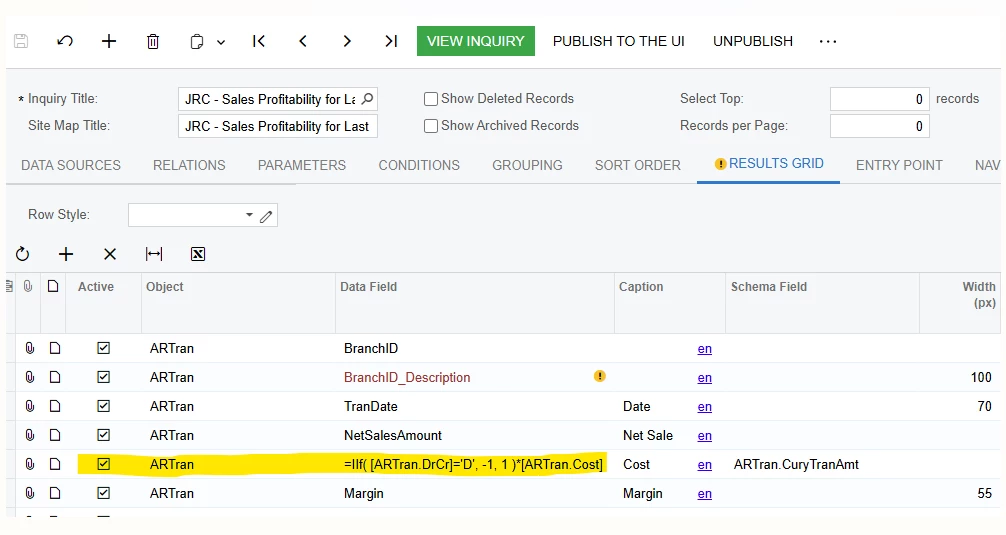
If you edit the GI, there should be a similar formula for the Net Sale field. Here is what I would suggest:

=IIf( [ARTran.DrCr]='D', -1, 1 )*[ARTran.Cost]


Forum|alt.badge.img
  • Author
  • Freshman II
  • February 11, 2026

this is the same formula of the Cost


meagan59
Varsity I
Forum|alt.badge.img
  • February 11, 2026

Ok, in that case, you may not need the formula. Try just selecting the Cost data field and see if that shows as a negative value for credits.


Forum|alt.badge.img
  • Author
  • Freshman II
  • February 11, 2026

There is no negative value in the Cost data field


aryanjadhav50
Jr Varsity I
Forum|alt.badge.img
  • Jr Varsity I
  • Answer
  • February 13, 2026

Hi ​@SandyA 
 

The repeating records in your GI are not caused by an incorrect join. The issue occurs because the inquiry is built on ARTran, which stores multiple AR document types for the same Sales Order and Inventory item.

For the same SO Nbr and Inventory ID, ARTran may contain:

  • Invoice (DocType = INV)

  • Credit Memo (DocType = CRM)

  • Debit Memo (DocType = DRM)

When a credit memo is issued against an invoice, ARTran creates a separate transaction with negative amounts. Since your GI does not filter DocType, it pulls both the original invoice and the related credit memo. This makes the data appear duplicated, but in reality, they are separate financial documents.

Solution

You need to decide how the report should behave.

If the report should show only sales invoices:
Add a condition in the GI:
ARTran.DocType = Invoice

This will exclude credit memos and eliminate the negative repeating lines.

If the report should show net sales (invoices minus credits):
Go to the Grouping tab and:

  • Group by SO Nbr

  • Group by InventoryID

  • Remove Date from grouping

  • Use SUM for Net Sales, Cost, and Margin

This will net invoices and credit memos together instead of displaying them as separate rows.

If both invoices and credit memos must be visible:
Add ARTran.DocType to the Results Grid so users can clearly distinguish between INV and CRM transactions.

The behavior you are seeing is standard ARTran functionality. It is not data corruption, but a reporting design issue that can be resolved by filtering or grouping correctly.


Forum|alt.badge.img
  • Author
  • Freshman II
  • February 13, 2026

@aryanjadhav50, thank you for the help. Now i do understand why it was acting that way.