We’re trying to build a inquiry/report that displays the following:
From Project Summary:
Project number
Project description
Project Manager (owner)
From Project Balances
Original Budgeted Amount
Revised Budgeted Amount
Actual Amount
Actual + Open Committed Amount
Variance Amount
Performance %
All the data is in the system but we’re struggling to find the correct tables/fields to pull this data from.
Has anyone out there developed something like this?
Best answer by Julie Baker
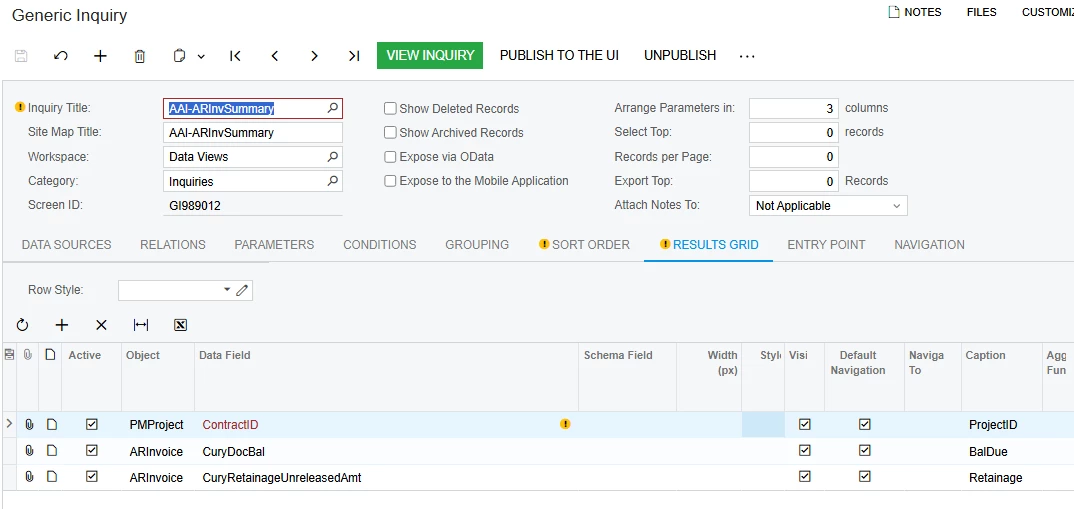
There is not a simple solution, unfortunately… but I did find that by creating a summary GI from ARInvoice, grouped by ContractID, I could identify the Balance Due for the project:
Which I was then able to add as a Data Source to my Project Summary GI on PMProject.ProjectID = AAIARInvSummary.ContractID. This allowed me to include the balance due to my GI (which was the value I needed) using the MIN aggregate function on =IsNull([AAIARInvSummary.ARInvoice_curyDocBal],0).
To get Paid to Date, without rewriting the above summary I just tried=Sum(iif([PMBudget.Type] = 'I', IsNull([PMBudget.CuryActualAmount],0),0))-IsNull(Min([AAIARInvSummary.ARInvoice_curyDocBal]),0). It appears the correct amounts result from the above calculation. But a more direct route for you might be to add ARInvoice.curyPaidAmt to the above GI to make that value directly available to Project Summary.
Full disclosure, I’ve been on Acumatica less than a year-so there may be an easier way to do this. Or I may find this insufficient over time to cope with credit memos, adjustments, etc. Give it a try though-perhaps it will lead you to a better solution. If so, please post here for the benefit of all of us!
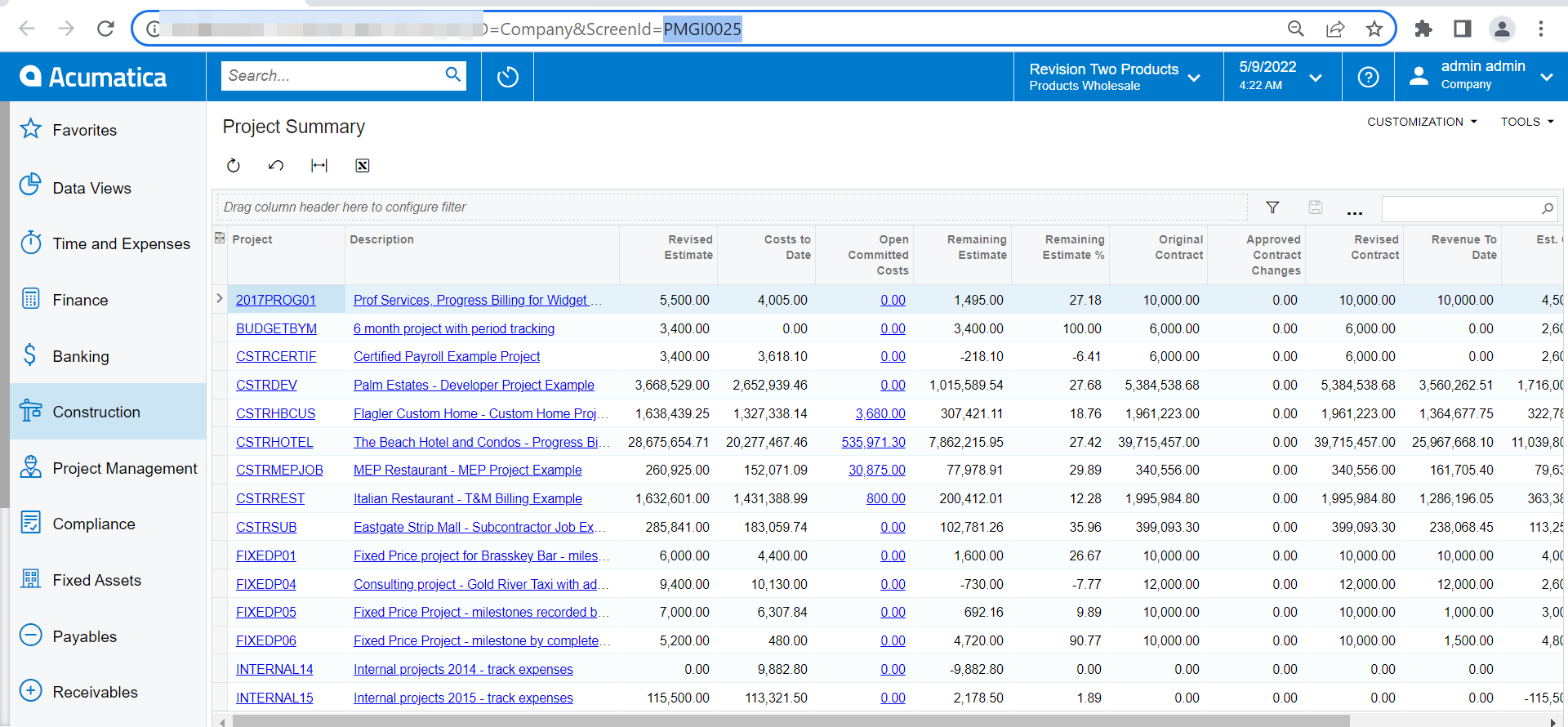
The Project Summary Inquiry (default) returns most of your columns except the Project manager. You can add additional columns as needed. You can find this on our Sales demo tenant.
This is report works to a point. Thanks for the advice of adding the Project Mgr to the GI. One of the items we can’t seem to get a handle on is where to find the actual paid to date value. One might look at the Revenue to Date field and think that is what is paid-to-date but what that really reflects is what’s been invoiced-to-date (which may reflect paid, but not always). Do you have a suggestions as to how I can get the actual paid-to-date amounts in this or any other GI we might create?
There is not a simple solution, unfortunately… but I did find that by creating a summary GI from ARInvoice, grouped by ContractID, I could identify the Balance Due for the project:
Which I was then able to add as a Data Source to my Project Summary GI on PMProject.ProjectID = AAIARInvSummary.ContractID. This allowed me to include the balance due to my GI (which was the value I needed) using the MIN aggregate function on =IsNull([AAIARInvSummary.ARInvoice_curyDocBal],0).
To get Paid to Date, without rewriting the above summary I just tried=Sum(iif([PMBudget.Type] = 'I', IsNull([PMBudget.CuryActualAmount],0),0))-IsNull(Min([AAIARInvSummary.ARInvoice_curyDocBal]),0). It appears the correct amounts result from the above calculation. But a more direct route for you might be to add ARInvoice.curyPaidAmt to the above GI to make that value directly available to Project Summary.
Full disclosure, I’ve been on Acumatica less than a year-so there may be an easier way to do this. Or I may find this insufficient over time to cope with credit memos, adjustments, etc. Give it a try though-perhaps it will lead you to a better solution. If so, please post here for the benefit of all of us!