
Question

Printing Opens “Process Report” Instead of Document

  • December 18, 2025
  • 2 replies
  • 13 views

SergioSP
Freshman II

We’re experiencing a consistent issue where printing documents screens that typically shows the actual document (invoice, statement, remittance, payment register) are sometimes routing the user to a “Process Report” screen and requires manually re-entering parameters (document type, reference number) and clicking Run Report.
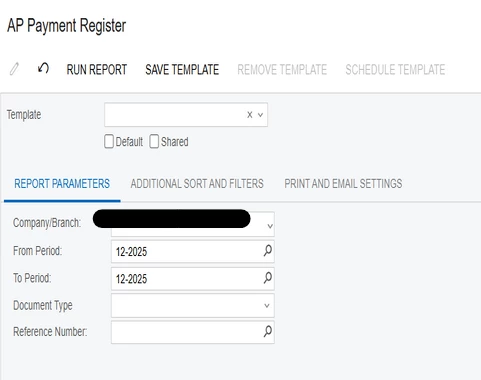

Same user sometimes gets it right, sometimes gets this screen. 

2 replies

Forum|alt.badge.img+1
  • Varsity I
  • December 18, 2025

Hi ​@SergioSP 

If you are using Chrome browser, this is a known issue you can find here. I hope this helps!


lauraj46
Captain II
Forum|alt.badge.img+8
  • Captain II
  • December 18, 2025

Hi ​@SergioSP ,

We have seen this issue recently for some users in Chrome when attempting to run a report from an Acumatica pop-up window.  

It may be related to the browser version and/or security settings.  Make sure that popups and redirects are allowed for the site.  Try using a different browser to confirm that the issue is browser related. I'm not sure if this is related, but there is also a known issue with the latest Chrome version that relates to running reports:


Hope this helps!

Laura
