Answer

Prev statement

  • March 6, 2023
  • 9 replies
  • 154 views

Forum|alt.badge.img+1

Hello,

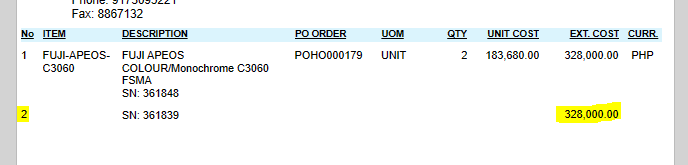
This is just one item w/ multiple serial #s. What statement do I write in each column to not show if its for the same item? Specially the LineNbr. Thank you!
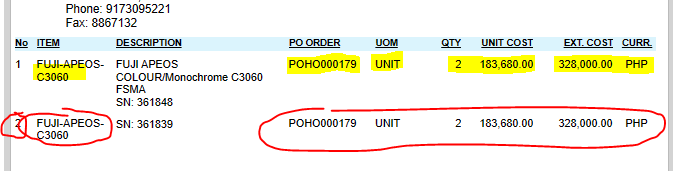
 

Best answer by Laura03

Hello,

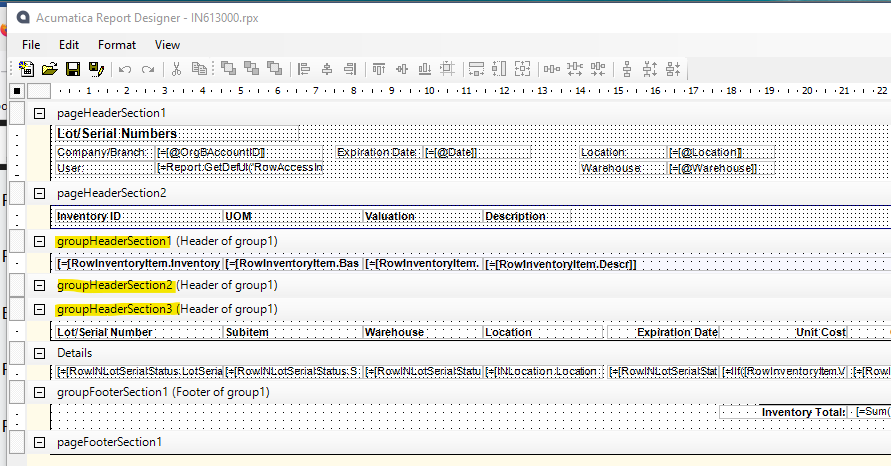
I think you want to add a Group to the report to group/aggregate the items by Item ID. I am showing Lot/Serial Numbers report as an example. To add Groups go to File → Build Schema. 
 

9 replies

Forum|alt.badge.img+1
  • Author
  • Semi-Pro II
  • March 6, 2023

Update:

These are the remaining fields I need the correct statement with.

This is my formula, I only change the last field for each.

For the EXT. COST,  I don’t know how I can integrate with it simply cos it has another IFF statement, I know this is easy but I just can’t analyze quickly. Any quick help pls? Thanks!


This is what I want to insert in the highlighted part:

=IIf([POReceiptLine.Released] = True, [POReceiptLine.TranCostFinal], [POReceiptLine.TranCost])


Laura03
Captain II
Forum|alt.badge.img+19
  • Captain II
  • Answer
  • March 6, 2023

Hello,

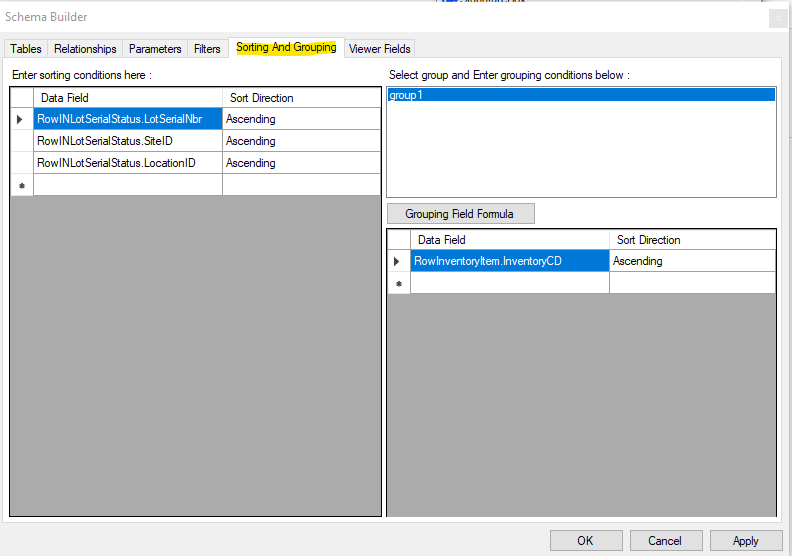
I think you want to add a Group to the report to group/aggregate the items by Item ID. I am showing Lot/Serial Numbers report as an example. To add Groups go to File → Build Schema. 


Forum|alt.badge.img+1
  • Author
  • Semi-Pro II
  • March 6, 2023

Hello,

I think you want to add a Group to the report to group/aggregate the items by Item ID. I am showing Lot/Serial Numbers report as an example. To add Groups go to File → Build Schema. 


Hi,

Thanks for your answer, but I believe I don’t need the grouping as it would also sort the serial numbers, right? Or would it also display the SPLIT serial numbers for ONE item when they’re grouped? Anyway, do not want that to happen. Instead, I just want to insert the said formula in the formula I took a screenshot of. Just making it confusing for me where to insert it, cause it’s another IIf formula. Can you help me with that? Thank you so much once again!


My needed formula (results to ONLY [POReceiptLine.TranCost] if no Serial#:

=IIf(IsNull([POReceiptLineSplit.LotSerialNbr], '')<>'', IIf(Prev([POReceiptLine.InventoryID])=[POReceiptLine.InventoryID], '',[POReceiptLine.TranCost]),
[POReceiptLine.TranCost])

Plus

The original formula I want to insert to my needed formula (results to [POReceiptLine.TranCost] OR [POReceiptLine.TranCostFinal]:

=iif([POReceiptLine.Released] = True, [POReceiptLine.TranCostFinal], [POReceiptLine.TranCost])


Forum|alt.badge.img+1
  • Author
  • Semi-Pro II
  • March 7, 2023

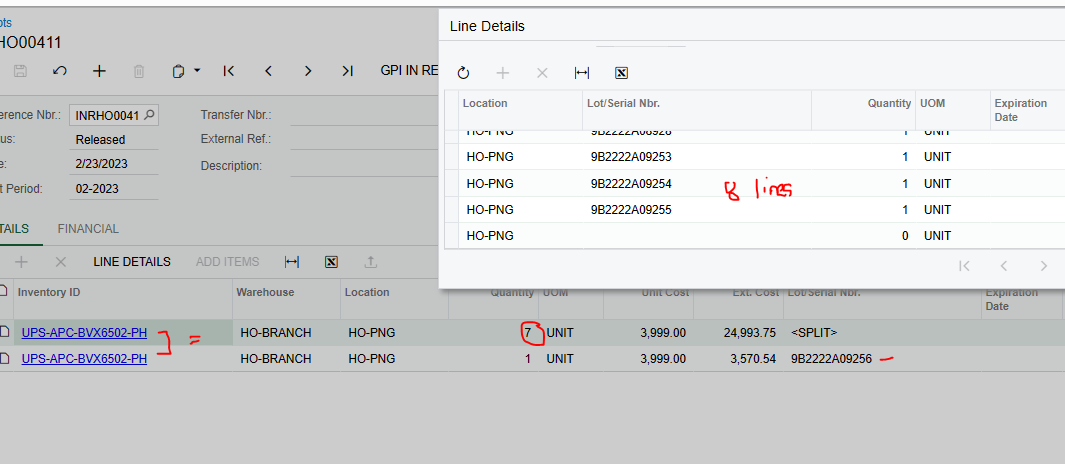
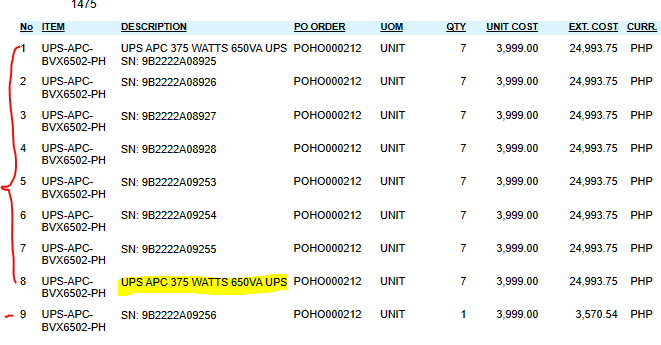
This is what’s in the Purchase Receipts tab. My 1st line detail’s serial # is split into 8, the last one with no SN. Then I have the 2nd line with SAME details with 1st line (e.g.inventoryid). The result is below. What’s best to do to display only 2 items (Line1 1 w/ 8 SN including no SN value and Line2 with another SN)?

I appreciate your help!


Chris Hackett
Community Manager
Forum|alt.badge.img
  • Acumatica Community Manager
  • March 22, 2023

Hi @paula012  were you able to find a solution? Thank you!


Forum|alt.badge.img+1
  • Author
  • Semi-Pro II
  • March 22, 2023

Hi @paula012  were you able to find a solution? Thank you!

Yes sir, all good. Thank you!


mike2665
Jr Varsity III
Forum|alt.badge.img
  • Jr Varsity III
  • March 28, 2023

I have a similar situation with split lot codes in a Purchase Receipt line detail. I am printing an inventory Label to apply to each container and if I add multiple containers in the line detail I need to have a label on each container. How do I set this up to print a label for each line in Report Designer?


Forum|alt.badge.img
  • Semi-Pro II
  • June 12, 2023

Hi @paula012  were you able to find a solution? Thank you!

Yes sir, all good. Thank you!


Hi @paula012, wonder if you could share how you solved this? We are also interested in aggregating Report Designer fields (ie. displaying just 2 lines instead of 8). 


mike2665
Jr Varsity III
Forum|alt.badge.img
  • Jr Varsity III
  • June 12, 2023

Hi @Chris Hackett I was able to solve my issue with the expression - =[POReceiptLineSplit.LotSerialNbr]. On the purchase receipt I select “:Line Details” and enter the multiple containers with different MFG Lot Codes in line entries. My label report prints out the different lot codes and now every container has an inventory label for put away.