Answer

Possible to automate file sync for export scenarios only for new records?

  • October 14, 2025
  • 7 replies
  • 82 views

Forum|alt.badge.img

For security reasons, I need to export a specifically formatted .csv file to a bank via sftp. I have a GI that populates when the payments are generated with a specific payment method (but before release). I then have automation schedules that process the export scenario to populate the file, then a separate one on the File Synchronization screen to synch the file(s).

This process works and the bank gets the file. BUT, the synch is set on a schedule and submits empty files when no payables are run and I can’t seem to get the business event to trigger export when the file is updated with new/incremental data.

Any ideas?

Best answer by tonym68

Hi ​@tonym68 were you able to find a solution? Thank you!

Automated, no. But we added some quick tiles to the File Synch screen and modified procedures to manually synch with the bank. Adds ~4 clicks to a process that happens 1-2 times a week.

7 replies

Forum|alt.badge.img+8
  • Captain II
  • October 15, 2025

@tonym68 


If you are using a GI for your data provider, you can set a condition for the last modified date of the record as something like @Today to pull data from that day, and another condition as Status is not Released or whatever criteria for payments you do not want to sync and run the sync on lets say 23:30 to ensure the records of the day are captured.


Hope this helps!


Forum|alt.badge.img
  • Author
  • Jr Varsity III
  • October 15, 2025

@tonym68 


If you are using a GI for your data provider, you can set a condition for the last modified date of the record as something like @Today to pull data from that day, and another condition as Status is not Released or whatever criteria for payments you do not want to sync and run the sync on lets say 23:30 to ensure the records of the day are captured.


Hope this helps!

Thanks for that ​@aiwan. But, the big issue I’m struggling with is to get the sync to fire off only IF there are transactions for the day. 

Another issue is that I will have 2 separate files to sync (one for ACH and one for CHECK), but I don’t see a way to set an action on a Business Event to export only a specific file on the File Synchronization screen. I can’t specify the file I want to export.


Manikanta Dhulipudi
Captain II
Forum|alt.badge.img+15

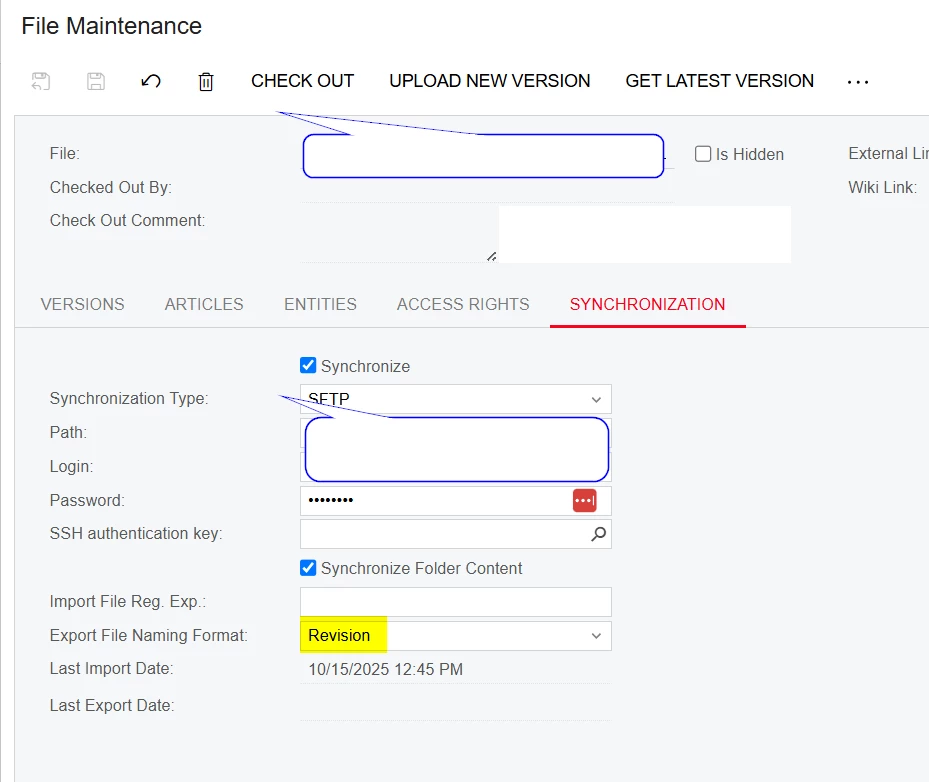
@tonym68 Did you check the below option?


Forum|alt.badge.img
  • Author
  • Jr Varsity III
  • October 17, 2025

@tonym68 Did you check the below option?


I have not, but there are restrictions on the file name placed by the financial institution. It’s the same name every time.


mohammadnawaz51
Jr Varsity I
Forum|alt.badge.img+4

@Manikanta Dhulipudi Please check another naming format like date and time.


Chris Hackett
Community Manager
Forum|alt.badge.img
  • Acumatica Community Manager
  • November 6, 2025

Hi ​@tonym68 were you able to find a solution? Thank you!


Forum|alt.badge.img
  • Author
  • Jr Varsity III
  • Answer
  • November 7, 2025

Hi ​@tonym68 were you able to find a solution? Thank you!

Automated, no. But we added some quick tiles to the File Synch screen and modified procedures to manually synch with the bank. Adds ~4 clicks to a process that happens 1-2 times a week.