Answer

Please help with my first SubReport: passing Financial Period as a Parameter doesn't work (yet)

  • November 26, 2024
  • 9 replies
  • 143 views

Laura03
Captain II
Forum|alt.badge.img+19

Hello,

I’m working on a custom Commissions Report that shows Paid invoices in the Top section and Not-yet-fully-paid invoices for the same Salesperson, as of the same Period-end in the bottom section -  “Future Commissions”.

The report works well until I connect the sub-report. One colleague helped me try the following ideas for passing the financial period to the subreport:

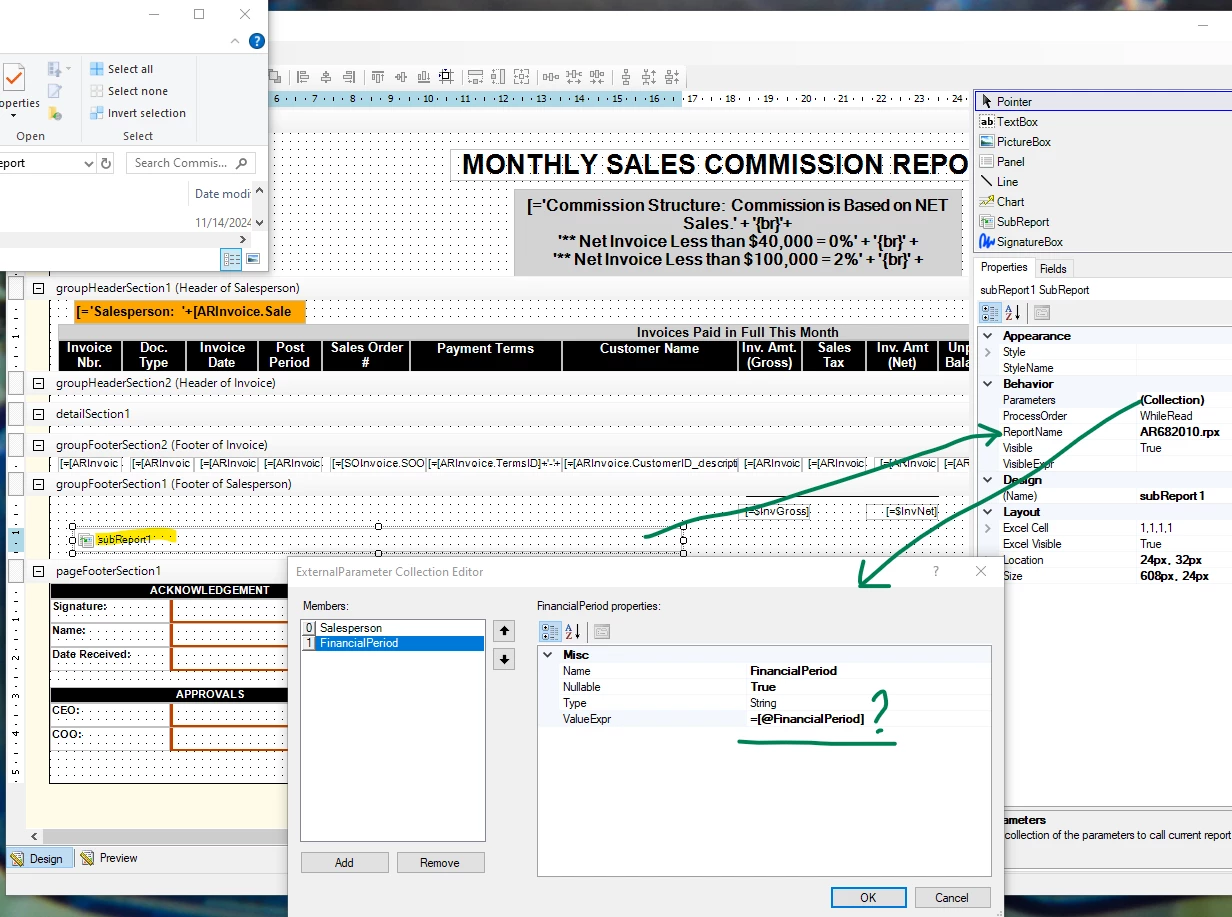
  1. Ideally we will pass the report parameters provided by the users - @Salesperson and @FinancialPeriod. Any period the User chooses upon printing, that value should pass to the subreport.
  2. When @Financial Period did not work, we tried a database field in the Parameters collection, [ARInvoice.FinPeriod], with no success.
  3. We tried hard-coding a Period that we know has commission activity in the Parameters collection.  We tried two different formats:  09-2024 and 202409, with and without quotes.
  4. We tried several fiscal periods, and the error presents for all periods we tested. When we remove the Sub Report Name, the report works fine.
 

When the report is printed, an error appears, with the following trace details:

Please advise.  Thank you in advance for any help you can offer!


Laura
Best answer by darylbowman

You’re not going to believe this:

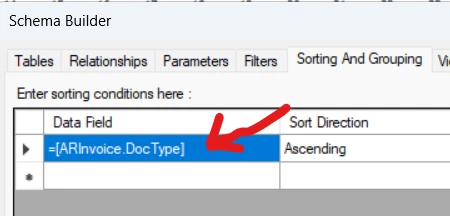
Having =[ARInvoice.DocType] as the Sorting condition is crashing the report when it’s run as a sub-report. When run as a regular report, it’s totally fine.

Change it to ARInvoice.DocType. I tested it a couple times.


P.S. For no one else that I’ve never met would I have done this for free 😉 Thank you for your contributions to the Community ♥️

9 replies

craig2
Pro I
Forum|alt.badge.img+3
  • Pro I
  • November 26, 2024

Hey ​@Laura02 !

Subreports can be a bear for sure.  I haven’t wrestled with passing a Parameter through to a subreport, but here’s what I would do to try to troubleshoot:

  • Do your parameters filter your dataset for the main report?  If so, maybe you could avoid passing the Parameter altogether and just reference [APInvoice.FinPeriodID] or the like
  • Create text boxes in that group that reference your @Salesperson and @FinancialPeriod parameters, just to make sure they are floating down properly.  Maybe even throw a CStr() on them to see if there’s anything weird happening behind the scenes
    • Having text boxes explicitly in the same group might be enough to trigger the Subreport (so @Salesperson/@FinacialPeriod).  I’ve had to pass Subreport Variables to other Subreports, and I believe you have to put the Variable in the same grouping to get that to work (and then hide the text box)
  • Turn the Subreport into a regular report for testing in the Site Map, Parameters and all.  That’s helpful for making sure the Subreport itself isn’t the issue.

Just some darts to throw, maybe one of them will stick.  Good luck!


darylbowman
Captain II
Forum|alt.badge.img+15

Did you also add these as parameters ON the sub-report?


Laura03
Captain II
Forum|alt.badge.img+19
  • Author
  • Captain II
  • November 26, 2024

Hello,

@darylbowman , My subreport is a copy of the MAIN report - then I changed the Conditions.

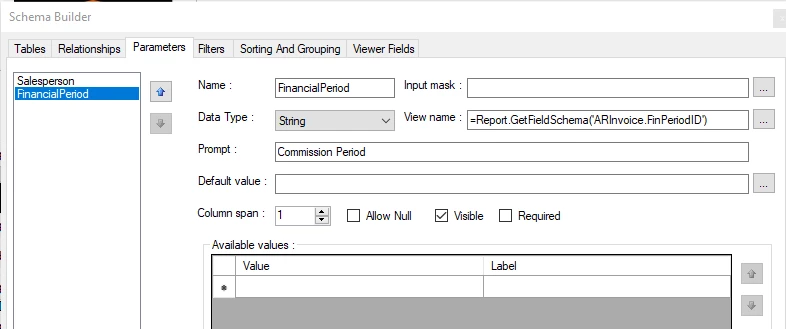
Parameters on main report match the subreport, except for one detail:  Only the Main report shows this default value for FinancialPeriod parameter:

Parameters on Subreport :

@Craig… still working on your suggestions.

Laura


darylbowman
Captain II
Forum|alt.badge.img+15

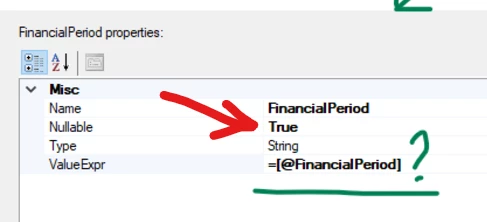
Your main report FinancialPeriod parameter allows null but your sub-parameter does not. I think this is why you’re getting a null reference exception.

Either allow null on your sub


or change the sub parameter on your main report to not allow null:


Laura03
Captain II
Forum|alt.badge.img+19
  • Author
  • Captain II
  • November 26, 2024

Thank you, will try this and let you know.


Best regards,

Laura


Laura03
Captain II
Forum|alt.badge.img+19
  • Author
  • Captain II
  • November 26, 2024

Hello,

I un-checked Allow Null on the Financial Period parameter for the main report and sub-report. My results are the same: when printing the Main report, ‘Object Reference Not Set’ error appears. The sub report does print separately.

I’ve attached both reports. Thanks in advance for any help you can give.

Laura


darylbowman
Captain II
Forum|alt.badge.img+15
  • Answer
  • November 27, 2024

You’re not going to believe this:

Having =[ARInvoice.DocType] as the Sorting condition is crashing the report when it’s run as a sub-report. When run as a regular report, it’s totally fine.

Change it to ARInvoice.DocType. I tested it a couple times.


P.S. For no one else that I’ve never met would I have done this for free 😉 Thank you for your contributions to the Community ♥️


Laura03
Captain II
Forum|alt.badge.img+19
  • Author
  • Captain II
  • November 27, 2024

Thanks Daryl!  You’re a SUPERSTAR! 😍

Edited:  error is gone 👍, sub-report doesn’t print. 👎  I’ll keep working on it.

XXXOOO

Laura


darylbowman
Captain II
Forum|alt.badge.img+15

I'm pretty sure the version you uploaded was working for me (with the change).