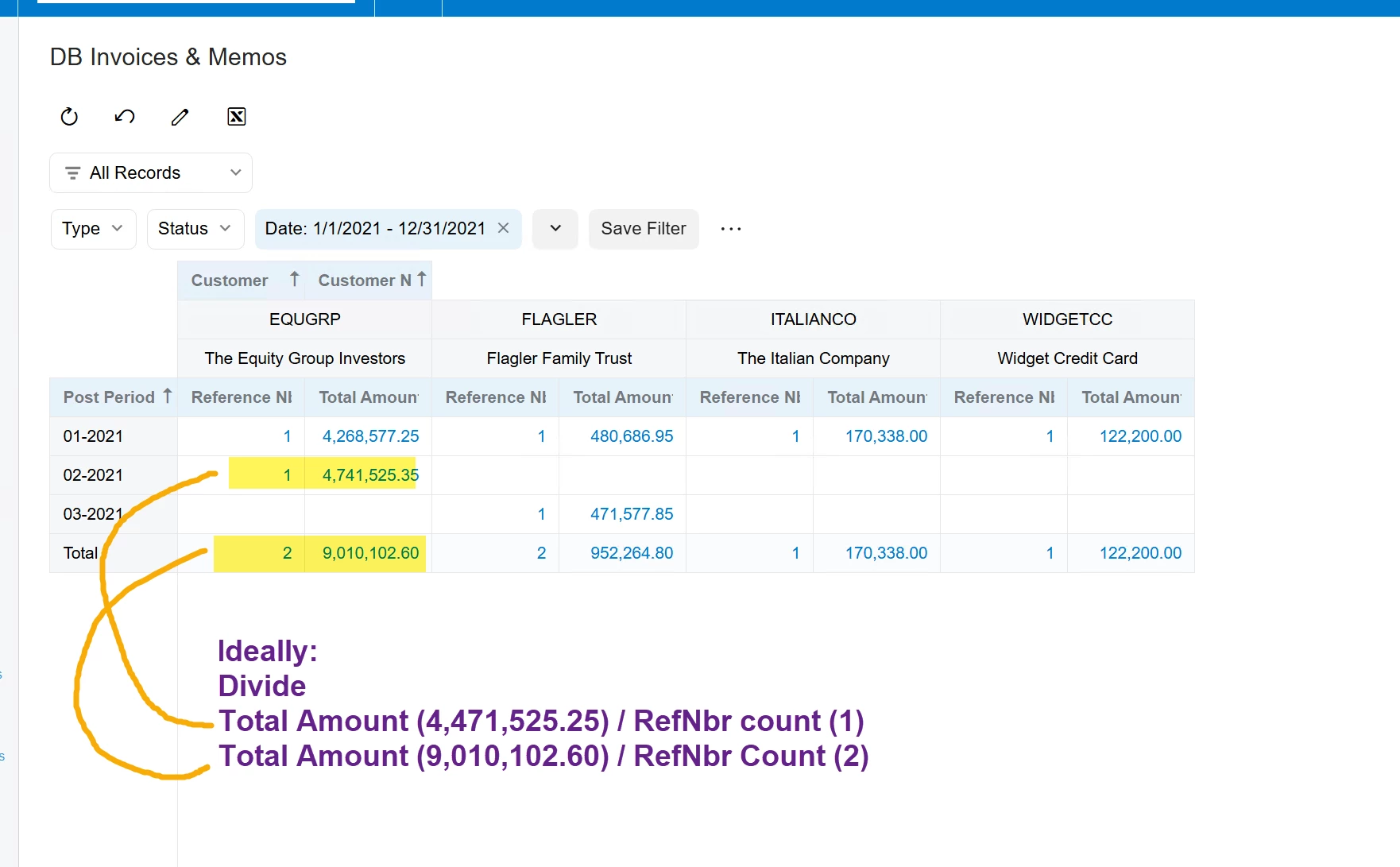
I need to perform some additional calculations on the results of a pivot table. How might this be possible? The goal is to come up with a value that is this formula:
SUM(Invoice Total) / COUNT (Number of Invoice RefNbr values) for a given customer & time period.
I am struggling to produce this number because of the limitations I am finding within Generic Inquiries.
Similar/Reference posts:
Does anyone know if this is possible?
I also see that other people are attempting to to aggregate functions as a product feature, so please upvote:
Thank you for any suggestions!
Best answer by WillH
Do you need to be able to change the pivot?
If you aren’t needing to actually change the pivot after calculation, you maybe could do all of the calculations in formula before pivoting it, so each cell is populated by exactly 1 value (which is the correct value) rather than being a sum of multiple values? (If that makes sense).
I admit this hampers the intuitive “You can just move things around” nature of pivot tables, but depending on the exact display purpose needed, might be an option.
Otherwise, I’d probably use an OData out to PowerBI and handle additional calculations there.
If you aren’t needing to actually change the pivot after calculation, you maybe could do all of the calculations in formula before pivoting it, so each cell is populated by exactly 1 value (which is the correct value) rather than being a sum of multiple values? (If that makes sense).
I admit this hampers the intuitive “You can just move things around” nature of pivot tables, but depending on the exact display purpose needed, might be an option.
Otherwise, I’d probably use an OData out to PowerBI and handle additional calculations there.
@WillH Thank you for this reply! I think this could work; even though the data are already aggregated. The RefNbr field is a simple formula that adds a value of 1 whenever there is a RefNbr in the Generic Inquiry. When that gets summed up, we see the total count of RefNbr.
I wonder if you’re suggesting that I have a calculated field within the generic inquiry that divides the Invoice Amount by that RefNbr value (a value of “1” for each Row). Then display that calculated field within the pivot?
I think that is worth a try. Thank you for your idea!