



Answer

Override Project Address on Project Quotes

  • January 3, 2023
  • 5 replies
  • 215 views

bzelinski
Varsity II
Forum|alt.badge.img

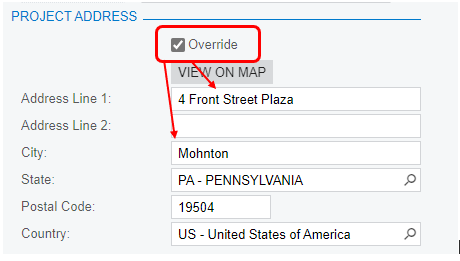
Does anyone know how to make the project address change on a project quote when the main address in the system is changed by overriding it on the quote? My current expression in Report Designer looks like this”

=IIf([CRShippingAddress.AddressLine1]<> null, [CRShippingAddress.AddressLine1] + '{br}', '')
+IIf([CRShippingAddress.AddressLine2]<>null,[CRShippingAddress.AddressLine2] + '{br}','')
+IIf([CRShippingAddress.AddressLine3]<> null,[CRShippingAddress.AddressLine3] + '{br}','')
+IIf([CRShippingAddress.City]<>null, [CRShippingAddress.City],'')
+IIf([CRShippingAddress.City]<>null And [CRShippingAddress.State]<>null, ', ', '')
+IIf([CRShippingAddress.State]<>null,[CRShippingAddress.State],'')
+IIf([CRShippingAddress.PostalCode]<>null And [CRShippingAddress.State]<>null, ', ', ' ')
+IIf([CRShippingAddress.PostalCode]<>null,[CRShippingAddress.PostalCode]+ '{br}','')

When we override that address in the project quote, it does not change it on the printed quote.

Any thoughts?
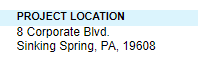
The printed quote still goes back to the original address linked to the customer in the system.

 

Best answer by bzelinski

Hi @Chris Hackett . Yes, we got it working. This is what we put in the field for Project location:

=IIf([QuoteShipAddress.AddressLine1]<> null, [QuoteShipAddress.AddressLine1] + '{br}', '')
+IIf([QuoteShipAddress.AddressLine2]<>null,[QuoteShipAddress.AddressLine2] + '{br}','')
+IIf([QuoteShipAddress.AddressLine3]<> null,[QuoteShipAddress.AddressLine3] + '{br}','')
+IIf([QuoteShipAddress.City]<>null, [QuoteShipAddress.City],'')
+IIf([QuoteShipAddress.City]<>null And [QuoteShipAddress.State]<>null, ', ', '')
+IIf([QuoteShipAddress.State]<>null,[QuoteShipAddress.State],'')
+IIf([QuoteShipAddress.PostalCode]<>null And [QuoteShipAddress.State]<>null, ', ', ' ')
+IIf([QuoteShipAddress.PostalCode]<>null,[QuoteShipAddress.PostalCode]+ '{br}','')

Thanks!

5 replies

brendan91
Semi-Pro III
Forum|alt.badge.img+1
  • Semi-Pro III
  • January 4, 2023

Same problem exists for me when you try to grab from the addresses on the shipment. My only experience with dealing with an overrode address is to grab from the next location in the order train. In that case it’s using ARContact vs SO Contact.

For your needs, can you just make a new customer location and swap out the location ID for when this happens?


bzelinski
Varsity II
Forum|alt.badge.img
  • Author
  • Varsity II
  • January 4, 2023

Hi @brendan91,

Thanks for the idea. If worse comes to worse, I can do that, but I’d prefer if we could just do it by overriding the project location. My reason for this is we deal with building contractors. They have their main office location, but then create contracts with us for many of their projects. It would be nice to just edit the address on the project without having many locations in the contractor’s customer file. Maybe I’m trying to simplify it too much. Thanks again for being so helpful. :-)


Chris Hackett
Community Manager
Forum|alt.badge.img
  • Acumatica Community Manager
  • March 15, 2023

Hi @bzelinski  were you able to find a solution? Thank you!


bzelinski
Varsity II
Forum|alt.badge.img
  • Author
  • Varsity II
  • Answer
  • March 16, 2023

Hi @Chris Hackett . Yes, we got it working. This is what we put in the field for Project location:

=IIf([QuoteShipAddress.AddressLine1]<> null, [QuoteShipAddress.AddressLine1] + '{br}', '')
+IIf([QuoteShipAddress.AddressLine2]<>null,[QuoteShipAddress.AddressLine2] + '{br}','')
+IIf([QuoteShipAddress.AddressLine3]<> null,[QuoteShipAddress.AddressLine3] + '{br}','')
+IIf([QuoteShipAddress.City]<>null, [QuoteShipAddress.City],'')
+IIf([QuoteShipAddress.City]<>null And [QuoteShipAddress.State]<>null, ', ', '')
+IIf([QuoteShipAddress.State]<>null,[QuoteShipAddress.State],'')
+IIf([QuoteShipAddress.PostalCode]<>null And [QuoteShipAddress.State]<>null, ', ', ' ')
+IIf([QuoteShipAddress.PostalCode]<>null,[QuoteShipAddress.PostalCode]+ '{br}','')

Thanks!


iqraharrison
Captain II
Forum|alt.badge.img+8
  • Captain II
  • March 16, 2023

@bzelinski thanks for sharing your solution! saving this for future use!

