Answer

Need to include sum of amount (PMRevenueBudget)in the report footer based on Inventory id in the detailed section

  • November 26, 2024
  • 5 replies
  • 67 views

Forum|alt.badge.img


I am wondering how to add the running total of amount (PMRevenvueBudget) in the report footer based on the inventory Item ClassID description of the inventory id in the detailed section. 

Best answer by Laura03

Hello,

Adding details to ​@arthia98 ‘s suggestion…

To create a Variable,

  1. Variable should be located in a Section above where you’d like the total to print.
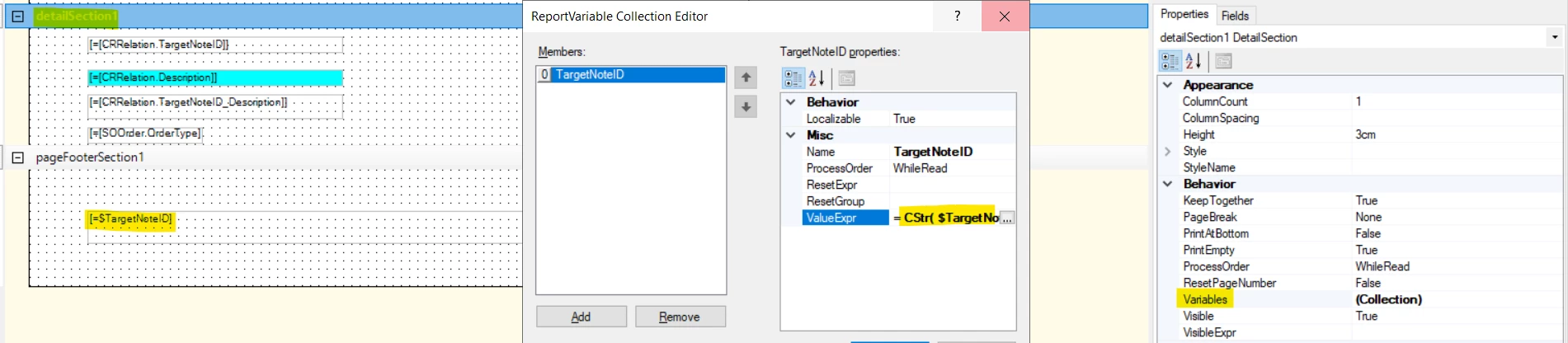
  2. Click header above where the total will print and then look for Variables collection.  Click [...] to open Variables.
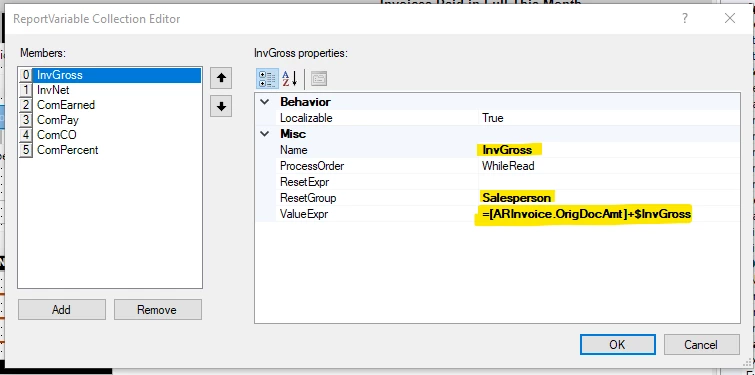
  3. Give the Variable a Name, on what field should the total Reset (ResetGroup)? And I’ve provided an example formula to create a total in ValueExpr field below.

I hope this helps you create your variables.

Laura

5 replies

Forum|alt.badge.img+3
  • Varsity I
  • November 26, 2024

Hi ​@SujaFMS , Create a variable in detail section and bind that variable in footer section


Laura03
Captain II
Forum|alt.badge.img+19
  • Captain II
  • Answer
  • November 26, 2024

Hello,

Adding details to ​@arthia98 ‘s suggestion…

To create a Variable,

  1. Variable should be located in a Section above where you’d like the total to print.
  2. Click header above where the total will print and then look for Variables collection.  Click [...] to open Variables.
  3. Give the Variable a Name, on what field should the total Reset (ResetGroup)? And I’ve provided an example formula to create a total in ValueExpr field below.

I hope this helps you create your variables.

Laura


Forum|alt.badge.img
  • Author
  • Freshman II
  • November 26, 2024

Thanks both… I am working on it. I will be back with my results.

Suja


Forum|alt.badge.img
  • Author
  • Freshman II
  • November 27, 2024

Hi ,

I got the desired results by adding variable in detailSection for displaying sum in Pagefooter. However, I added the variable in Pagefooter and placed the variable in Report Footer I am not getting the value. Am I doing anything wrong here. My variable has the properties as Value Expr : Revenue amount + $SumRev  and Rest Expr :InvItem.Item Class Description. 

Can you please help me understand where I am going wrong.  Further, I need to display as For eg: InvItem1    $20,999.00 ($RevenueAmt)

InvItem2    $10,000.00

Total :     $30,9999.00

. How to achieve this?


Forum|alt.badge.img
  • Author
  • Freshman II
  • November 27, 2024

Hi ,

I got the desired results by adding variable in detailSection for displaying sum in Pagefooter. However, I added the variable in Pagefooter and placed the variable in Report Footer I am not getting the value. Am I doing anything wrong here. My variable has the properties as Value Expr : Revenue amount + $SumRev  and Rest Expr :InvItem.Item Class Description. 

Can you please help me understand where I am going wrong. 

In the detail section it is as below:

Item          Desc           Amt

I1             InvItem1    10000.00

I2             InvItem1    10000.00

I3             InvItem1      $999.00

I4             InvItem2    $10,000.00

Further, I need to display in the Report section as:

InvItem1    $20,999.00 ($RevenueAmt).  

InvItem2    $10,000.00

Total:         $30,9999.00

. How to achieve this?