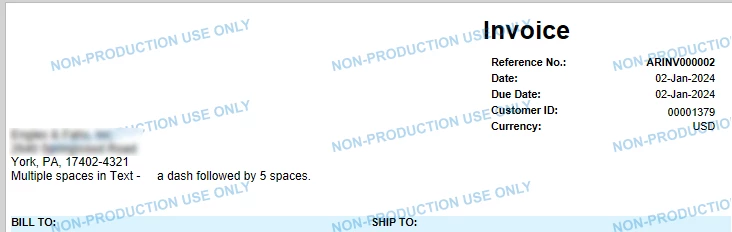
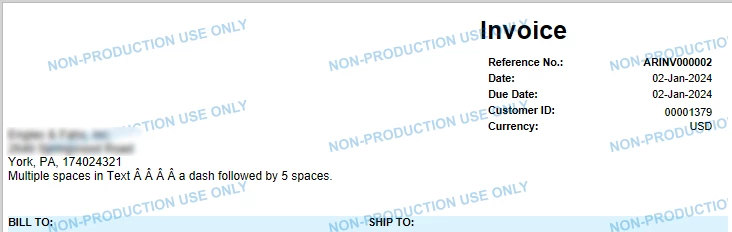
Name / Address block on reports - multiples space characters cause unexpected results on report

  • January 20, 2026
  • 3 replies
  • 26 views

mgroff47
Freshman I

While modifying several AR Reports / Forms i.e. AR Statement / AR Invoice I needed to add a line in the address block, I did not want it to be a standalone textbox because I wanted it dynamically sized and to stay together with the other address rows. It was two pieces of data that we wanted to separate with several spaces, one space works just fine, but as soon as you enter two you get this result. 
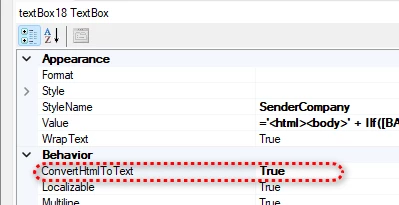
After trying multiple approaches and finding no answer anywhere, I landed on this resolution, hopefully this will help you. The answer I implemented is to use HTML, start by setting the “ConvertHtmlToText” Property to True for the textbox in question.


Next change the Value to an HTML string below is the one I used in this example, it also has some parsing for USA +4 Zip Code formatting where a zip code is stored as numbers with masking in the UI, and would be shown here as numbers only but this inserts the dash, for better readability. 

='<html><body>' 
+ IIf([BAccountNoMask.AcctName]<> null, [BAccountNoMask.AcctName] + '<br>','')
+ IIf([CompanyAddress.AddressLine1]<> null, [CompanyAddress.AddressLine1] + '<br>', '')
+ IIf([CompanyAddress.AddressLine2]<>null,[CompanyAddress.AddressLine2] + '<br>','')
+ IIf([CompanyAddress.AddressLine3]<> null,[CompanyAddress.AddressLine3] + '<br>','')
+ IIf([CompanyAddress.City]<>null, [CompanyAddress.City],'')
+ IIf([CompanyAddress.City]<>null And [CompanyAddress.State]<>null, ', ', '')
+ IIf([CompanyAddress.State]<>null,[CompanyAddress.State],'')
+ IIf([CompanyAddress.PostalCode]<> null And [CompanyAddress.State]<> null, ', ', ' ')
+ IIf([CompanyAddress.PostalCode]<> null,IIf(Len([CompanyAddress.PostalCode])> 5,Left([CompanyAddress.PostalCode],5) + '-'
+ Right([CompanyAddress.PostalCode],4),[CompanyAddress.PostalCode]),'') + '<br>'
+ IIf([CompanyContact.Phone1] <>null,'Phone: ' + [CompanyContact.Phone1]+ '<br>','')
+ IIf([CompanyContact.Phone3] <>null,'Fax: ' + [CompanyContact.Phone3]+ '<br>','')
+ IIf([CompanyContact.WebSite]<>null,'Web: '+[CompanyContact.WebSite],'')
+ 'Multiple spaces in Text - &nbsp;&nbsp;&nbsp;&nbsp;a dash followed by 5 spaces.<br>'
+ '</body></html>'

The results:


3 replies

BenjaminCrisman
Acumatica Employee
Forum|alt.badge.img+4
  • Acumatica Support Team
  • January 20, 2026

@mgroff47 There are certain HTML conversions that work in Report Designer, this is a good example.

I’ve seen similar type iterations using other HTML, just wanted to remind that the function does not DisplayHTMLasText, it is conversion, so there are a number of types of markup which don’t work, but this is a good example of a way to make the spaces without creating the Â


Forum|alt.badge.img+1
  • Semi-Pro II
  • January 21, 2026

I would probably not use the HTML Value that way.

Refer to the native Reports and look at the Formatting Logic here:

=IIf([BillingContact.FullName]<>null,     [BillingContact.FullName] + '{br}', '') 
+IIf([BillingAddress.AddressLine1]<>null,[BillingAddress.AddressLine1]+'{br}','')
+IIf([BillingAddress.AddressLine2]<>null,[BillingAddress.AddressLine2]+'{br}','')
+IIf([BillingAddress.AddressLine3]<>null,[BillingAddress.AddressLine3]+'{br}','')
+IIf([BillingAddress.City]<>null,        [BillingAddress.City]+' ', '')
+IIf([BillingAddress.State]<>null,       [BillingAddress.State]+' ','')
+IIf([BillingAddress.PostalCode]<>null,  [BillingAddress.PostalCode],'')
+IIf([BillingAddress.City]<>null OR [BillingAddress.State]<>null OR [BillingAddress.PostalCode]<>null,'{br}','') 
+IIf([BillingAddress.CountryID]<>null,   [BillingAddress.CountryID_Country_Description]+'{br}', '')
+IIf([BillingContact.Attention]<>null,   'Attn: ' + [BillingContact.Attention], '')


It is basically using “HTML” with the ‘{br}’ for a Line Break

So you should be able to use similar language / commands here.

Some are not supported, I would think though.


mgroff47
Freshman I
  • Author
  • Freshman I
  • January 21, 2026

@krausef77 

Thanks for your suggestion but using HTML in the form that is used in the native report doesn’t allow you to enter a string with consecutive spaces, either consecutive space characters or several &nbsp; (HTML space) characters. It's not the {br} I was fighting, it was consecutive spaces. In every case where I entered two or more consecutive spaces they showed on the report as Â.

I would be glad to revert to the native format for simplicity, please send me a working sample.

Thanks