


Solved

Mailing and Printing are not working after upgrading to 25R2.

  • March 27, 2026
  • 2 replies
  • 28 views

mos11
Freshman I
Forum|alt.badge.img

I upgraded my system from 25R1 to 25R2, and I have a snapshot of the old 25R1 system.

In 25R1, on the Invoice and Memos screen, when I printed a report, it used the report ID from the Customer Class.

Now, in the new version, it always uses the standard ‘AR641000’ and does not pick up any other report.

I verified that my custom report ‘AR641001’ works correctly. It also works properly when printing from the SO Invoice screen.
Best answer by kmuczynski54

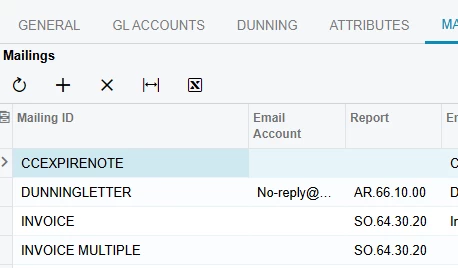
We had the same issue.  I logged a case with Acumatica and they provided a solution for us.  I’m not sure if they had to set something up behind the scenes for us, but we had to create a new Mailing ID of INVOICE MULTIPLE for our customer class and it now works.  This is an example:


2 replies

Forum|alt.badge.img
  • Varsity I
  • Answer
  • March 27, 2026

We had the same issue.  I logged a case with Acumatica and they provided a solution for us.  I’m not sure if they had to set something up behind the scenes for us, but we had to create a new Mailing ID of INVOICE MULTIPLE for our customer class and it now works.  This is an example:


BenjaminCrisman
Acumatica Employee
Forum|alt.badge.img+4
  • Acumatica Support Team
  • March 27, 2026

@mos11 This is a known issue in 25 R2:

https://portal.acumatica.com/(W(11))/Main?ScreenId=KI2025R2&PageID=21e88c8a-7917-41f3-93c0-22ace48f97cb

AC-362573: When a user printed an invoice for a customer whose mailing and printing settings specified in a custom report for the INVOICE mailing on the Customers (AR303000) or Customer Classes (AR201000) form, the system printed the default invoice report instead of the custom report.
The issue occurred in Acumatica ERP 2025 R2 and later versions if the INVOICE MULTIPLE mailing existed in the mailing settings in addition to the INVOICE entry.
When the user clicked Print on the Invoices and Memos (AR301000) form, the system incorrectly used the INVOICE MULTIPLE mailing as the default one and could not find the correct report ID.
 

Workaround: In the mailing and printing settings of the Customer Classes (AR201000) or Customers (AR303000) form, add the INVOICE MULTIPLE mailing and assign to it the same custom report ID that is used for the INVOICE mailing.

