Answer

lotSerialNbrs repeating for common item

  • April 24, 2025
  • 22 replies
  • 199 views

Forum|alt.badge.img+1

We have a subreport for an Invoice that is working fine for the most part. The issue is that sometimes we have a duplicate item, qty of 1, that is listed as “Free”, gets a LotSerialNbr of it’s own. When we have this type of scenario, the LotSerialNbr’s from both get printed with each other. I have attached a Word document and the rpx of the subreport. I’m thinking that it has to do with the linenbr(s) from the subreport, but unable to narrow down as to the why. I’ve already tried passing the main report line numbers to the subreport as a parameter, and in that case all of the lotserialnbrs went away, even the one number that is assigned to the item in line 2.

Best answer by wmatthews1877

Hi ​@lauraj46 

I am attaching the finished commercial/invoice, main report and subreport. I was able to find a solution using one subreport. Thank you for all your help with this project, and I hope that if anyone else out there has a similar issue finds this useful.

22 replies

Forum|alt.badge.img+1
  • Author
  • Semi-Pro I
  • April 25, 2025

I am adding the troubleshooting procedures that were tried for this issue. 


lauraj46
Captain II
Forum|alt.badge.img+8
  • Captain II
  • April 25, 2025

Hi ​@wmatthews1877 ,

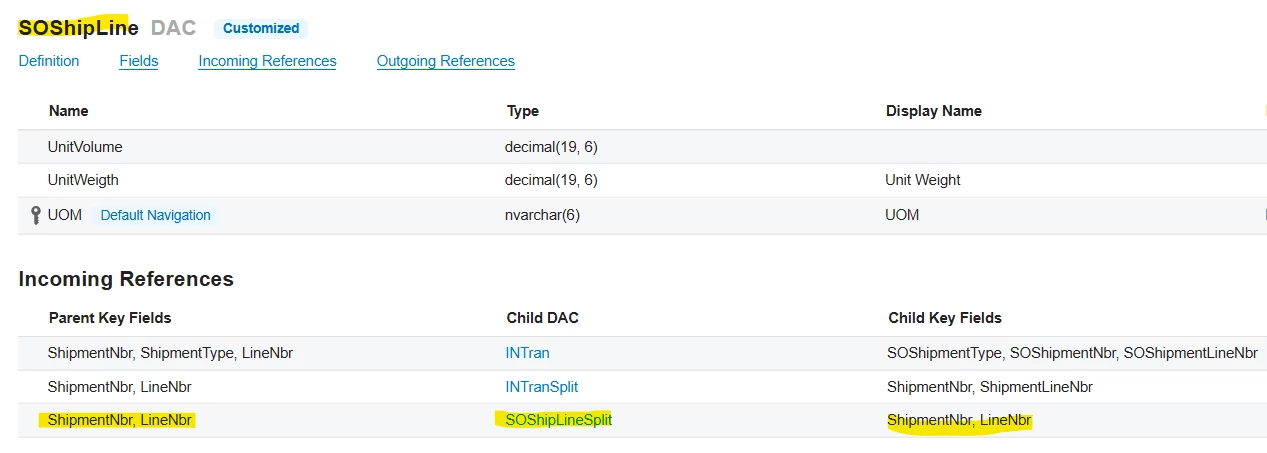
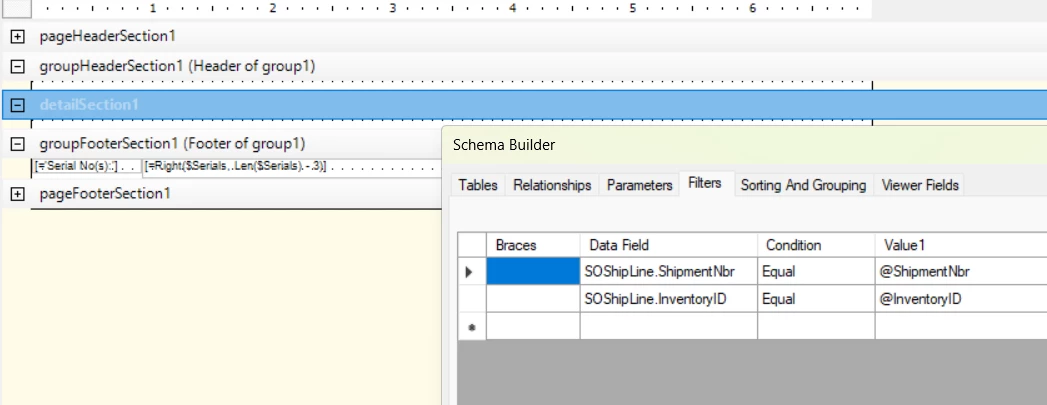
The relationship between SOShipLine and SOShipLineSplit is by the ShipmentNbr and the LineNbr.  These are the parameters that you should pass to the subreport. Instead of ARTran.LineNbr, use SOShipLine.LineNbr.  Then in the subreport, make sure to filter SOShipLine by those same parameters. 


Let me know if this helps!

Laura


Forum|alt.badge.img+1
  • Author
  • Semi-Pro I
  • April 25, 2025

I’ll try that. Thank you for responding. Stay safe.


Forum|alt.badge.img+1
  • Author
  • Semi-Pro I
  • April 25, 2025

Ordinarily SOShipLine is not part of the main report. We do have SOLine and SOShipLineSplit which is not even being used. SOShipLine and SOShipLineSplit are both being used in the subreport though.


Forum|alt.badge.img+1
  • Author
  • Semi-Pro I
  • April 26, 2025

This worked like a champ! 


Forum|alt.badge.img+1
  • Author
  • Semi-Pro I
  • April 27, 2025

Back to the drawing board. It worked just for that one report. Anything else it is stringing each like item on its own line.


Forum|alt.badge.img+1
  • Author
  • Semi-Pro I
  • April 27, 2025

I’ve added both reports (main and sub) in a zip file. I’ve tried troubleshooting this with other reports and it has me baffled as to why it only works on the one report.


lauraj46
Captain II
Forum|alt.badge.img+8
  • Captain II
  • April 28, 2025

Hi ​@wmatthews1877 ,

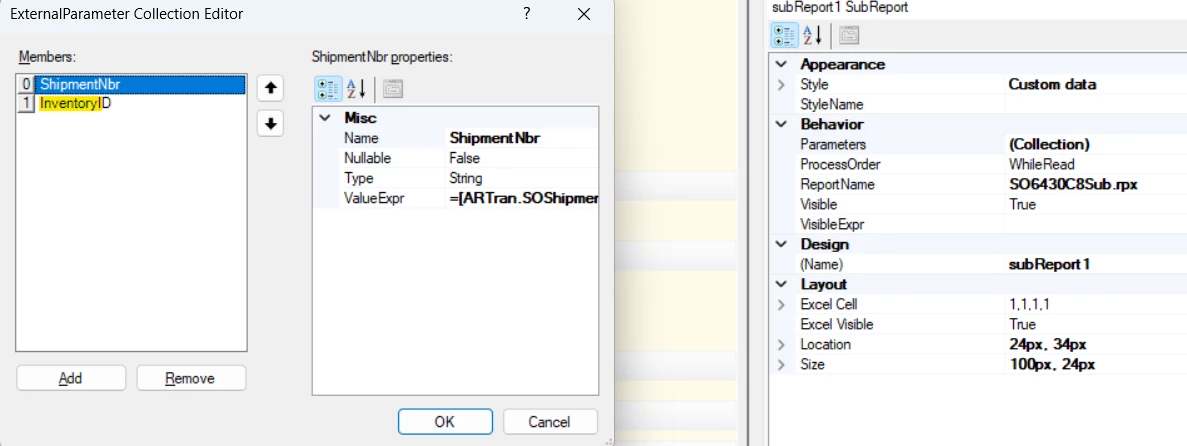
On the parameters collection for the subreport, you need to pass the LineNbr instead of the InventoryID.  


Hope this helps!

Laura


Forum|alt.badge.img+1
  • Author
  • Semi-Pro I
  • April 28, 2025

Hi lauraj46. I am attaching a screenshot from a GI that was done just using the line numbers and any DAC’s would could have a linenbr and lotserialnbr. I’ve tried grouping, sorting, every which way and this one has me stumped. Using what you sent last Friday, that one report works fine, but everything else that is “normal” comes out with each item, listed by itself with a quantity of greater than 1 (if that makes sense).


lauraj46
Captain II
Forum|alt.badge.img+8
  • Captain II
  • April 28, 2025

Hi ​@wmatthews1877 ,

Sorry, I’m not following how this screenshot relates to the issue that you’re having. 

Did you try adjusting the parameters collection that links to the subreport to pass thru the LineNbr instead of the InventoryID?  

Laura


Forum|alt.badge.img+1
  • Author
  • Semi-Pro I
  • April 28, 2025

Hi ​@lauraj46 

Yes I have. It works perfectly on just that one report, but when we try and pull “normal” reports (any report(s) that don’t have a free item on it), it is listing the items by single lines. For example, if the quantity of the item is 3, each of the items are then listed one by one with the lotserialnbr instead of one item with three lotserialnbr’s. The Word document I sent over was to show what is actually happening with the linenbr’s even though the InventoryID is not part of the parameters anymore. On the subreport, I’ve tried an INNER, LEFT, RIGHT joins and still get the same results. 


Forum|alt.badge.img+1
  • Author
  • Semi-Pro I
  • April 28, 2025

My next step, and please correct my thinking if it’s not feasible; is to put the parameters as text boxes on the subreport so that I can see what may or may not be passing from the sub to the main. 


Forum|alt.badge.img+1
  • Author
  • Semi-Pro I
  • April 28, 2025

Hi ​@lauraj46 

Attached is another screen shot showing what is working with the one report and how it has affected any other reports. 


lauraj46
Captain II
Forum|alt.badge.img+8
  • Captain II
  • April 28, 2025

My next step, and please correct my thinking if it’s not feasible; is to put the parameters as text boxes on the subreport so that I can see what may or may not be passing from the sub to the main. 


@wmatthews1877 That’s a good idea.  As well, you could add the subreport to the site map and run it separately for testing purposes.


Forum|alt.badge.img+1
  • Author
  • Semi-Pro I
  • April 28, 2025

Okay, I’ve got my subreport on the Site Map as SO.64.30.01 and the name of the subreport is SO6430C8Sub.rpx I’ve never run a subreport from the Site Map before. I’ve put it out there but don’t see it in the Sales Orders → Printed Forms where i added it to the Site Map. Am I perhaps missing a step? The main report is there, SO64.30.00 Invoice under the same Workspace and Category.


lauraj46
Captain II
Forum|alt.badge.img+8
  • Captain II
  • April 28, 2025

Hi ​@wmatthews1877 ,

Okay, I’ve got my subreport on the Site Map as SO.64.30.01 and the name of the subreport is SO6430C8Sub.rpx I’ve never run a subreport from the Site Map before. I’ve put it out there but don’t see it in the Sales Orders → Printed Forms where i added it to the Site Map. Am I perhaps missing a step? The main report is there, SO64.30.00 Invoice under the same Workspace and Category.

Make sure that you assign access rights to the new report.  The system doesn’t distinguish between a subreport and main report.

Laura


Forum|alt.badge.img+1
  • Author
  • Semi-Pro I
  • May 22, 2025

I’d like to revisit this issue. I am attaching a zip file of two subreports and the main report. Individually, the subreports work quite well showing the LotSerialNbr’s. One SO6430C8Sub.rpx works with the majority of invoices whether they are International or Domestic. The other one, SO6430C9Sub.rpx, works for any International invoices that have at least 1 free item along with other costed items. I’ve tried to get one subreport to work both ways, and have not been successful. The issue now is to try and find a solution to set VisibleExpr so that if the majority of invoices will print normally, and if the International invoice is used, then the SO6430C9Sub is used. I’ve tried using several different IIF statements such as =IIF([SOShipLine.IsFree] = True, True, False) so that the SO6430C9Sub shows the LotSerialNbr’s for all of the items listed for the invoice with the 1 free item, but then, when the main report parameters (not the subreport (Collections) for SOC6430C8Sub.rpx) are changed so that regular invoices are showing, the LotSerialNbr’s only come up where the invoice has a qty of 1 item even though there are items with a quantity of 3 or more. If anyone has any suggestions as to how we can use one subreport for both scenarios or using the two subreports to set VisibleExpr,  we would welcome any suggestions. On the SO6430C9Sub.rpx we are using SOShipLine as (Collection) parameters from the main report, and ARTran parameters for the “normal” which is the way our VAR had set things up.


Forum|alt.badge.img+1
  • Author
  • Semi-Pro I
  • May 23, 2025

Hi lauraj46,

I’ve been tweaking the main report and subreport, and I’ve gotten it to work (sort of) with just one subreport. The only thing holding this project up right now is when a normal invoice parameters are keyed into the main report, the subreport will show the LotSerialNbr of an item that has a qty of 1, but will not show up the LotSerialNbr’s for any other items. I’m able to show the other item(s) but with no LotSerialNbr’s. I’ve also been able to get the subreport to show the proper sequency of LotSerialNbr’s for the “free” item invoice. It shows all of the items, with the correct LotSerialNbr’s so that is progress at least in the right direction. I’ve had to set multiple parameters in the subreport (Collection) on the main report and maybe that’s not the correct way to do it, but it is working to a certain extent.


lauraj46
Captain II
Forum|alt.badge.img+8
  • Captain II
  • May 27, 2025

Hi ​@wmatthews1877 ,

I don’t know if it’s supported to pass two different values to the same parameter of a subreport.  Instead of populating the parameter multiple times, you should be able to use a formula like this:

=IsNull([ARTran.ShipmentNbr],[SOShipLine.ShipmentNbr])

The IsNull function will return the first argument unless it’s null, in which case it will return the second argument.

As regards the issue with missing serial numbers on certain lines where qty>1, I would suggest using a Generic Inquiry to investigate the data in the SOShipLineSplit table for a line that isn’t working correctly.  You can also publish the subreport and run it separately for the line.  \

Also, the InventoryID parameter and filter should actually not be needed since there can only be one InventoryID on any particular line.

Let me know if these suggestions help with troubleshooting.

Laura


Forum|alt.badge.img+1
  • Author
  • Semi-Pro I
  • May 27, 2025

Hi ​@lauraj46 

Thank you for your reply. I’ll give that a shot and see what happens. Thank you.


Forum|alt.badge.img+1
  • Author
  • Semi-Pro I
  • Answer
  • June 2, 2025

Hi ​@lauraj46 

I am attaching the finished commercial/invoice, main report and subreport. I was able to find a solution using one subreport. Thank you for all your help with this project, and I hope that if anyone else out there has a similar issue finds this useful.


Chris Hackett
Community Manager
Forum|alt.badge.img
  • Acumatica Community Manager
  • June 2, 2025

Thank you for sharing your solution with the community ​@wmatthews1877!