Answer

LotSerialNbr's over running on with no page breaks

  • January 10, 2025
  • 17 replies
  • 141 views

Forum|alt.badge.img+1

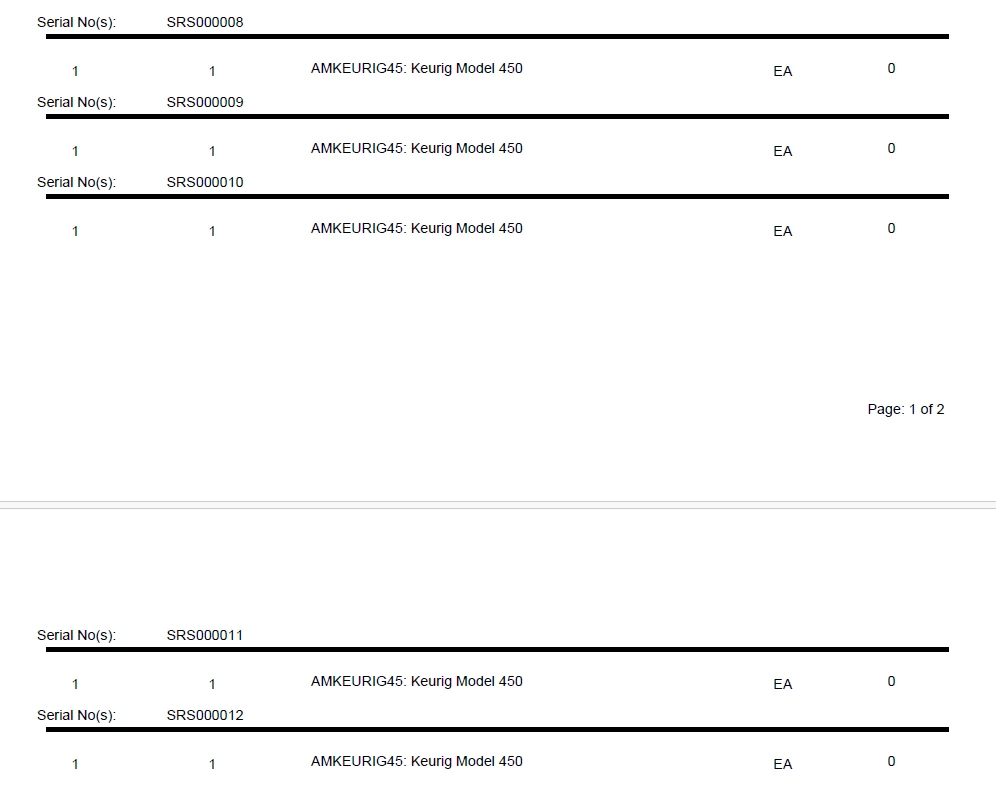
We are using a subreport for a Packing List. There is one item, quantity of over 900, each with its own LotSerialNbr. When printed from the subreport, all of the LotSerialNbr’s print on one long sheet of paper and we would like to break that up into at least two or more pages. I’ve tried using “Keep Together”, “Page Break” to After, Before, BeforeAndAfter, including a =’Page: ‘ + [PageOf]] in the subreport pageFooterSection1.

Best answer by lauraj46

Hi ​@wmatthews1877 ,

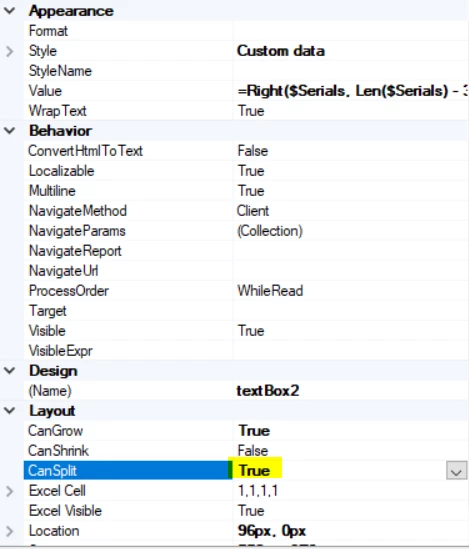
Understood that you need the subreport to paginate.  Sorry, the example that I created didn’t have all of the serial numbers on the same shipment line so it was a poor test.  With the changes that I posted the subreport should paginate, but it could be that you’re running into issues because the field in the subreport won’t split across pages.  For that, make sure that the field in the subreport has CanSplit = True.

It’s hard for me to create a test example with so many serial numbers.  Give it a try and let me know.
Hope this helps!

Laura

 

17 replies

lauraj46
Captain II
Forum|alt.badge.img+8
  • Captain II
  • January 10, 2025

Hi ​@wmatthews1877 ,

Subreport pagination can be fussy.  The following advice has worked for me:

  1. Place the subreport in a separate section, with a little bit of space between the subreport and the section borders.
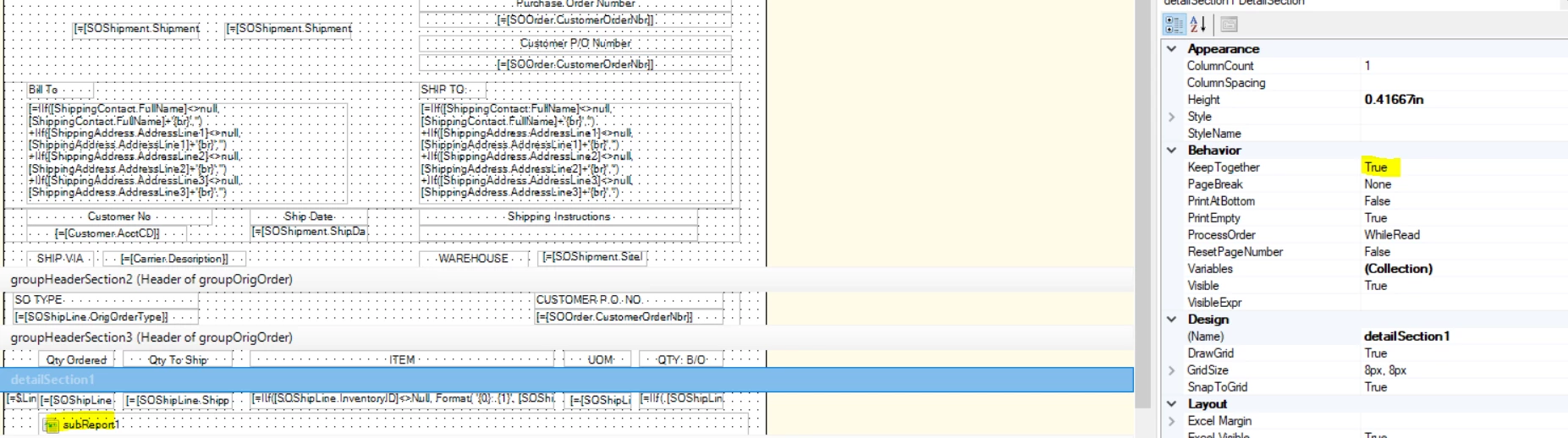
  2. Set the KeepTogether property on the section to False
  3. Set the PageBreak propert on the section to After

Hope this helps!


Forum|alt.badge.img+1
  • Author
  • Semi-Pro I
  • January 10, 2025

Hi ​@lauraj46 ,

Still the same thing, all of the LotSerialNbr are showing up on one long legal or bigger page.


Forum|alt.badge.img+1
  • Author
  • Semi-Pro I
  • January 10, 2025

I tried it in the detailSection2 and groupFooterSection2. Back to the drawing board. 


lauraj46
Captain II
Forum|alt.badge.img+8
  • Captain II
  • January 10, 2025

Hi ​@wmatthews1877 ,

Interesting.  I’ve personally run into this issue several times.  The instructions that I provided are based on the post below: 

https://stackoverflow.com/questions/57860344/enable-multi-page-sub-report-in-acumatica-report-designer

If you’re still having issues, please upload your rpx file and that might help with troubleshooting.

Laura


Forum|alt.badge.img+1
  • Author
  • Semi-Pro I
  • January 10, 2025

I appreciate the help with this. Stay safe and thank you.


Forum|alt.badge.img+1
  • Author
  • Semi-Pro I
  • January 10, 2025

Sorry, both the main and sub are included in the zip file.


lauraj46
Captain II
Forum|alt.badge.img+8
  • Captain II
  • January 10, 2025

Hi ​@wmatthews1877 ,

I tried to download the Zip file but I’m getting an error.  Can you upload the rpx files instead?

Thanks,

Laura


Chris Hackett
Community Manager
Forum|alt.badge.img
  • Acumatica Community Manager
  • January 10, 2025

Hi ​@lauraj46 - The site won’t support uploading an rpx file but I was able to download ​@wmatthews1877 ‘s zip file and emailed to you 😀


lauraj46
Captain II
Forum|alt.badge.img+8
  • Captain II
  • January 12, 2025

Hi ​@wmatthews1877 ,

Try putting the subreport in s separate section with no other controls, and a little bit of space around the subreport control.  Also, be sure to set the Keep Together property on the new section to False.  Let me know if that works.


Laura


Forum|alt.badge.img+1
  • Author
  • Semi-Pro I
  • January 13, 2025

Hi lauraj45, 
Tried the subreport in other sections, including groupHeaderSection4, groupFooterSection3, detailSection3 all were negative (in all three the subreport did not send back any data), along with other sections which had the same result of an elongated overflowing page.


Forum|alt.badge.img+1
  • Author
  • Semi-Pro I
  • January 13, 2025

Hi lauraj45,

Is there maybe a way to set up pagination based on a count? In this particular case, there are 960 LotSerialNbr’s associated with one item. Maybe there is a way to have a counter for let’s say about 100 or 150 then page, next 150 then page etc. Just a thought.


lauraj46
Captain II
Forum|alt.badge.img+8
  • Captain II
  • January 13, 2025

Hi ​@wmatthews1877 ,

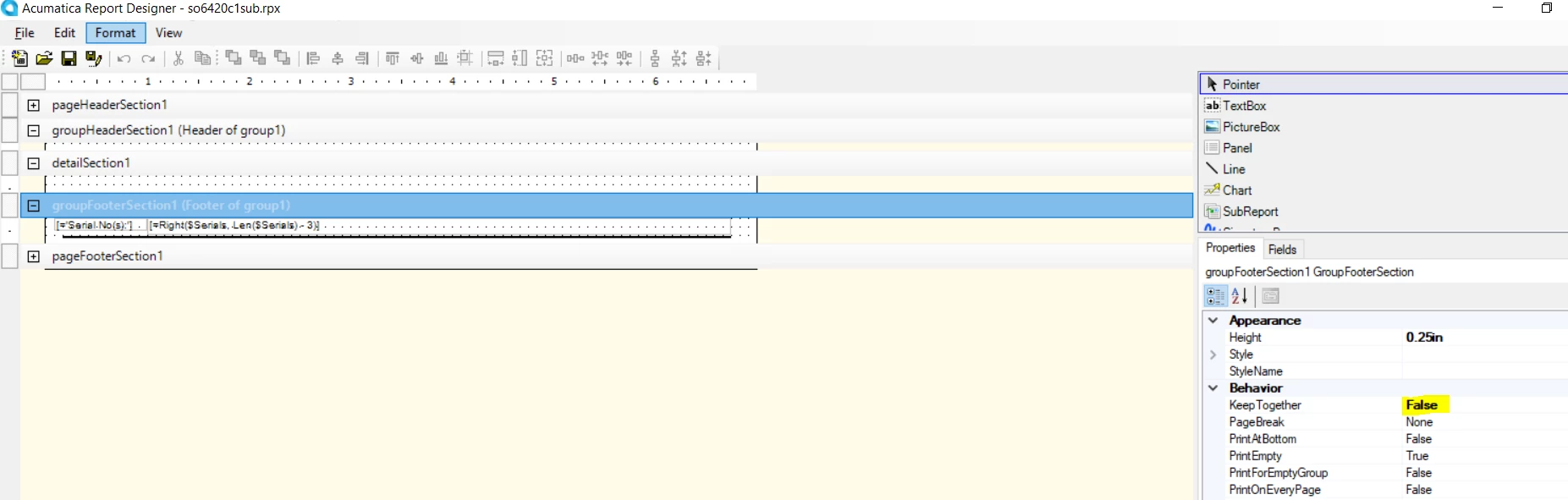
You also need to turn off KeepTogether on the footer section of your subreport.  I updated both of these reports (attached), and tested it with a shipment.  The serial number paginated correctly.  Hope this helps!


Laura


Forum|alt.badge.img+1
  • Author
  • Semi-Pro I
  • January 13, 2025

Hi lauraj46,

The report does paginate, but the subreport, since it has 1,344 LotSerialNbr’s prints out page two with like super legal paper, all on one sheet, all 1,344 numbers with no page breaks. I apologize if I wasn’t clear on the requirements, but we are attempting to print on a standard 8.5in x 11in size paper for the Packing List unless I am missing something. I appreciate the help though. Any other suggestions?

Thank you.


lauraj46
Captain II
Forum|alt.badge.img+8
  • Captain II
  • Answer
  • January 13, 2025

Hi ​@wmatthews1877 ,

Understood that you need the subreport to paginate.  Sorry, the example that I created didn’t have all of the serial numbers on the same shipment line so it was a poor test.  With the changes that I posted the subreport should paginate, but it could be that you’re running into issues because the field in the subreport won’t split across pages.  For that, make sure that the field in the subreport has CanSplit = True.

It’s hard for me to create a test example with so many serial numbers.  Give it a try and let me know.

Hope this helps!

Laura


Forum|alt.badge.img+1
  • Author
  • Semi-Pro I
  • January 14, 2025

Hi lauraj46,

It worked, it worked, it worked. It’s not really very pretty, but it is functional and it is splitting the page into sections. Your suggestions about the Subreport: View PDF, TRUE, the field on the subreport, in the groupFooterSection1, CanSplit = True, Main Report: detailSection1 band where the subreport resides, Keep Together False, no PageBreak. I certainly hope someone else can use the same settings as what you suggested and I want to thank you for your time and help on this. Stay safe. 😊


lauraj46
Captain II
Forum|alt.badge.img+8
  • Captain II
  • January 14, 2025

Hi ​@wmatthews1877 ,

So glad you finally go this working!  Hopefully this thread will be useful to others as well.

I reside in Ohio where it’s just cold today.  I share your hope that everyone in this wonderful Acumatica community is staying safe 😊!

Laura


Forum|alt.badge.img+1
  • Author
  • Semi-Pro I
  • January 14, 2025

I reside in Florida, where it’s not too cold today. Yesterday was chilly, but bearable. I love this community as that is what life should be about, sharing and caring about others. I’m still a fledgling from the SQL community, so a lot of the differences still takes time to get used to. Again, thank you for the help, and I don’t mind sharing the knowledge with others.