Answer

LOTSERIALNBR'S AND FREE ITEMS

  • June 20, 2025
  • 8 replies
  • 103 views

Forum|alt.badge.img+1

I have a rather strange situation that may or may not have an answer. I’ve reached out to the Report Design community before and while there have been some very good responses, none of them are working for what we are trying to accomplish. We have International and Domestic Invoices. One in a while the International invoices will have a free item (Item A) on it along with an associated LotSerialNbr. If there is a similar item (Item A) that is also on the invoice that is a purchased item(s), then the LotSerialNbr of the purchased item and free item are listed together (which we are pulling from a subreport), and the free item will also show the paid item LotSerialNbr along with it’s own. I’ve tried using two different subreports, using a condition, ARTran.IsFree = True for the free item, or ARTran.IsFree = False. I have tried ARTran LEFT with SOShipLine and so far have not been very successful. I am attaching the main (SO643000.rpx) and the two subreports (SO6430C8Sub.rpx, SO6430C9Sub.rpx) but if possible, I would like to use only one subreport. I have been able, most of the time, and by changing the (Collections) of SO6430C8Sub.rpx to work with normal or freebie, but not both. Our International invoices always start with an INT and Domestic INV. I am also attaching a worksheet with what I’ve been able to see how the data joins and such are for the normal and freebie in conjunction with the subreport(s). This may not be the correct place for this type of question, but I’ve exhausted all other avenues trying to piece this together. Our VAR helped us initially with the subreport to pull the LotSerialNbr’s in from the subreport, but there is no way that anyone could have foreseen two identical InventoryID’s on the same invoice, one free, the other paid.

Best answer by wmatthews1877

Hi lauraj46,

The main report and subreport are working as expected. The LineNbr scheme was the key to it, but not with the LineNbr’s that we thought. I am attaching the zip file in case anyone else runs into a similar issue. The report is working for both the free item(s) and normal invoice. The zip file has all the details as far as what LineNbr’s and joins are being used. Thank you and the other members that contributed your inputs to help with this issue.

8 replies

lauraj46
Captain II
Forum|alt.badge.img+8
  • Captain II
  • June 20, 2025

Hi ​@wmatthews1877 ,

Every records in SOShipLineSplit shouldnhave a LineNbr that can be used to associate it with a specific line from the Shipment.  You can use a GI to explore the data and verify that there are different LineNbr values for the two SOShipLineSplit records on the shipment that have the same serial no.

It looks like you may be missing some of the linkages and filters between the main report and subreport to ensure that the LineNbr is passed correctly and used in the subreport filter.  In order for this to work properly you should verify that:

  1. LineNbr is defined as a parameter in the subreport
  2. LineNbr is in the collection of parameters that are passed to the subreport
  3. LineNbr is a filter on the Schema of the subreport.

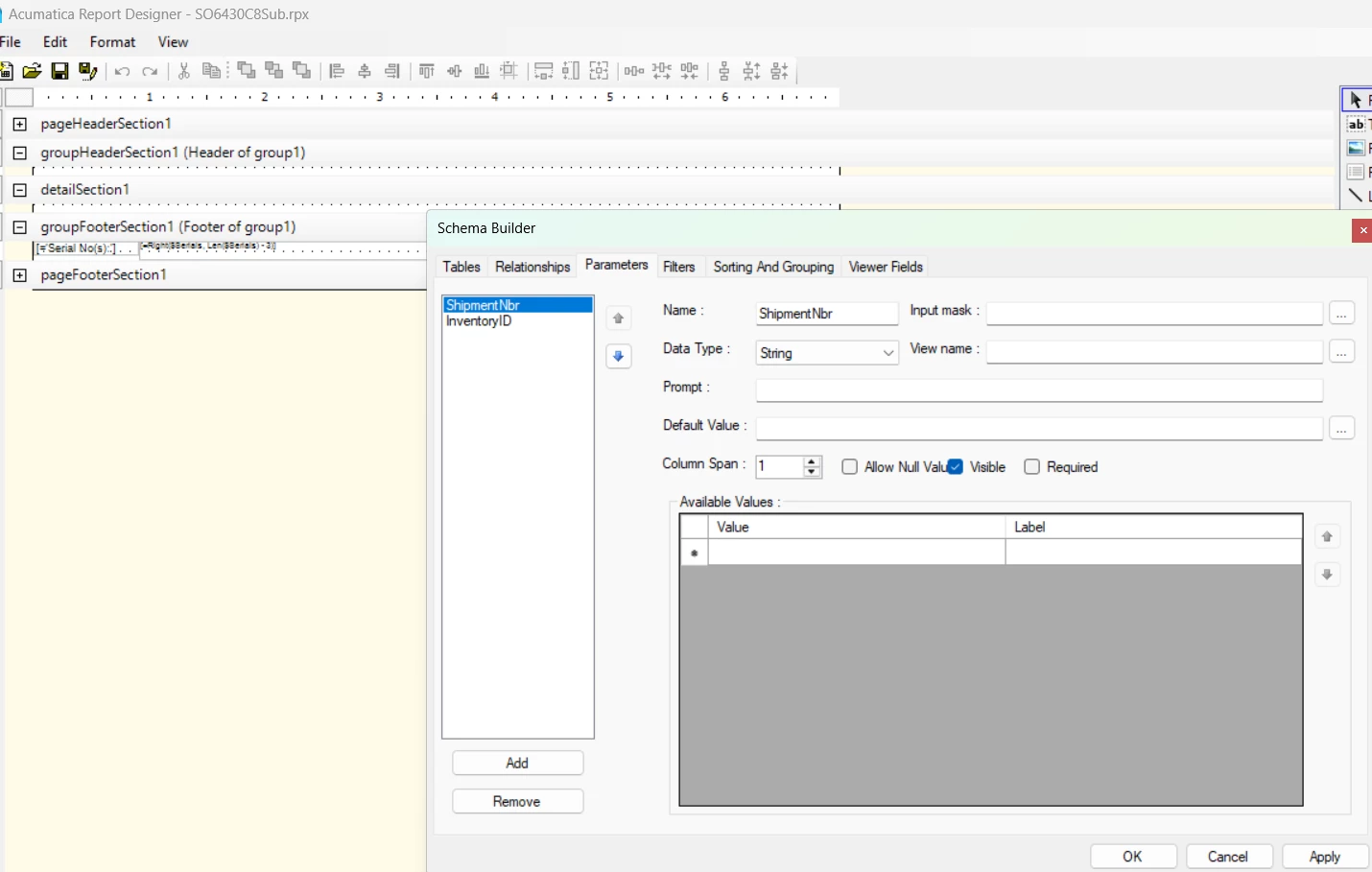
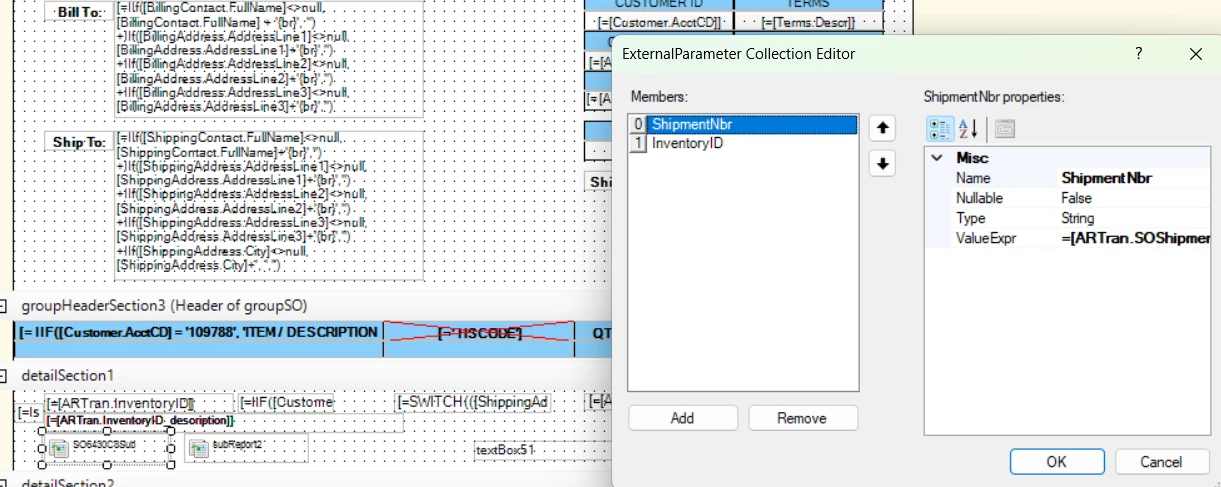
On SO6430C8sub, the LineNbr parameter is not defined and it also is not being passed in the collection from the main report. 

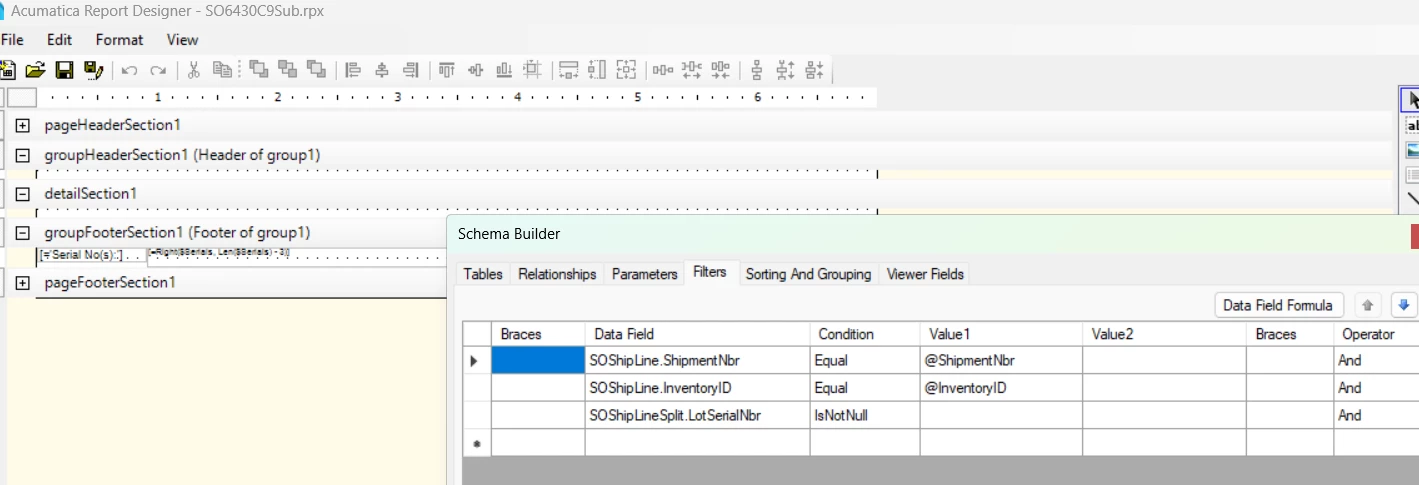
On SO6430C9sub, LineNbr is a parameter and in the collection on the main report, but I don’t see any filter that applies this parameter value on the subreport:

Hope this helps!

Laura


Forum|alt.badge.img+1
  • Author
  • Semi-Pro I
  • June 23, 2025

Hi lauraj46,

Thank you for your response, unfortunately, and I will show you by two Excel worksheets generated by GI, how complicated it really is. I have tried using the LineNbrs every way that I could think of. One way enables the free item invoice to print correctly, but will not work for the normal invoice, and vice-a-versa. I’ve tried using for the subreport (Collections) ShipmentNbr =[ARTran.SOShipmentNbr], InventoryID =[ARTran.InventoryId], and LineNbr =[ARTran.SOShipmentLineNbr].


plambert
Semi-Pro I
Forum|alt.badge.img+2
  • Semi-Pro I
  • June 23, 2025

So if I understand correctly, when you have an invoice that has a single item with both free and purchased records, then you want to display both lines and each has both lists of LotSerialNbrs? To me this, boils down to: a subreport that lists the Lot Serial numbers related to the inventory item on an invoice separated by the IsFree flag.


So, in the subreport the parameters and filters should be the ARTran number, type, Shipment number, inventoryID, and IsFree. Then join the SOShipmentLineSplit onto ARTran based on the SOShipmentNbr = ShipmentNbr and SOShipmentLineNbr = LineNbr to get all the Lot Serials which are associated. This will get all Lot Serials even if there are multiple ARTran records on the invoice for that item, for example, if you had multiple lines on the shipment. However, if you have multiple ARTran records (beyond the one for free and one for paid), then it won’t be filtering down the list to just the ones associated with that line. You will have to clarify how you would want the lists limited in the situation of multiple paid/free lines.


In the main report, you can pass a fixed True/False for the IsFree parameter to the two instances of the sub report if you want those lists to be fixed, since it looks like you want the paid lot serials on the left and free on the right. You’ll have to tweak the formatting to your liking, but see my attached for an example of this setup.


Forum|alt.badge.img+1
  • Author
  • Semi-Pro I
  • June 23, 2025

What was happening is that the free InventoryID LotSerialNbr was being added to the normal InventoryID LotSerialNbr and vice a versa. For example item 123456789 qty 15, actually came up with 16 (including the 1 from the free item) LotSerialNbr’s and the same item 123456789 qty 1 came up with 16 of the same LotSerialNbr’s including its own. The worksheets I included show that there is a doubling on the items of the same type. I will take a look at your solution and I appreciate the help.


plambert
Semi-Pro I
Forum|alt.badge.img+2
  • Semi-Pro I
  • June 23, 2025

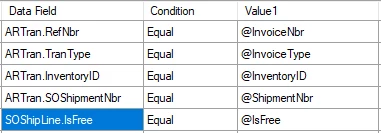
I was a bit hasty in my reply. When I test this through, my ARTran record for shipped free items are not themselves being flagged as IsFree as I had expected. You should use the ShipmentLine.IsFree field to filter between the two lists of Lot Serials in the subreport, not ARTran.IsFree.
 

Subreport filters after adding the ARTran > SOShipLine join


lauraj46
Captain II
Forum|alt.badge.img+8
  • Captain II
  • June 24, 2025

Hi ​@wmatthews1877 ,

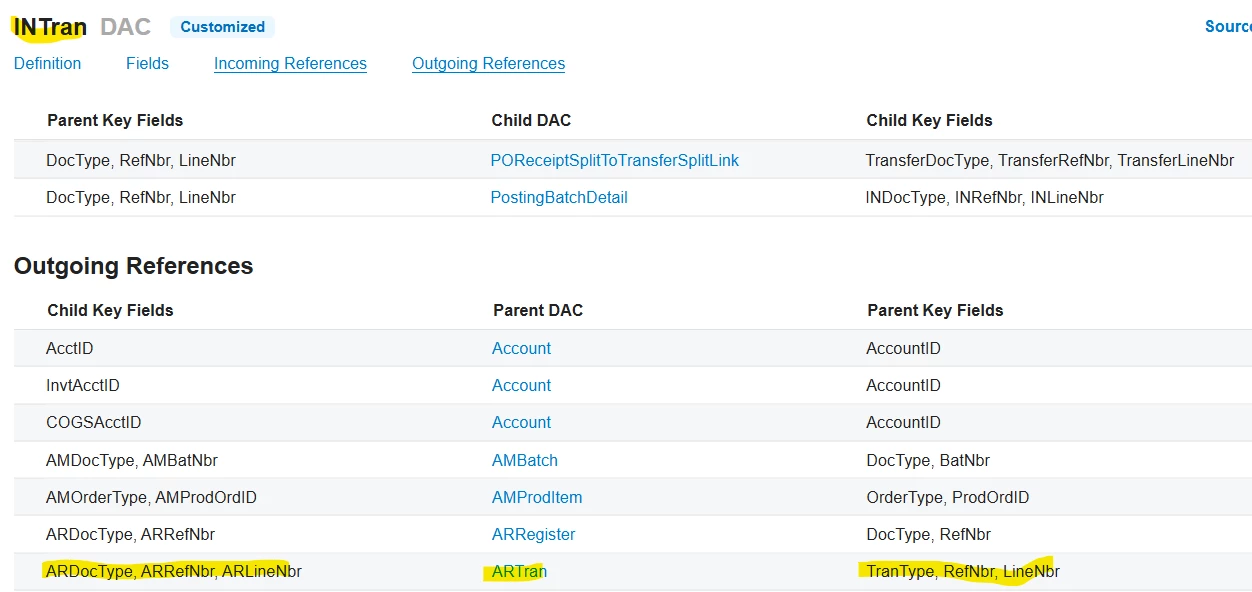
Sorry, I didn’t appreciate the fact that your report is based on an invoice and not a shipment.  In the spreadsheet it looks like the shipment line number is not always populated in this scenario.  Have you considered using the INTran DAC your subreport instead of SOShipLineSplit?  This represents the issue transaction, and also includes the LotSerialNbr field. 

You should be able to join as shown below.  Since you will be passing the specific document type, invoice number, and invoice line number (ARTran.LineNbr) to the subreport, you should get only the serial numbers for one line no matter if the InventoryID repeats.  

Hope this helps!

Laura


Forum|alt.badge.img+1
  • Author
  • Semi-Pro I
  • Answer
  • June 24, 2025

Hi lauraj46,

The main report and subreport are working as expected. The LineNbr scheme was the key to it, but not with the LineNbr’s that we thought. I am attaching the zip file in case anyone else runs into a similar issue. The report is working for both the free item(s) and normal invoice. The zip file has all the details as far as what LineNbr’s and joins are being used. Thank you and the other members that contributed your inputs to help with this issue.



Chris Hackett
Community Manager
Forum|alt.badge.img
  • Acumatica Community Manager
  • June 24, 2025

Thank you for sharing your solution with the community ​@wmatthews1877!